190 Discovery Calls in 8 Days: Our Clay Cold Email Build, Every Column, Formula and Prompt
How did CMM build its cold email workflow in Clay?
CMM stored audience rules, suppression checks, verification and copy on Clay records. When Josh checked the calendar, 43 of 190 discovery calls had happened and 147 were upcoming.
In this article
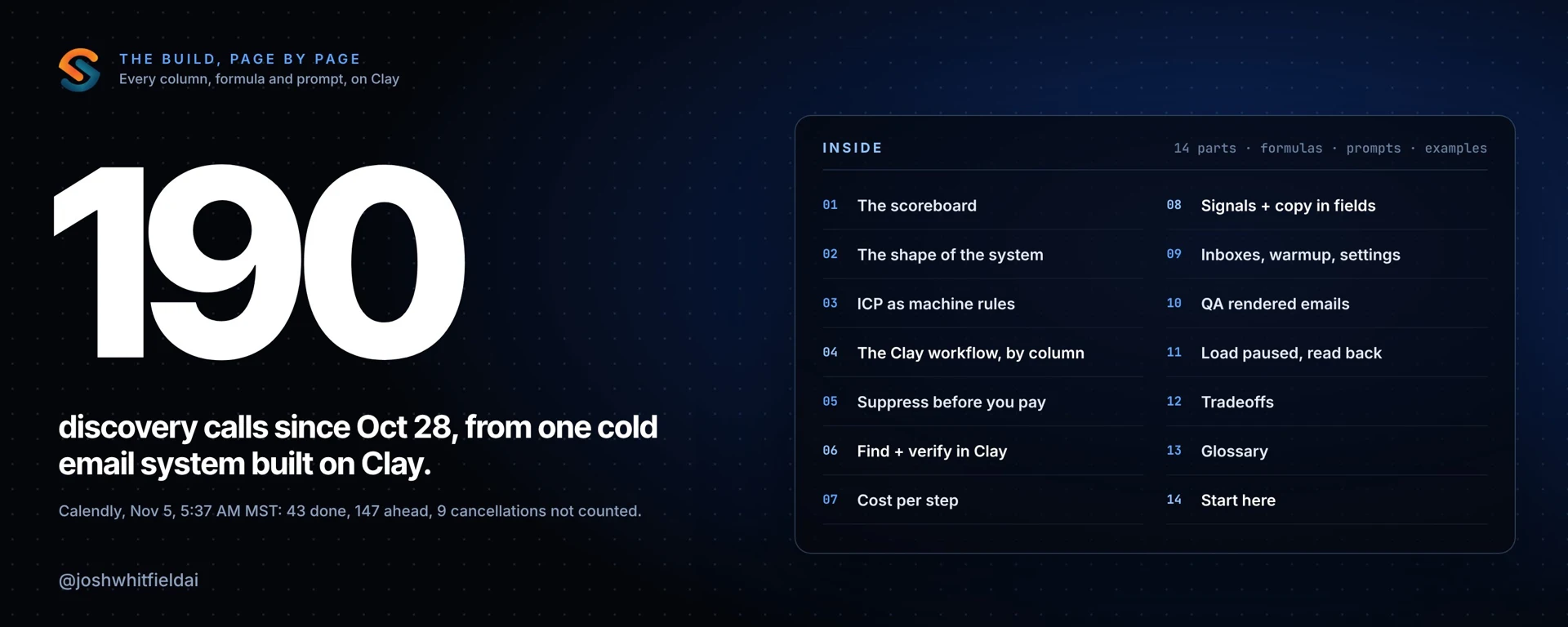
- 1. The scoreboard, and what it doesn't prove
- 2. The shape of the system
- 3. Write the ICP as rules a machine can check
- 4. Set up the Clay workflow, column by column
- 5. Suppress before you pay
- 6. Find and verify every email inside Clay
- 7. What each step takes, and what comes out
- 8. Signals and copy, written into Clay fields
- 9. Sending setup: inboxes, warmup and campaign settings
- 10. QA the rendered emails, not the template
- 11. Load paused, re-check, read back
- 12. The tradeoffs we accepted
- 13. Glossary
- 14. Start here: your first build, in order
190 discovery calls are on my calendar since we launched our own cold email campaign on Oct 28.
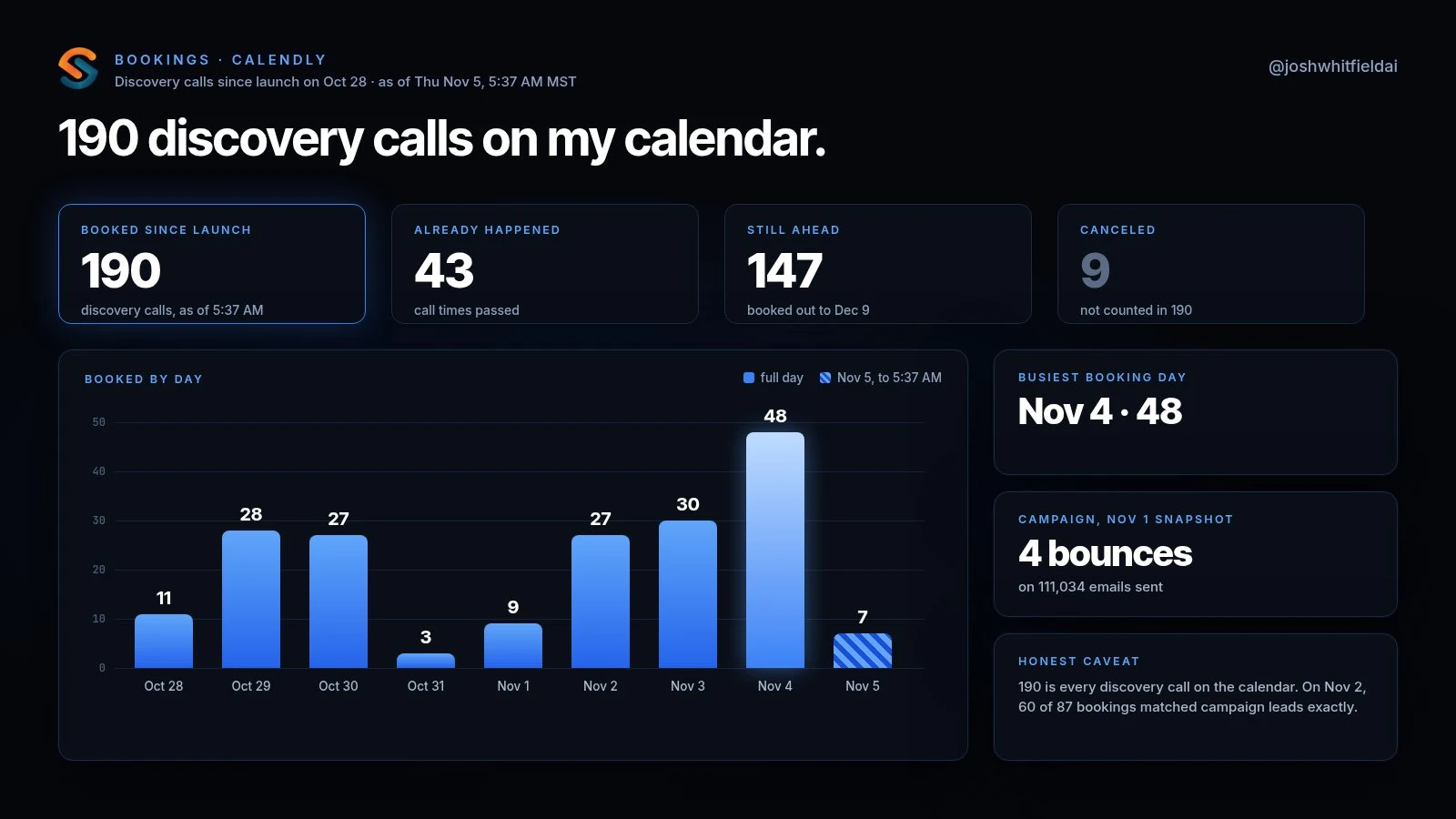
That's the Calendly count as of Thursday, Nov 5 at 5:37 AM MST. 43 of those calls have already happened. 147 are still ahead, booked out to Dec 9. 9 people canceled, and they're not in the 190.
This is the full build behind it, written so you can rebuild it from this page. Every section gives you a rule, a worked example with real numbers from our own campaign or a client build we ran this week, and the exact formula, prompt or setting we use. No client names. If a number isn't from a log, a receipt or a calendar, it isn't here.
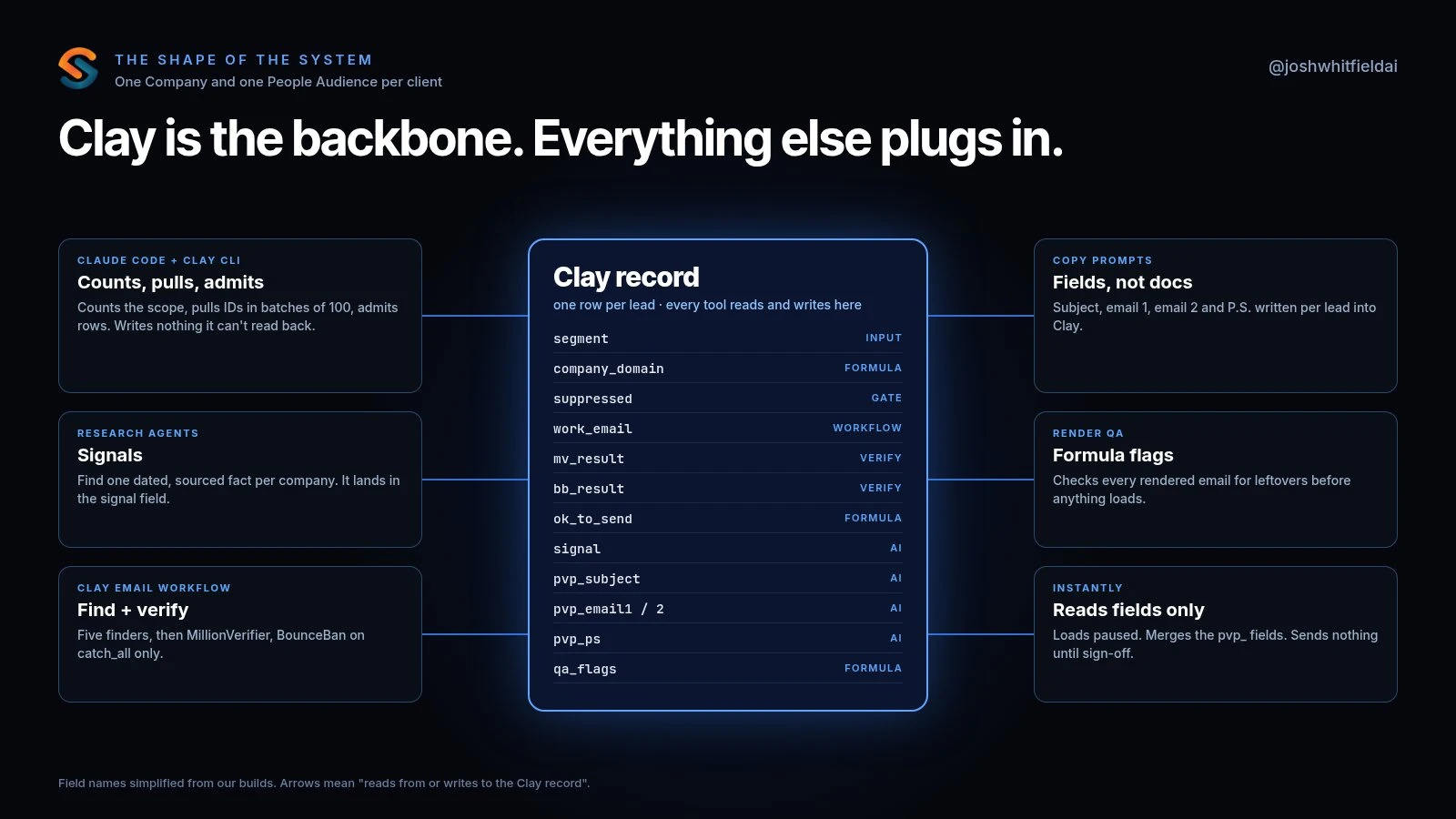
One thing up front, because I get asked a lot: Clay is the backbone. The audience, the emails, the verification results, the signals and the copy fields all live on Clay records. Claude Code and our agents do a lot of the work, but they work by reading and writing those records. Nothing sits beside Clay. Everything plugs into it.
1. The scoreboard, and what it doesn't prove
Bookings by the day they were booked: Oct 28: 11. Oct 29: 28. Oct 30: 27. Oct 31: 3. Nov 1: 9. Nov 2: 27. Nov 3: 30. Nov 4: 48. Nov 5: 7, as of 5:37 AM.
The campaign from Instantly on Nov 1 at 5:24 PM MST: 91,126 people contacted, 111,034 emails sent, 515 unique replies and 4 bounces. By Nov 4 at 7:32 AM MST: 249,489 emails sent to 163,877 people, 1,081 unique replies, 8 bounces.
The honest caveat: 190 is every discovery call on my calendar, not only the ones I can tie to this campaign lead by lead. When I matched bookings to campaign leads on Nov 2, 60 of the 87 bookings at that point matched exactly.
Rule: report the number you can prove, then say what it doesn't prove.
2. The shape of the system
Everything below hangs off one rule: every step reads from and writes back to the same Clay record.
Clay Audiences hold one persistent Company audience and one persistent People audience per client.
Claude Code runs the Clay CLI to count, pull and admit records, and it builds and tests the Clay workflows.
Research agents find signals and write them to the record as fields.
One shared Clay email workflow finds and verifies emails and writes the result to the same record.
Instantly only sends. It gets a paused draft with copy that was already written into Clay fields.
If a fact isn't on the Clay record, nothing downstream can use it. That's the point. It makes every step checkable.
3. Write the ICP as rules a machine can check
A persona doc can't be checked. Rules can. We turn every ICP into titles in and out, industries, revenue band, geography and a per-company cap.
Decision rule for revenue: Clay stores revenue as buckets like "10M-25M". If a bucket straddles your floor, it's out. With a $2M floor, we require the 5M-10M bucket or higher, because a bucket that crosses the floor can't prove the floor.
Decision rule for density: always set a per-company cap. Without one, a list of thousands turns into dozens of people at a handful of companies. This week it was 2 per company on a security-services build, and we raised it from 2 to 3 on a consumer-brand agency build when we widened it.
Here's how Claude Code sizes a scope in Clay Audiences before anyone spends anything. This is the command shape from our skill; the title and size band are an example, not a real ICP:
Count first. For 1,000 people we ask for about 1,100 IDs, because some will be duplicates or fail a gate. Records come back in batches of 100 IDs, with up to 10 calls running at once.
Hard gates run as code inside Clay, and they beat scores. This is trimmed from a real Clay code step on a security-services build. The field names are real, and the client context is removed:
Worked example: on that build, a test company scored 10 out of 10 and was still held, because it passed 13 of 14 checks and the one it failed was revenue. That test run took 7 steps and 8 seconds, with 1 paid call. A perfect score doesn't override a hard gate.
Before scaling, read 10 to 20 qualified rows. If more than 2 are wrong, tighten the rules and rerun.
4. Set up the Clay workflow, column by column
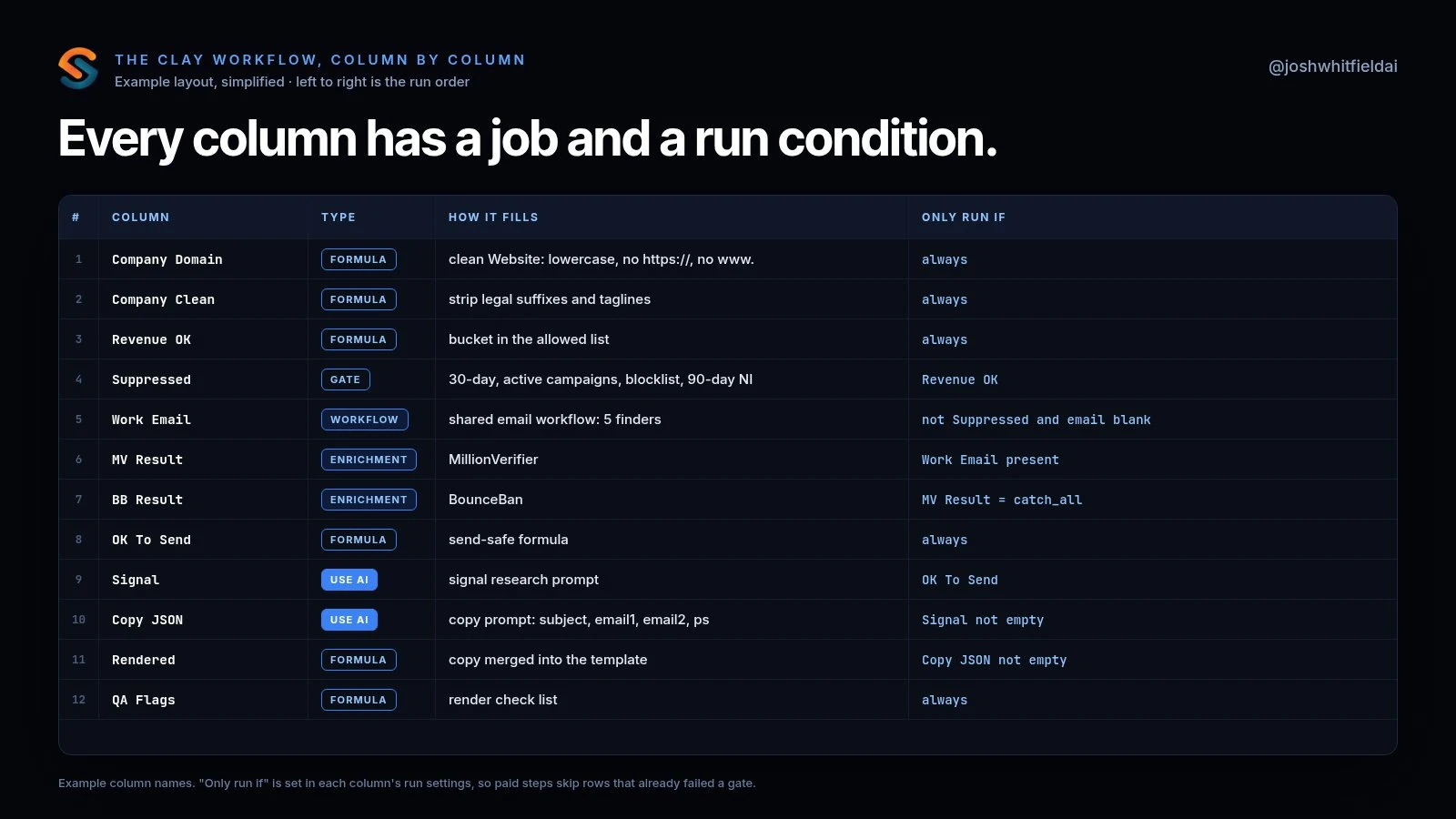
This is the column layout we use, simplified into one Clay workflow. In our real builds it's split across the Company audience, the People audience and a shared workflow, but the order and run conditions are the same.
To add each one: scroll right and click Add column. Pick Formula for formulas, Add enrichment for providers, or Use AI for research and copy. Then open the column, go to its run settings, and set "Only run if" so nothing paid runs on a row that should have stopped.
The formulas, copy-paste ready. In Clay, type / to insert a column reference. Our column names are shown in braces.
Clean the domain (same logic as our code step above):
Revenue bucket gate, example for a $2M floor:
Those are the bucket labels Clay search uses. For net-new companies, the same gate goes straight into the search. Example query, with an example geography:
Check the labels in your own Audiences before you copy the list. We pull them with clay audiences fields list-values revenue --entity-type companies, because data you already own can carry different labels.
Send-safe, the one formula that decides who gets emailed:
Rule: if a field isn't in a column, the copy can't use it. For our own campaign, every lead carries two tags, the segment they're in and the tool they most likely run, and the copy reads both.
5. Suppress before you pay
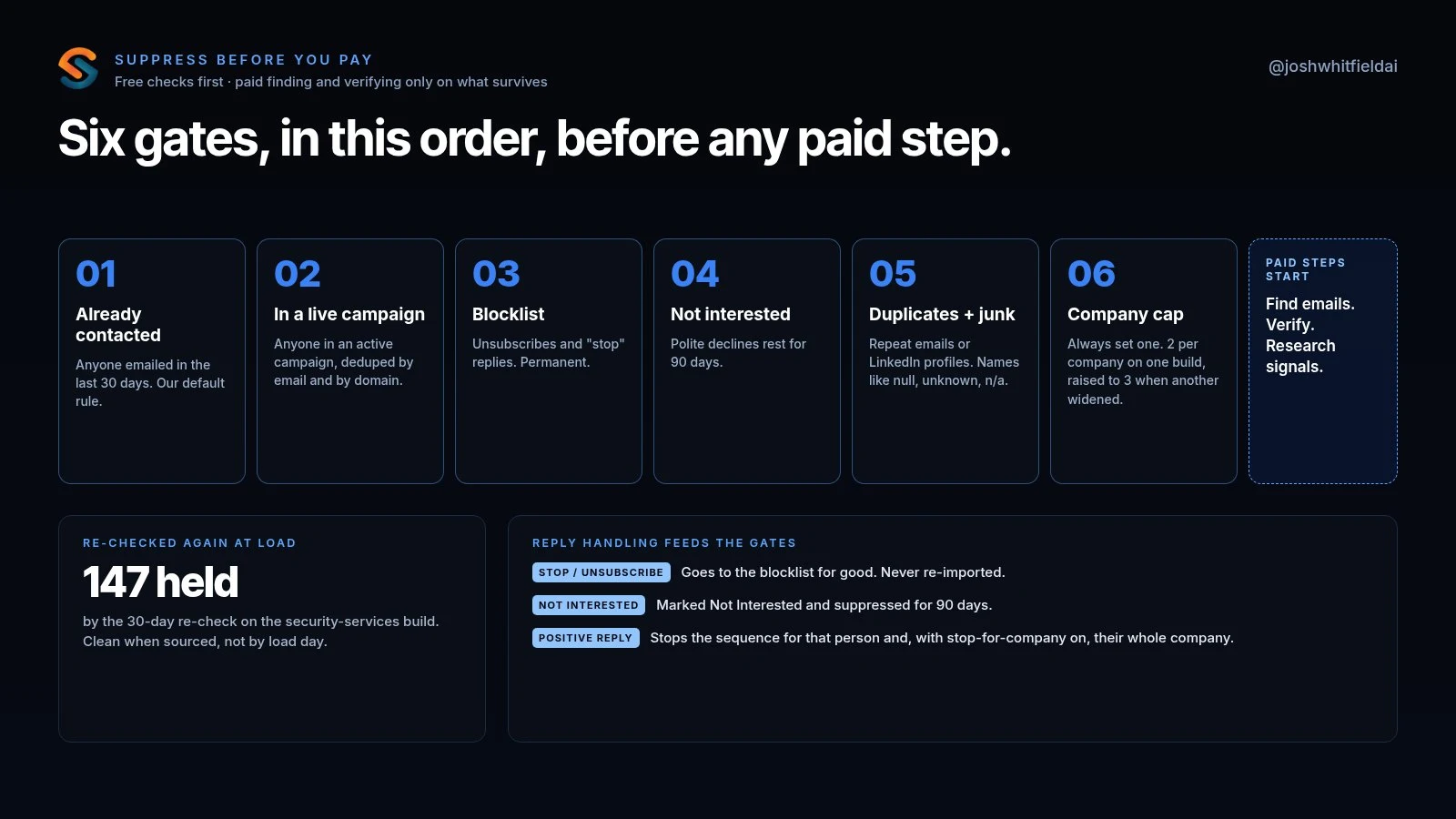
The order of the gates is the whole trick. If you find and verify emails first and suppress second, you pay to enrich people you were never going to email.
Our order, applied to every candidate before any paid step:
Anyone emailed in the last 30 days.
Anyone in an active campaign, deduped by email and by domain.
The blocklist and every unsubscribe.
Anyone who said not interested in the last 90 days.
Duplicate emails, duplicate LinkedIn profiles and placeholder names like null, unknown, n/a or none.
The per-company cap.
We record the count before and after each exclusion, so we can show where every row went. If a client has no written recontact rule, the default is no recontact within 30 days of the last send.
Reply handling feeds the same lists: "stop" or "unsubscribe" goes on the permanent blocklist. A polite decline is marked Not Interested and suppressed for 90 days.
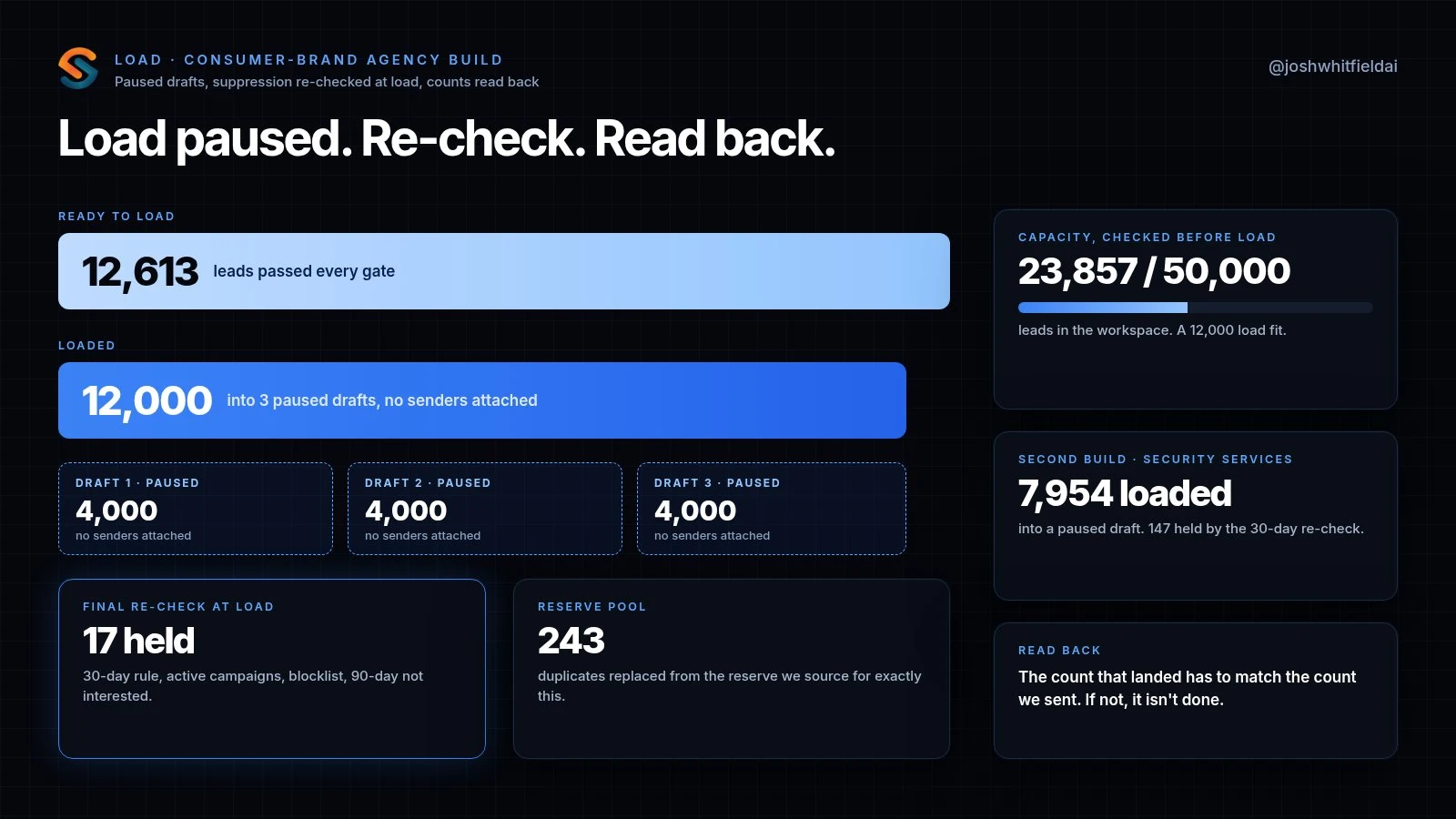
Worked example: the security-services build had 147 people held by the 30-day re-check at load. They were clean when sourced and weren't by the time we loaded.
6. Find and verify every email inside Clay
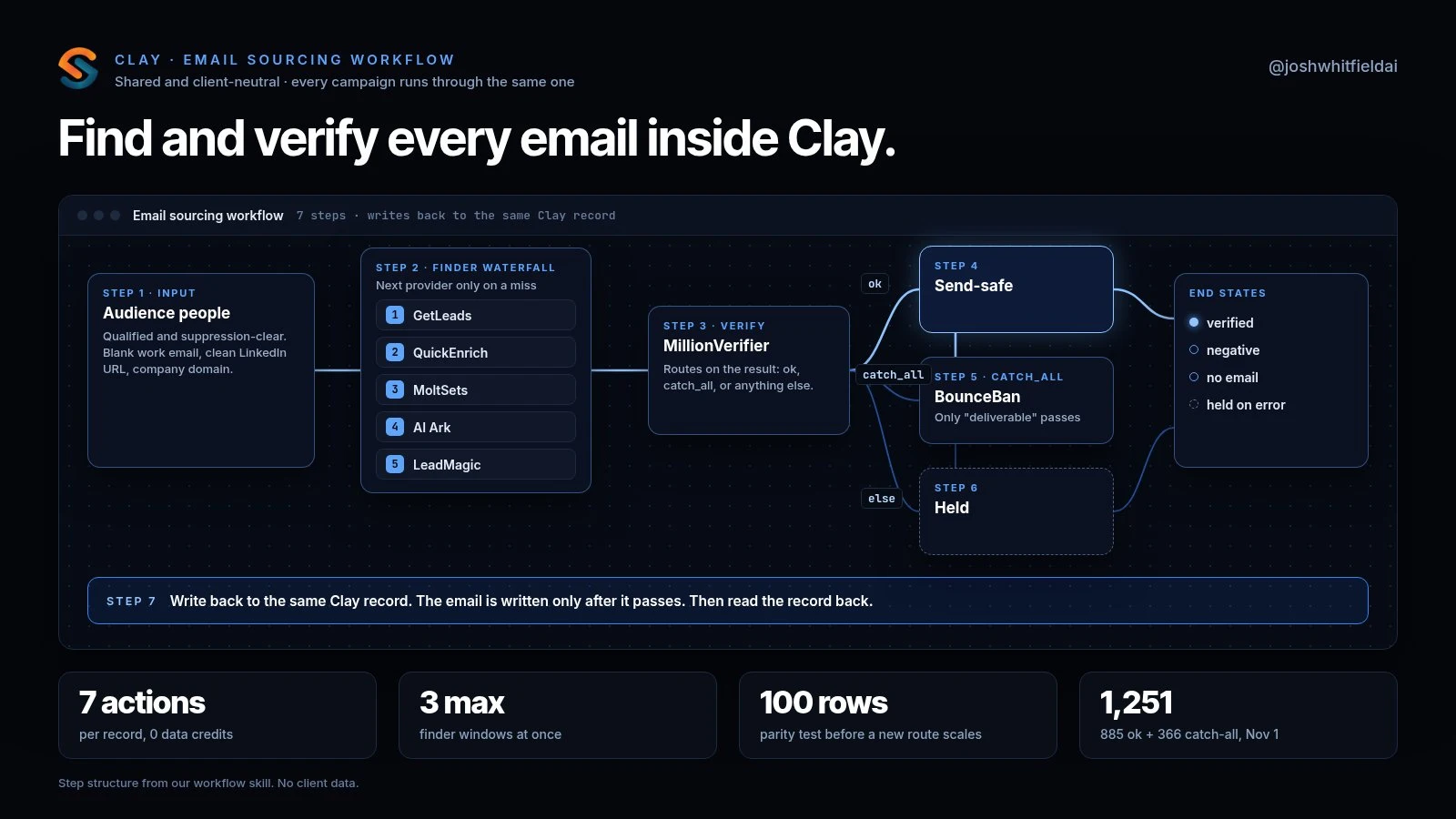
Guessed emails burn domains, so nothing gets guessed. Every missing email goes through one shared, client-neutral Clay workflow:
Take only Audience people who passed qualification and suppression, with a blank work email, a clean LinkedIn URL and a company domain.
Run the finder waterfall in a fixed order: GetLeads, QuickEnrich, MoltSets, AI Ark, LeadMagic. Move to the next provider only on a real miss.
Send every found email to MillionVerifier.
"ok" is send-safe. "catch_all" goes to BounceBan, and only "deliverable" passes. Everything else is held.
Write the result to the same Clay record. Write the email only after it passes, then read the record back.
Our verification contract, verbatim:
Not a green checkmark, not a cached flag, not an HTTP 200. An email from an old campaign needs current proof too.
Worked example: at a Nov 1 checkpoint on the security-services build, 1,251 emails were verified. 885 were MillionVerifier "ok" and 366 were catch-alls BounceBan cleared as deliverable. Without the BounceBan step, those 366 would have been thrown away or, worse, sent blind.
7. What each step takes, and what comes out
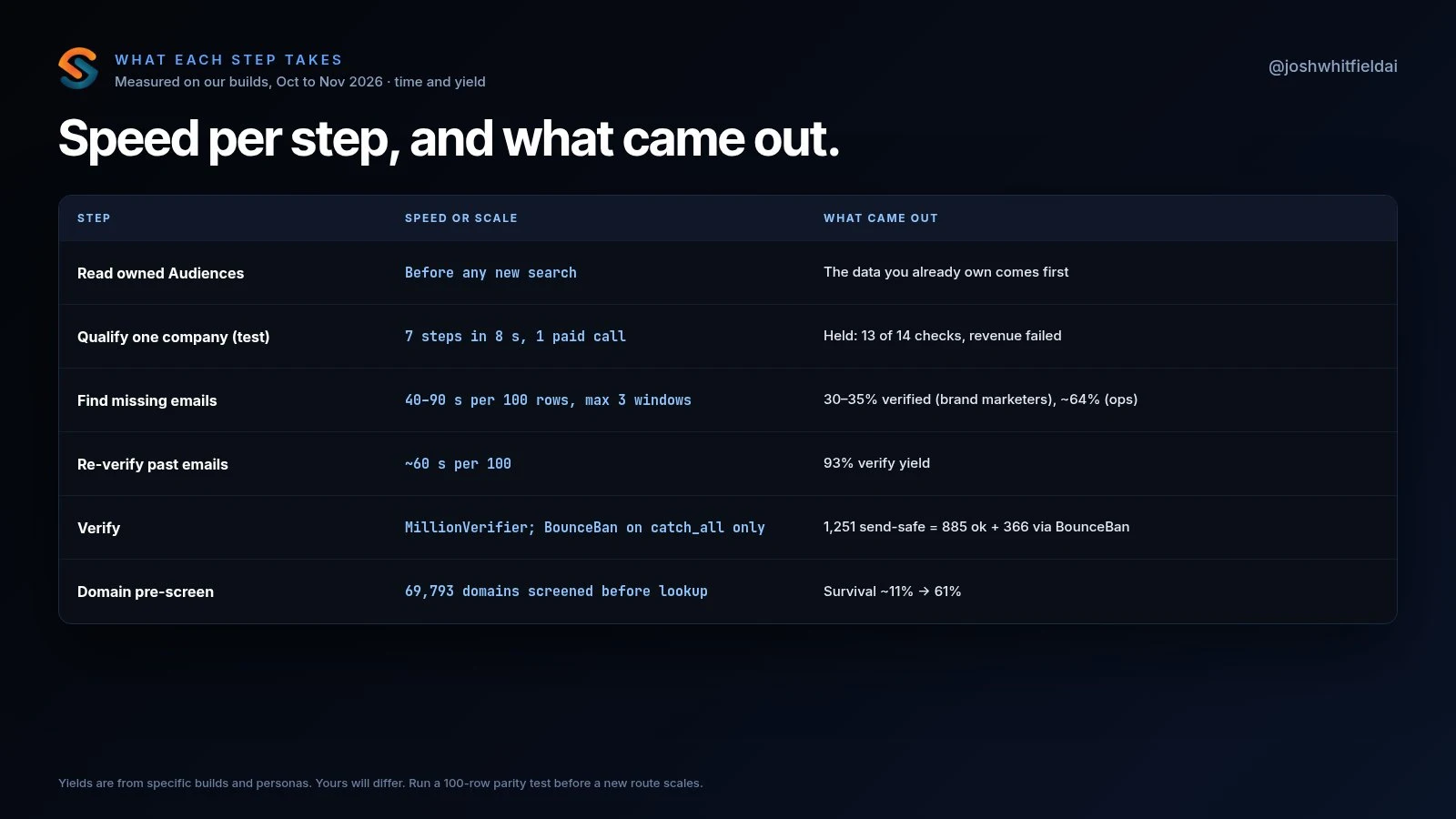
Measure every step for speed and yield, not just whether it ran.
The numbers behind that chart:
A 100-row finder window takes 40 to 90 seconds. We run 3 windows at once at most. More than that caused GetLeads rate-limit storms.
Verified yield depends on the persona: about 30 to 35% for brand marketers, about 64% for ops personas.
Re-verifying past campaign emails is the biggest speed lever we have: 93% verify yield at about 60 seconds per 100.
On a large build aimed at business owners, screening 69,793 active domains before lookup raised survival from about 11% to 61%. Owners with no company website domain kept about 28%, against 61% for those with one.
Rule: start with the data you own in Clay, use Clay search for the true gap, and use web research only where the records don't exist yet.
Any new route gets a 100-row parity test before it runs at scale.
8. Signals and copy, written into Clay fields
The copy is only as good as the field it reads. So the research comes first, and it writes to the record.
Signal research prompt. In Clay this is an AI column (Add column, then Use AI, with web research on). For volume, we run the same brief through research agents and write the results back to the record. Adapted from a real brief we ran this week, with the product details removed:
Copy prompt, run as an AI column only on rows where ok_to_send is true and a signal exists. Built from our PVP rules (PVP means permissionless value proposition: open on the reader's own situation, give an insight, ask softly before asking for time):
Those four outputs become per-lead variables. Our own campaign loads them into Instantly as pvp_subject, pvp_email1, pvp_email2 and pvp_ps, so the sending tool never writes anything. It only fills in what Clay already holds.
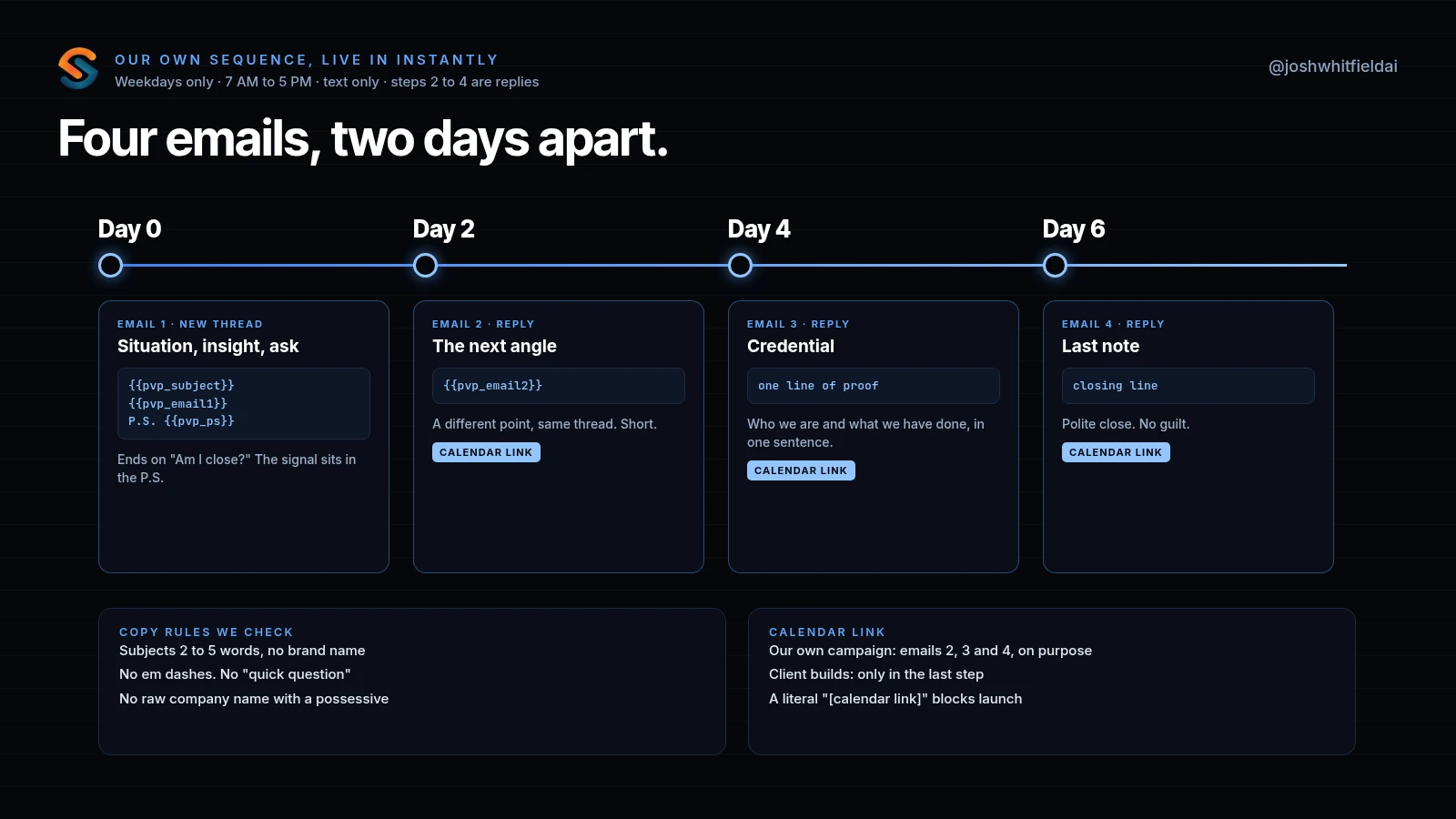
The sequence: 4 emails on day 0, 2, 4 and 6, weekdays only, with emails 2 to 4 as replies in the same thread. For client builds, the calendar ask is only in the last step. Our own campaign breaks that rule on purpose: the link is in emails 2, 3 and 4, and email 3 is the credential email.
9. Sending setup: inboxes, warmup and campaign settings
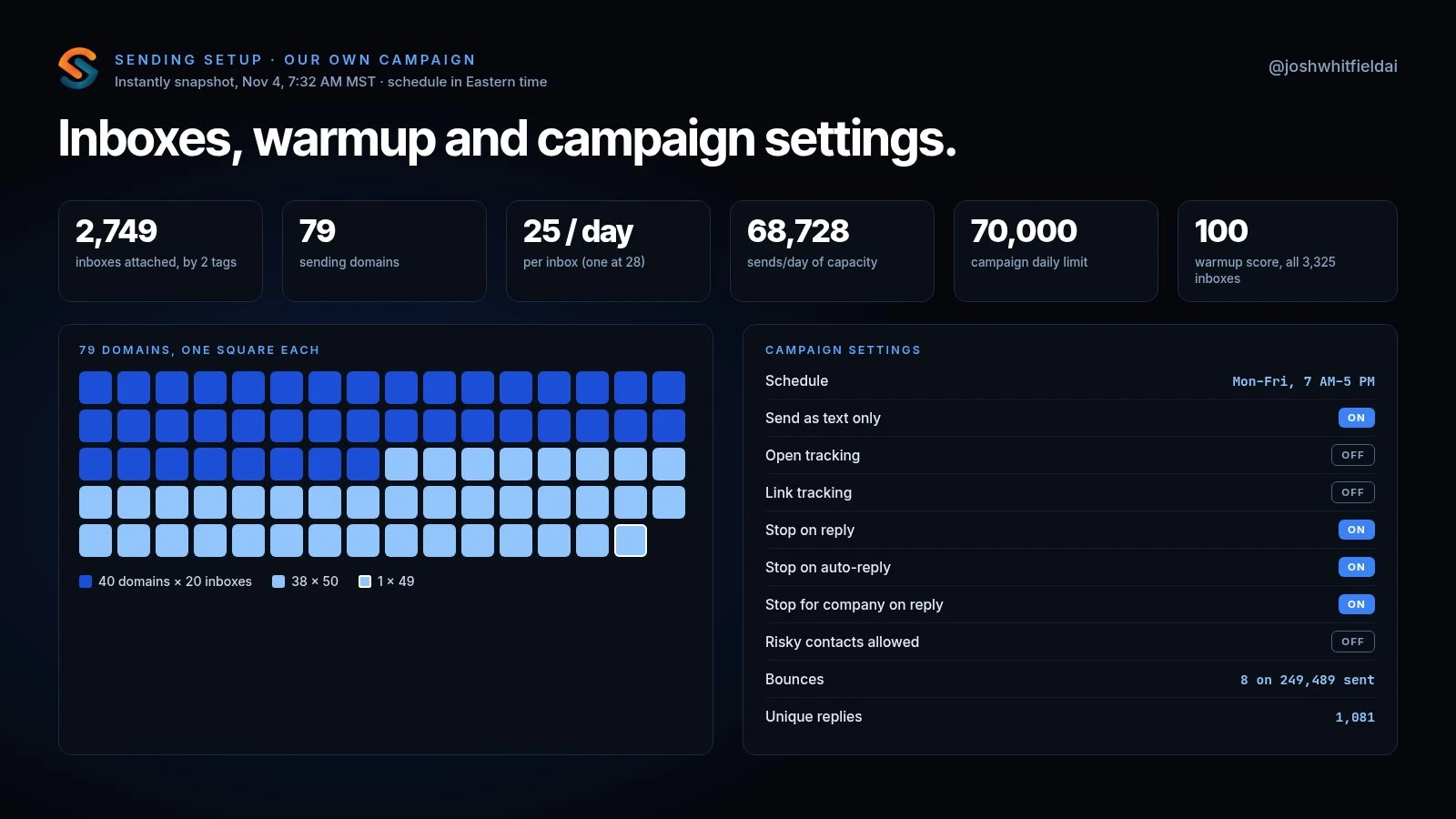
The cleanest list in the world won't save a bad sending setup. Here's ours, from the Instantly snapshot on Nov 4 at 7:32 AM MST.
2,749 inboxes attached to the campaign, across 79 domains. 40 domains carry 20 inboxes each, 38 carry 50, and one carries 49.
25 sends a day per inbox, with one at 28. That's 68,728 sends a day of inbox capacity, under a campaign daily limit of 70,000. The inbox caps are what actually set the pace.
Warmup stays on. All 3,325 inboxes in the workspace showed a warmup score of 100 in that snapshot.
New inboxes start at 25 sends a day.
Campaign settings, in Instantly under the campaign's Options tab:
Schedule: weekdays, 7 AM to 5 PM, Eastern time (the campaign's time zone).
Send emails as text-only: on.
Open tracking and link tracking: off.
Stop sending emails on reply: on. Stop on auto-reply: on.
Stop campaign for company on reply: on.
Risky contacts: not allowed.
Sending accounts: attached by tag, not one by one, so adding inboxes is one change.
Warmup rule from our monitor's design: an inbox below a warmup score of 90 gets marked Recovering, and it isn't treated as healthy again until it's back above 97.
The payoff of verification plus this setup: 8 bounces on 249,489 emails sent.
10. QA the rendered emails, not the template
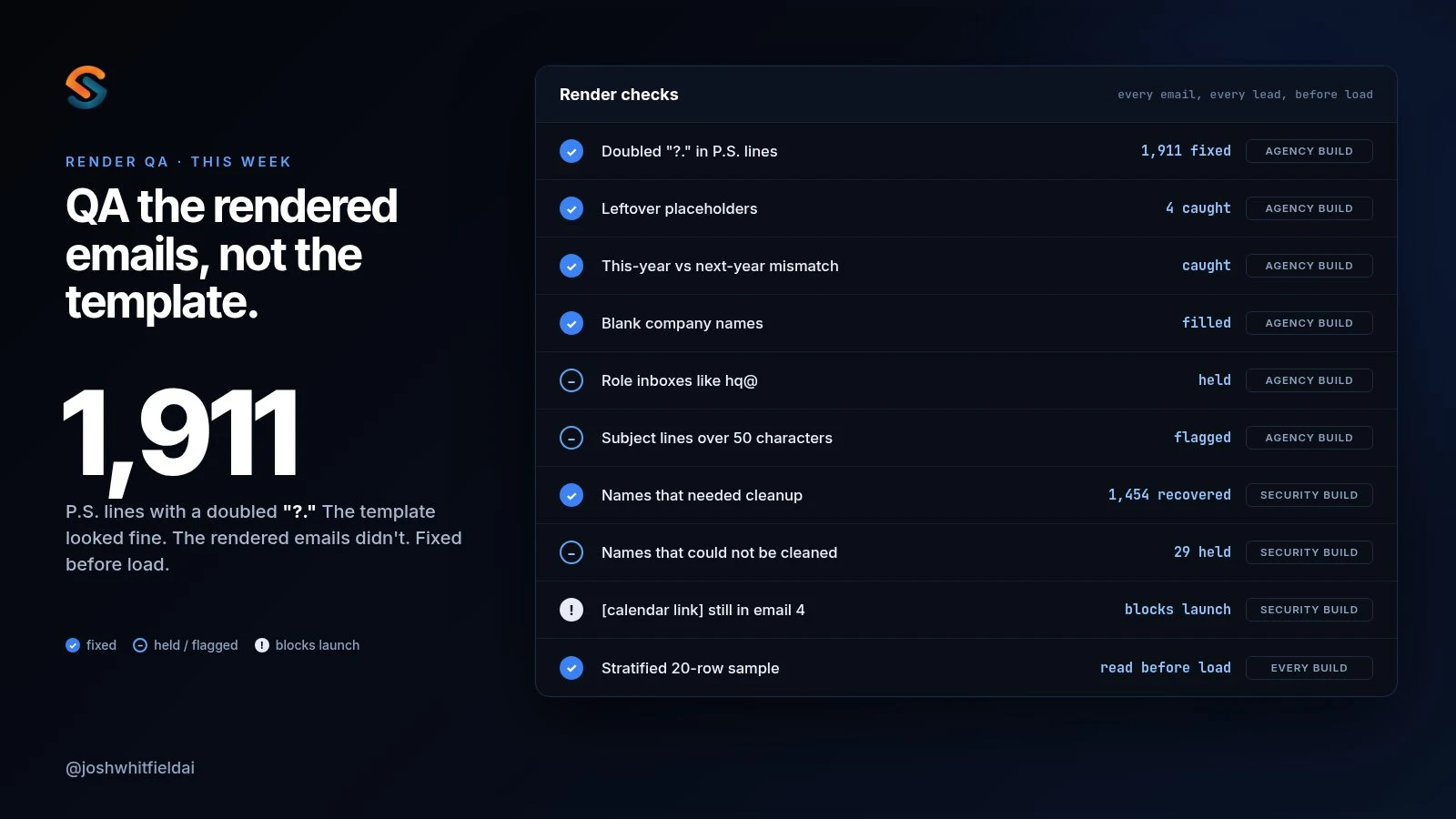
Render every email for every lead, then check the output. A template can look perfect while hundreds of rendered emails are broken.
Our render check as a Clay formula. It returns the problems it finds, and anything not empty is held:
We also check year mismatches, a raw possessive on a merged company name, subjects over 50 characters and role inboxes.
What render QA caught this week:
Consumer-brand agency build: a doubled "?." in 1,911 P.S. lines, 4 leftover placeholders and a mismatched year, all fixed. Blank company names filled. Role inboxes like hq@ held. Subjects over 50 characters flagged.
Security-services build: 1,454 names recovered and 29 held. A [calendar link] placeholder still sits in email 4, so that draft doesn't launch until it's filled.
Then a stratified 20-row sample, covering every copy pattern and every sender, comes to me to read the way a prospect would.
11. Load paused, re-check, read back
Nothing goes live on load. Every campaign loads as a paused draft with no sending inboxes attached.
Check capacity first. The consumer-brand agency workspace held 23,857 leads against a 50,000 limit, so a 12,000 load fit.
Re-run every suppression gate right before the load. Lists age between Monday and Wednesday.
Load in parts. 12,613 leads were ready, and 12,000 went in as 3 paused drafts of 4,000. 17 were held at the final re-check, and 243 duplicates were replaced from a reserve pool we source for exactly this.
Read the campaign back. The count that landed has to match the count you sent. If it doesn't, the load isn't done.
Then people sign off. I approve the copy, the client's contact approves their copy, and I approve every write into the sending tool, even a paused one. Launch means senders attached, a start date and the switch turned on, and only I do that. Every client build runs in its own session, so a slow build never holds up the next one.
12. The tradeoffs we accepted
Suppressing first makes the start slower. It's still cheaper than paying to enrich people you'll throw away.
Strict verification cuts volume. 30 to 35% verified on brand marketers is low, and we take fewer, safer sends over more, riskier ones.
3 finder windows at once is slower than the providers' headline speed. Going faster cost us rate-limit storms.
Re-querying owned Audiences means some records are older. They go through the same gates and get current verification, so age costs us yield, not safety.
Paused loads and human sign-off add hours to every build. We'd rather lose hours than a domain.
Our attribution isn't perfect. Bookings are counted from the calendar, and not every one ties back to a lead.
13. Glossary
Audience: a persistent Clay set of companies or people that every campaign reads from and writes back to.
Waterfall: providers tried in a fixed order, moving on only after a real miss.
Catch-all: a domain that accepts any address, so the first check can't confirm the inbox exists.
Send-safe: MillionVerifier "ok", or "catch_all" plus BounceBan "deliverable".
Parity test: 100 rows through a new route, compared against the old one, before it runs at scale.
Suppression: the lists that remove people before any paid step.
Per-company cap: the most people you'll email at one company.
Run condition: Clay's "Only run if", which keeps paid columns from running on rows that already failed.
PVP: copy that opens on the reader's situation and earns the ask.
Paused draft: a loaded campaign with no senders attached.
Read-back: re-reading what landed to prove the count and fields match.
14. Start here: your first build, in order
Write your ICP as rules, including a revenue floor and a per-company cap. Read a 20-row sample.
Create one Company and one People audience in Clay. Count your scope before you pull it.
Add the suppression columns and set "Only run if" on everything after them.
Build the email waterfall and the send-safe formula. Run a 100-row test before anything bigger.
Add the signal and copy AI columns, then the render check formula.
Set up inboxes at 25 a day with warmup on, text only and tracking off.
Load paused, re-check suppression, read it back, sign off, then launch.
Every one of those steps reads and writes the same Clay records. That's what put 190 calls on the calendar.
If you'd rather have this built and handed to your team, that's what we do at CMM. My DMs are open.
Article figures