How We Booked 485 Calls in 30 Days: The 5 Holes That Almost Broke Us, and the Fix for Each
What broke when CMM booked 485 calls in 30 days?
Reply handling, deal tracking, qualification, closing and team capacity came under pressure. CMM used draft replies with human review, a Slack deal tracker and pre-call campaigns to manage the workload.
In this article
Booking 485 calls in 30 days for one agency seems like a pipe dream, pardon the pun. Honestly, it did to me too.
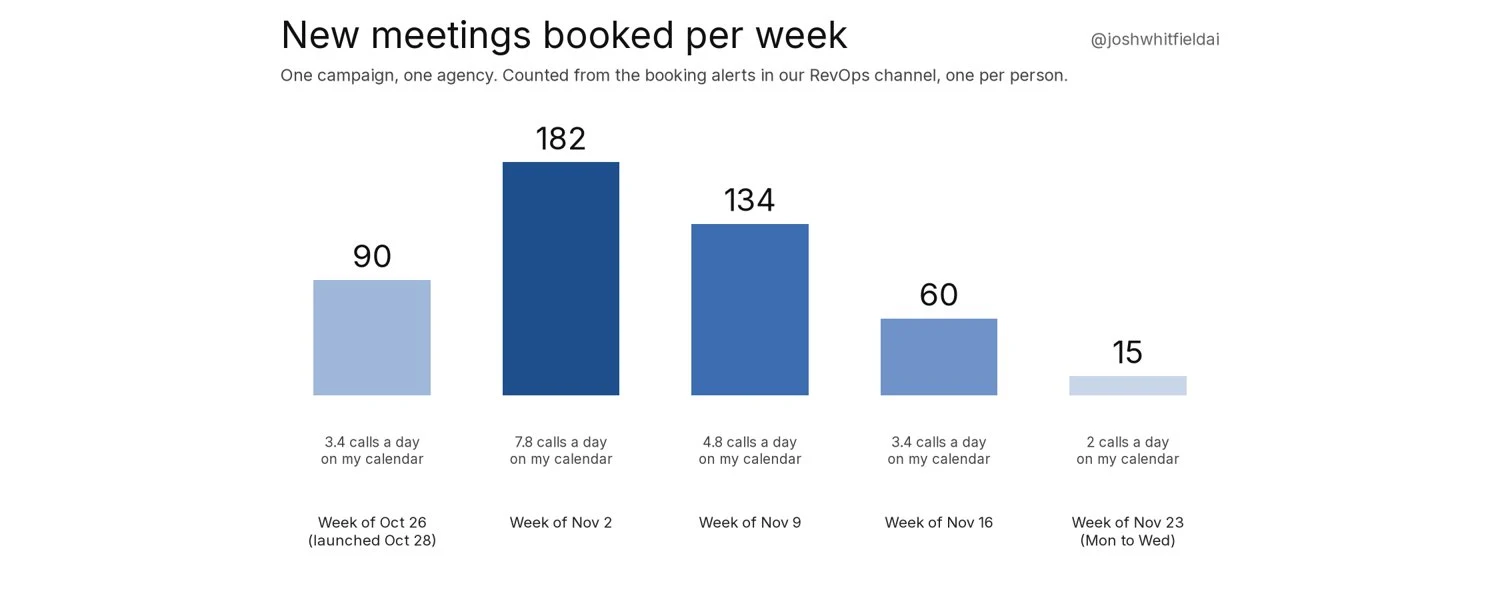
Two days before Halloween we launched one campaign for our own agency. Over a million emails later, the calendar stopped being the problem. At the peak we booked 182 meetings in one week, and 46 in a single day. Everything around the calendar became the problem.
Because quickly you find the holes. Replies coming in at all hours. No real place to track deals. Calls with people who were never going to buy. Prospects showing up and needing a reason to close. And me, trying to still eat, work out and stay sane.
This was a journey of survival. Here are the five holes, what we built to plug each one, and the exact setup underneath so you can steal it.
Hole 1: We couldn't reply fast enough
Our rule is a 15 minute SLA on every reply. Replies come in all hours of the day. You can't staff that with humans unless nobody on the team ever sleeps.
So we built an agent. We trained it off 500 of our Zoom calls, so the drafts sound like us on a call, not like a bot. It started as a Grok Bot agent, and we moved it to Codex, event driven from an MCP in Instantly. And it's true human in the loop: the agent only answers from facts we've approved, and a person decides everything else.
Here's the shape:
1) Instantly flags the reply and an event fires
2) The agent sorts it. Auto replies, out of office and unsubscribes never reach a human
3) It drafts every positive, but it can only answer from our approved facts
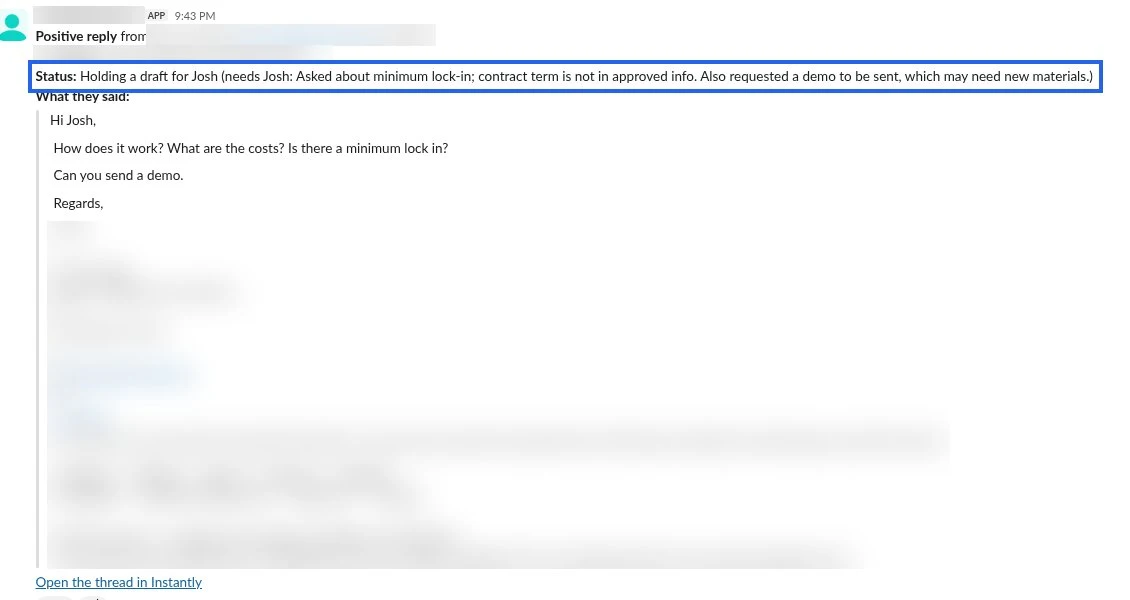
4) Anything outside those facts gets held as a draft and kicked to Slack, with the reason written on it
5) A person reads the card, fixes the draft, sends it, then sends the booking link
Sorting matters more than people think. Our always-on campaign is at 4,333 replies, and 2,270 of them were auto replies. No human should ever read an out of office.
Here's one real day. On Tuesday, Nov 24, 148 replies came in and 76 were auto replies. The agent held 33 for a human in Slack, every one with a written reason.
What the agent kicks to Slack (copy this list, it's what those 33 were):
1) A proposed meeting time that needs my calendar
2) Custom pricing or terms: commission deals, lock-ins, one-off quotes
3) "How did you get my email?"
4) Replies that are ambiguous, where it can't tell what they actually asked for
5) Questions our approved facts don't cover, like market coverage, our location or a competitor comparison
6) Referrals, partnerships and people pitching us back
7) Anything urgent
What the Slack card shows: who replied, the campaign, a status line with the reason, what they said, and a link to the thread in Instantly. A real one from this week: "Holding a draft for Josh (needs Josh: Asked about minimum lock-in; contract term is not in approved info.)"
Two more rules that kept us out of trouble:
1) A polite no gets stopped and suppressed for 90 days, not blocklisted. A stop or remove goes on the blocklist forever
2) Calendar asks always use a real booking link. Never "does Tuesday at 2 work?"
Did it work? On day 1, the median time from someone replying to them booking was about 33 minutes. The fastest was 10 minutes.
Hole 2: We needed a CRM, so we thought
When calls start stacking up, the obvious move is to go buy a CRM. Another login, another tool to keep updated.
So we didn't. Using Grok and Slack, we built a pipeline tracker in Slack, right where the team already works. Then we created a dedicated RevOps channel.
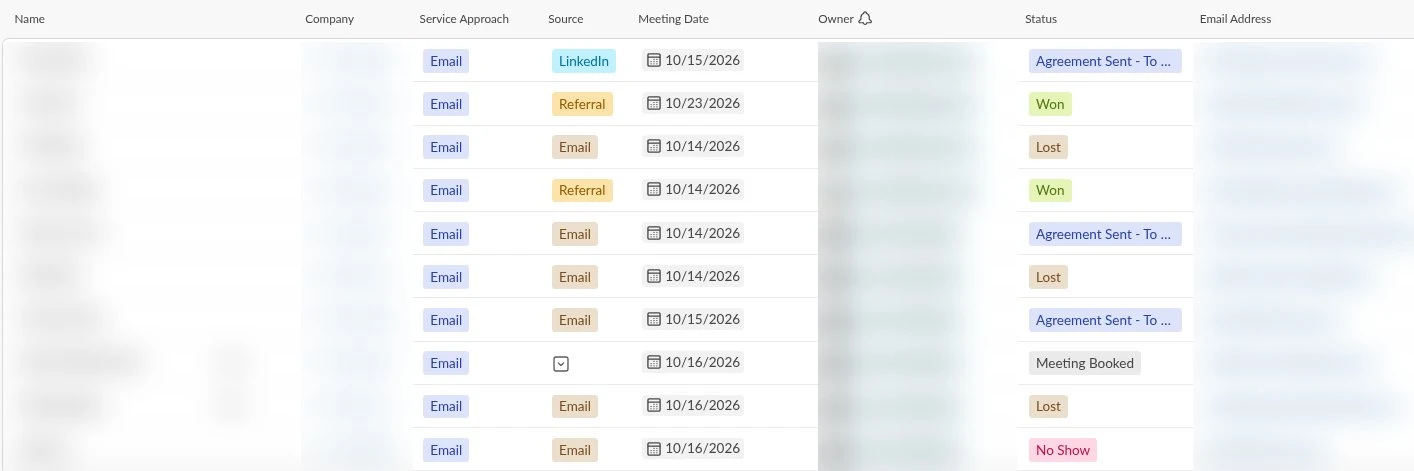
The tracker is a Slack list. One row per meeting:
1) Name, company, email
2) Meeting date
3) Status, starting at Meeting Booked
4) Owner
5) Source
6) Service approach, once we know it
7) Follow up date
8) Notes, where the agent appends the pre-call campaign link plus a 3 line brief: ICP, how we help, open with
The RevOps channel is the feed. Every one of these posts there:
1) A new meeting booked, posted automatically the moment someone books
2) Every follow up sent, with the date of the next one
3) Agreements sent
4) Deals lost, so we note the reason and keep moving
5) A daily wrap from the team
In the last 30 days that channel logged 314 follow ups sent, 53 agreements sent and 22 deals lost. Nobody had to go update a CRM for any of it.
Grok writes to the tracker, and the agents check it before they build anything, so nothing gets built or sent twice. And because the deals live in one place, we can point Octave at it for the RevOps context layer.
Rule: if the team works in Slack, the pipeline lives in Slack. Don't make people go somewhere else to update a deal.
Hole 3: The criteria had to keep changing
A full calendar isn't pipeline. When a campaign is working, some of the people booking were never going to buy.
So we kept tightening the campaign the whole month: tighter revenue qualifications, and budget questions right on the calendar link.
What we ask on the booking form:
1) How can we help? In their words
2) A plain yes or no on our starting budget
3) Are you ready to start?
Those three answers do a lot of work. One booking came in with budget "nope" and ready to start "maybe." We cancelled it. No prep, no pre-call campaign, no hour lost.
Our agent applies the same thinking. When a prospect had already said our minimum didn't fit, its note was: "I'd qualify budget before investing much in prep." We left the booking alone and didn't build anything for it.
On the list side, revenue gets its own check. In testing, our AI gave one company a 10/10 fit score, and the Clay gate held it anyway. The summary said every revenue threshold was met. The revenue question was never actually answered. Each criterion needs its own yes.
And the copy itself doesn't rush the ask. There's no calendar link until email 4. Email 1 is about their customers, email 2 is a worked example, email 3 is why listen to me.
Rule: put the hard questions on the booking form, not on minute 20 of the call.
Hole 4: We needed to close more deals
Booking is half the job. Somebody still has to say yes.
So, using Grok and Clay, we build every qualified prospect a real campaign before the call. They walk in and see their own outbound. Then on the call we demo our signals engine live.
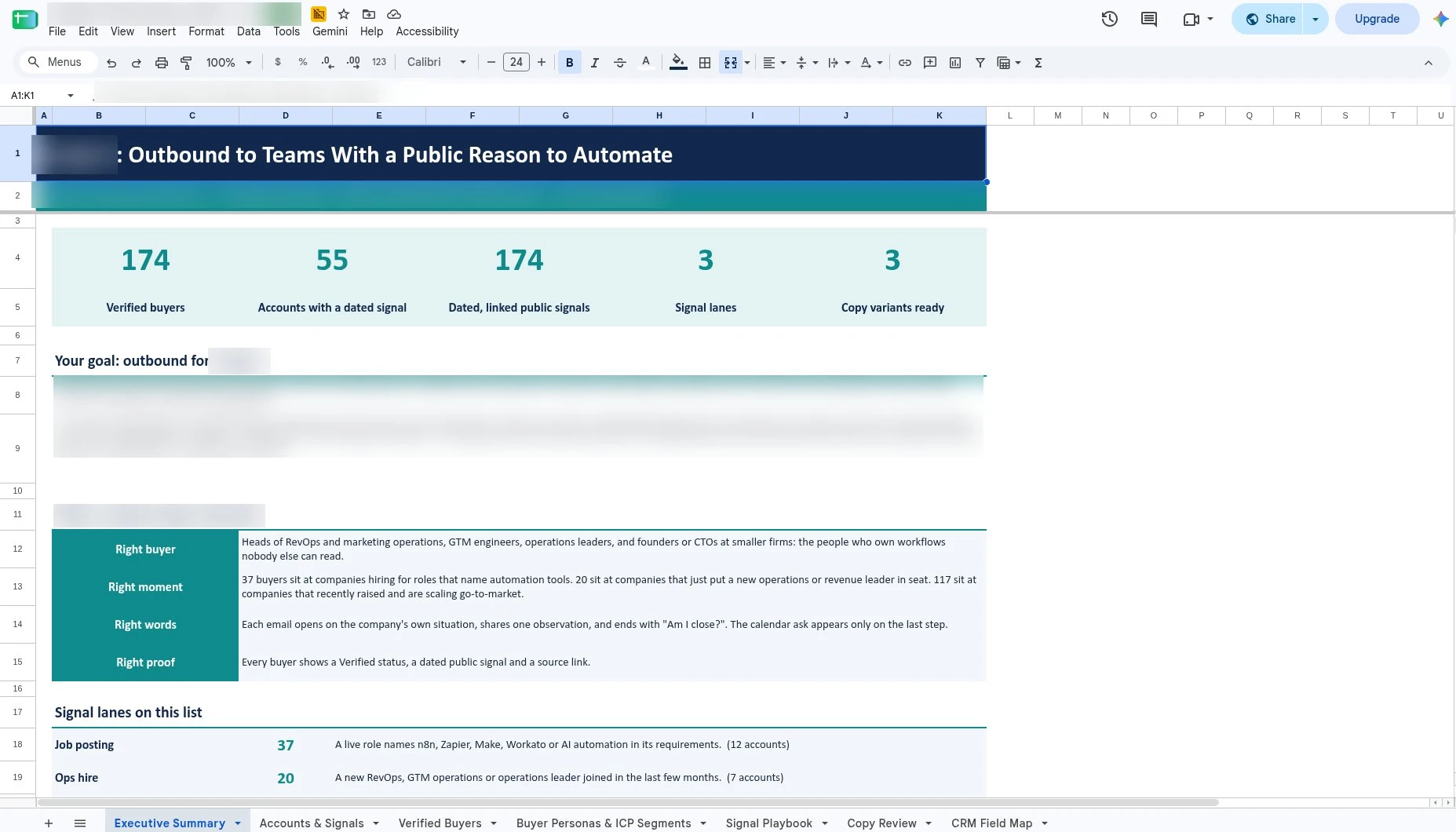
What a pre-call campaign contains:
1) An executive summary
2) 100+ verified leads, every one with a dated public signal and a source link
3) The accounts and the signals behind them
4) Their ICPs and personas. Who they sell to, not who we sell to
5) Signal definitions
6) Copy review: 3 PVP email variants, each on a different signal, each answering what they said to us
7) A short call brief for us: ICP, how we help, what to open with
The order we build it in:
1) Qualify first. Not every booking earns prep
2) Grok does the intake: the email thread, the booking answers, their website
3) Claude Code builds the leads with Clay, past our gates
4) No dated signal, no custom email. If nothing happened at a company recently, the row goes in as "held: no signal," and the buyer sees we held it
5) Done 48 hours out. If the call moves, the deadline moves with it
So far we've built 116 of these that cleared 100+ verified leads. That's 14,980 verified leads, built for people who hadn't bought anything yet.
Built is not sent. The campaign is a draft for the buyer to judge. Nothing goes out until a person on their side says go.
A Pre Meeting bot does the deep research and posts it to a dashboard, then preps me before the call. I show up knowing their business, and they show up to a campaign that's already done.
Rule: don't tell a prospect what you'd build for them. Show up with it built.
Hole 5: We still need to eat, work out and stay sane
Nobody talks about this part. I have five kids. At some point the calendar was winning.
Over the month we adjusted from 10 calls a day down to 6. My own calendar shows it. The busiest day was 12 discovery calls, and that week I averaged about 8 a day. By the week of Nov 16 I was under 4 a day on my calendar, with the team taking calls too. I don't recommend the 12.
What actually helped:
1) We cancelled some unqualified calls. The booking form made that an easy decision instead of a guilty one
2) The campaign only sends on weekdays, 7 to 5 Eastern. Sunday is for the replies
3) The agents handle the middle of the night replies, so I don't have to
4) We documented the whole journey as we went. That's what you're reading
Rule: set a calls per day ceiling before the calendar sets it for you.
What to steal this week
1) Write your approved facts and your escalation list. Meeting times, custom pricing, "how did you get my email," ambiguous replies and anything outside the facts go to a human, with the reason on the card
2) Set a reply SLA and measure reply to booked time, not opens
3) Build one Slack list for every booked meeting, and one channel where every booking, follow up and lost deal posts
4) Add three questions to your booking link: how can we help, budget yes or no, ready to start
5) Pick your next qualified call and build that prospect a campaign before it happens. 48 hours out
6) Pick your calls per day ceiling. Ours landed at 6
Next month we're going to share how we did all of this in our live Clay Series, from the campaign building side. The campaign behind the 485 calls, step by step.
So far it has been one hell of a journey:)
Article figures