Cold Email Without Deliverability Panic: The Risk, Caps, and Replies Playbook
How does CMM manage cold email deliverability risk?
CMM limits contacts per company, spaces first touches, checks domain readiness and scores replies. Its pre-send checks catch risky patterns before a campaign goes live.
In this article
- Do the basics once, then stop obsessing
- What people panic about versus what actually gets you blocked
- The risk checklist: what gets you blocked
- Per-company caps, written as exact rules
- Spacing, written as exact rules
- Domain age and warmup
- A reply-first scoring rubric
- Pass your own bar: the pre-send check
- Copy-paste config for caps and spacing
- What always goes to a human
- Failure modes, with fixes
- Glossary
- Start here: your first week
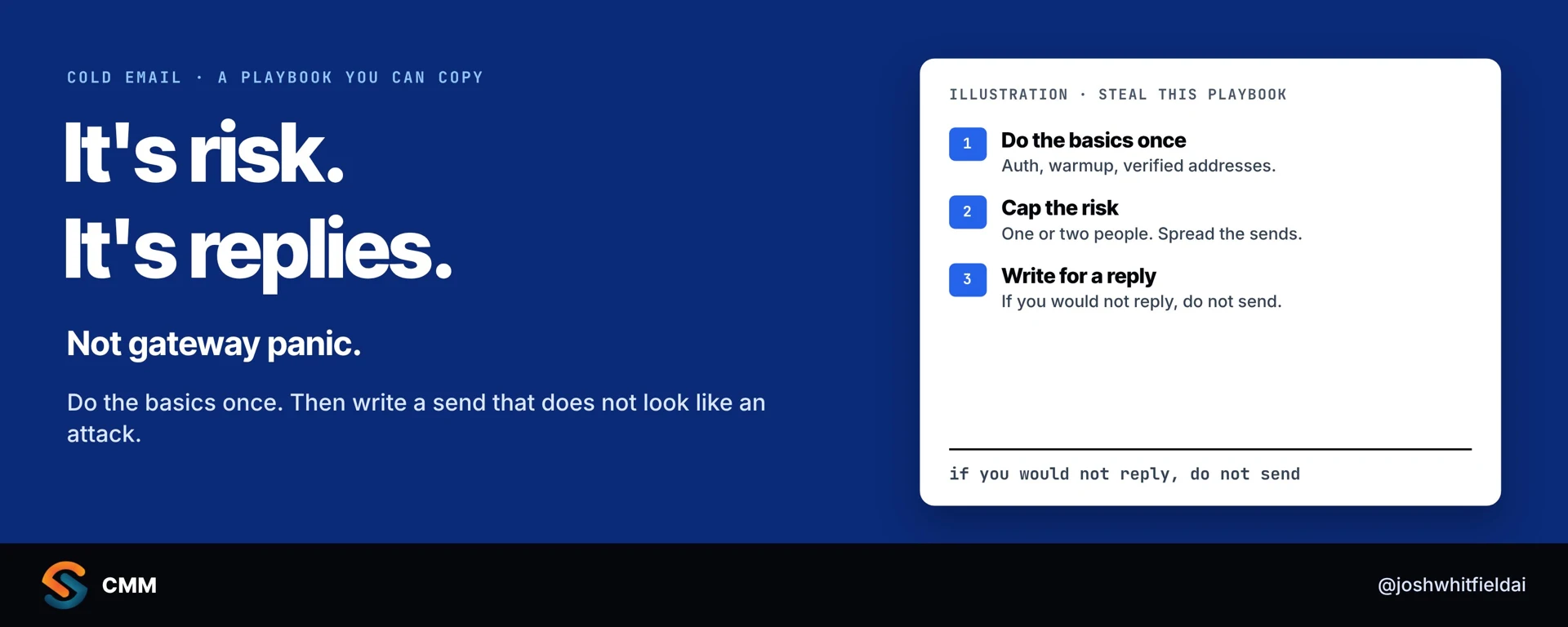
I don't worry about deliverability much. Most of the security gateway panic is crap. What gets you blocked is risk.
That is the stance. This Article is the playbook underneath it, written so you can copy it. Do the sending basics once. Then stop refreshing threads about which gateway is impossible this month, which inbox provider you should hop to, and whether enterprise is "undeliverable." The thing that actually gets you blocked is looking like an attack: a domain that did not exist yesterday, suddenly writing a list of large companies, or a pile of messages landing at one company on the same day from a crowd of sender identities that all look like you.
The low-risk pattern is not mysterious. One or two people at a company. Those sends spread over a couple of days. A message you would reply to if it hit your own inbox. Replies are how you win, and they are also how a mailbox stops looking like a machine.
This is the method: a myths-versus-what-matters list, a risk checklist, per-company caps and spacing written as exact rules, a domain and warmup rule set, a reply-first scoring rubric, a pre-send "would I reply?" check, copy-paste config, failure modes with fixes, a glossary and a first-week plan.
If you want the decision layer underneath the send, who gets emailed, who gets a human and who gets dropped, that's the Nov 9 Article: https://x.com/joshwhitfieldai/article/2119817928480616923 . If you want the team that runs the work, a coordinator that builds nothing and specialists that each own one job, that's the Nov 10 Article: https://x.com/joshwhitfieldai/article/2120143896407921069 . This one is how the send itself stays low-risk, and how you write for a reply instead of for an open.
Clay is the backbone. The companies, the people, the caps, the send log and the replies live in Clay workflows. Agents can draft. They do not get to ignore a cap, and they do not get to declare something sent.
Do the basics once, then stop obsessing
I am not telling you authentication is optional. On that same podcast I said security email gateways matter, to some extent. Of course they do. A domain with no authentication, a mailbox you just created, and a copy-paste blast at large companies is not a strategy. It is a dare.
Do these once, write down that you did them, and then stop treating them as the campaign.
Authenticate the sending domain. SPF, DKIM and DMARC should be in place before the first campaign email leaves. If you cannot see them, you are not ready to send.
Send from a domain you control, with a mailbox that belongs to a real sending identity, not a random string you will abandon next week.
Warm the mailbox before you ask it to carry a campaign. The public Instantly case study on CMM's site describes automated warmup as part of how 17,000+ mailboxes stay healthy. Warmup is a basic. It is not the strategy.
Verify the address before you send to it. A bounce looks less like a person than a reply does.
Keep a log of what left, who it went to, which company it hit, and which sender identity sent it. If you cannot answer those four things, you cannot enforce a cap.
That is the floor. People spend weeks past the floor, hopping from provider to provider, because hopping feels like work. I said I am not one of those people who are constantly saying try Microsoft, try Google. Once the basics are done, the campaign is a risk problem and a reply problem.
Rule: do the basics once, write down that you did them, and then stop obsessing.
What people panic about versus what actually gets you blocked
Here is the split, written so you can screenshot it.
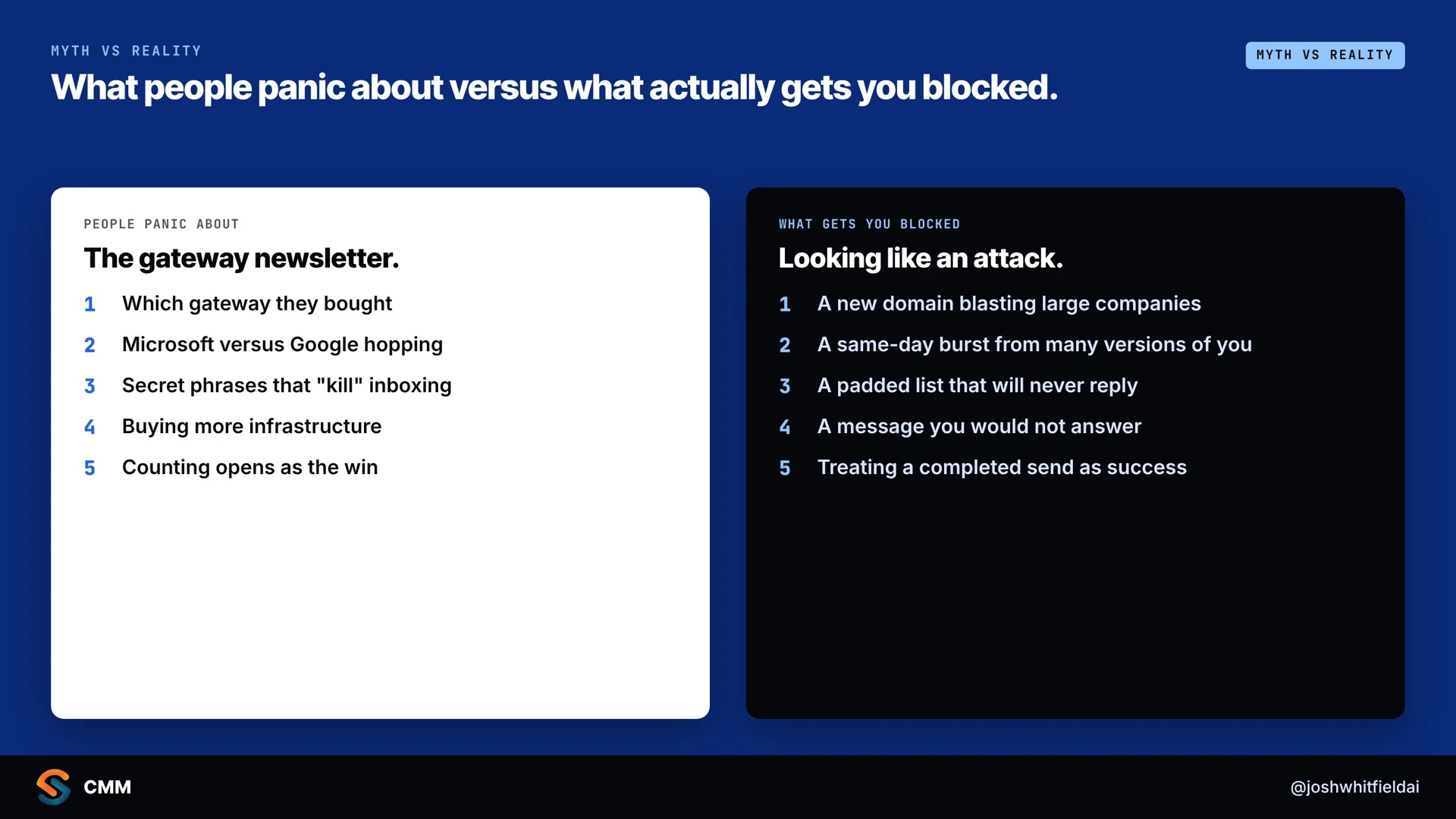
People panic about:
Which security gateway the target company bought.
Whether the inbox is Microsoft or Google, as if that is the strategy.
Secret phrases that "kill deliverability" this week.
Buying more infrastructure when the last campaign did not earn replies.
Opens, as if an open is the point.
What actually gets you blocked:
A brand-new domain writing a list of large companies the next day. I said it like this: if you set up a domain and the next day you blast a list of Fortune 500s, it is probably not going to work out so well. Logically that does not make sense given the age of the domain. That is what attackers do.
A pile of messages to the same company on the same day, from many versions of you. I used 50 emails and 16 sender identities as the example. A gateway that sees that does not think "ambitious sequence." It thinks it is under attack, blocks the identities, and then you blame the industry.
A list padded with people who were never going to reply. I tell people it is better to reach out to 500 people who are absolutely good candidates than 5,000 people to make a bigger list, because those extra 4,500 will never reply and that kills your deliverability anyway.
A message you would not answer if it hit your own inbox.
Treating a completed send as a win. Built is not sent in spirit either: uploaded is not replied to.
I also said the other half out loud. Obviously security email gateways and that stuff matter. But it is very much the offer, and it is the risk of your email to that organization, not all the extra things people focus on.
Rule: risk and replies decide it. Gateways are a reason to be careful, not a reason to panic.
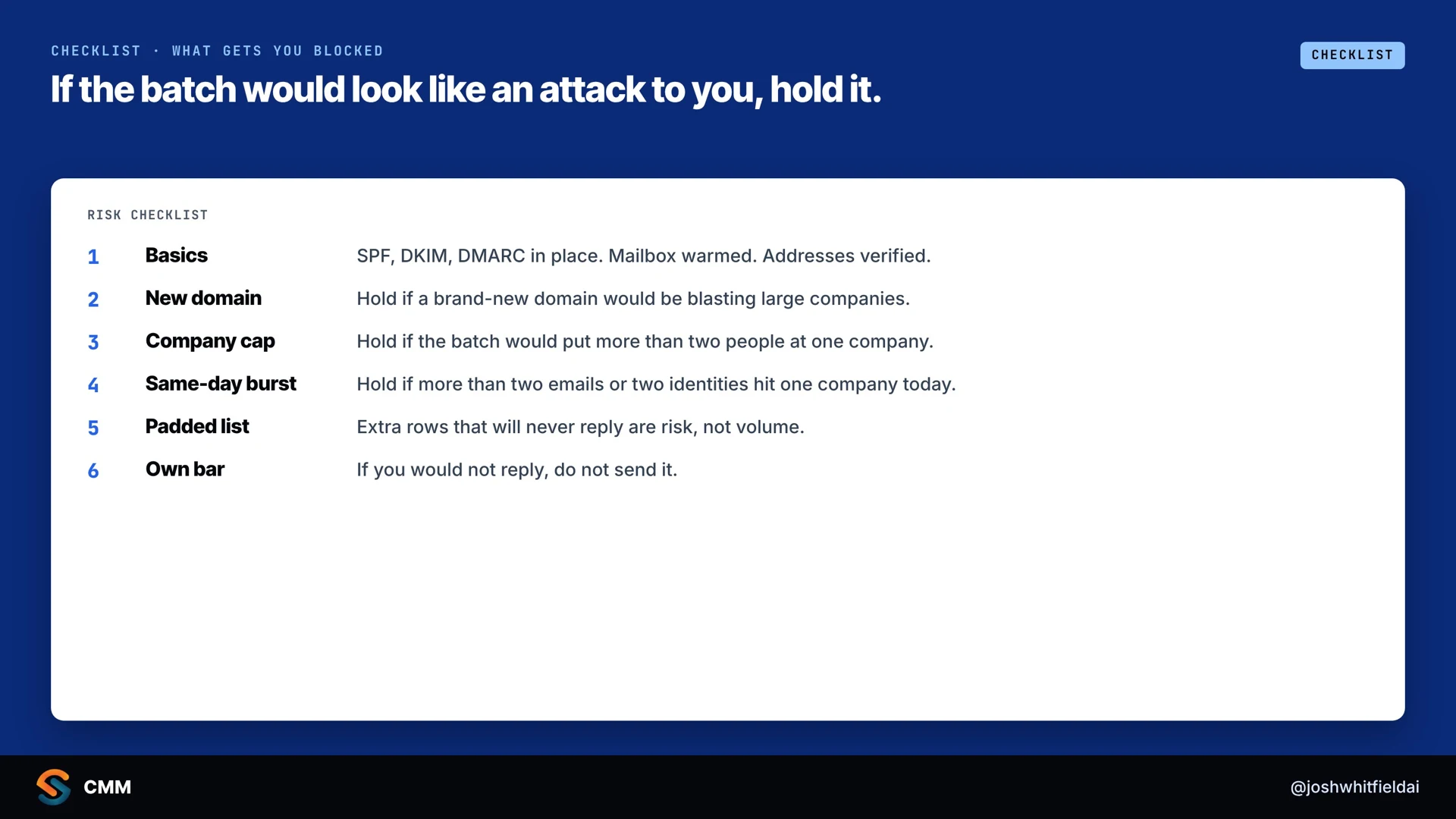
The risk checklist: what gets you blocked
Run this before a campaign starts, and run it again before any batch goes out. A yes on any "blocked by" line holds the batch. A missing answer is not a no, and it is not a yes. Missing goes to a human.
The 50 and the 16 are my example of the burst pattern, not targets to aim just under. If 20 messages from 8 identities would look like an attack to you, they will look like an attack to a gateway too. The written caps in the next sections are the daily habit. This checklist is the last look.
Rule: if the batch would look like an attack to you, it will look like an attack to a gateway. Hold it.
Per-company caps, written as exact rules
A cap is not a vibe. It is a number the workflow is allowed to enforce without asking anyone how they feel today.
These are the caps I run, taken from the same place as the stance. On the podcast I said to do it with relative logic: maybe one or two people at the company. Today's short version of that is the same idea. Here it is as rules.
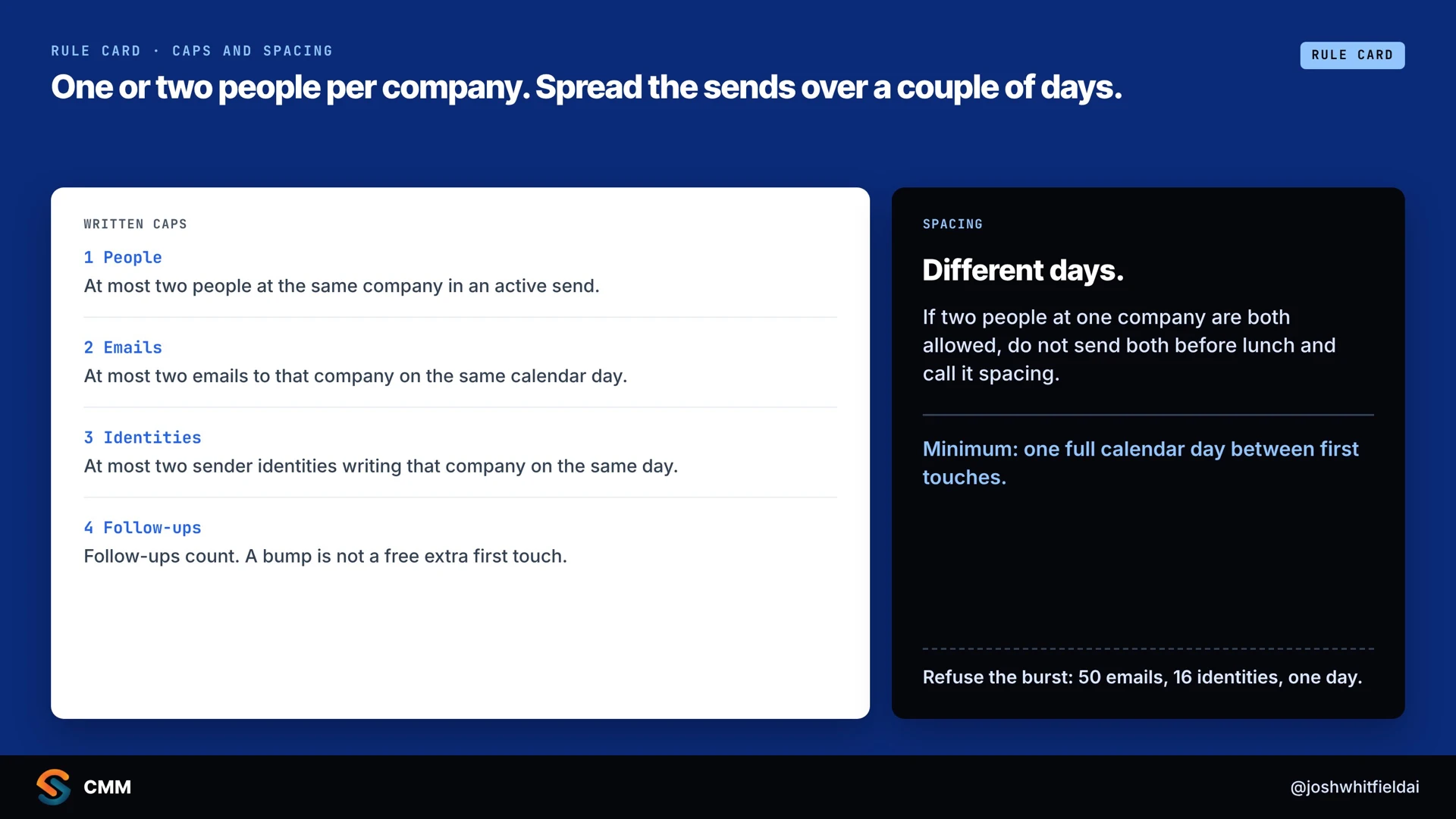
At most two people at the same company may be in an active send for this campaign. One is better when the company is large, high-stakes, or already being written by another motion.
At most two emails may land at the same company on the same calendar day, counting every sender identity you control.
At most two sender identities may write the same company on the same calendar day. A crowd of lookalike addresses is the 16-identity problem, even if each mailbox only sent once.
A company already reserved by another active campaign does not get a second motion piled on top until a human says so.
Follow-ups count. A follow-up to person A plus a first email to person B, at the same company on the same day, is two emails at that company. The cap does not reset because you called one of them a bump.
A specialist, an agent or a "quick extra persona" does not get to exceed the cap because the copy came out well. Extra output that breaks a cap fails even if the sentence is good.
If a request would break a cap, the workflow does not "do its best" and send whoever fits. It holds the extra rows and names the reason: cap:people, cap:emails_per_day, or cap:identities_per_day.
Rule: one or two people per company. Never a crowd, and never a crowd of you.
Spacing, written as exact rules
Caps without spacing still let you hit a company twice before lunch. Spacing is how two allowed people stop looking like one burst.
On the podcast I said to spread those sends out over a couple of days. That is the rule. The config later encodes it as a two-day window so a machine can enforce it. If you want a wider window for a higher-stakes list, widen it. Do not shrink it to "same morning, different hour" and pretend that is spacing.
If two people at the same company are both allowed under the cap, do not send both on the same day if you can send them on two different days.
The minimum space between first-touch emails to two people at the same company is one full calendar day. Same-day first touches need a human exception, not a default.
Follow-ups to the same person are part of that person's thread. They do not give you a free extra first touch to a second person on the same day.
A retry after a hold does not get to "catch up" by dumping the missed day and today into one send.
Timezones belong on the log. A timestamp without a timezone is how two logs disagree about whether two sends were the same day.
Spacing is also how you stay honest about volume. If the list only works when everyone is emailed today, the list is too big or the deadline is fake.
Rule: spread the allowed sends over a couple of days. Same-day bursts are a hold, not a flex.
Domain age and warmup
I am not going to invent a magic number of days and pretend a podcast said it. What I did say is the pattern that fails: you set up a domain, and the next day you blast a list of large companies. That does not make sense given how new the domain is. That is what attackers do.
Write the domain rules so a person can enforce them without guessing.
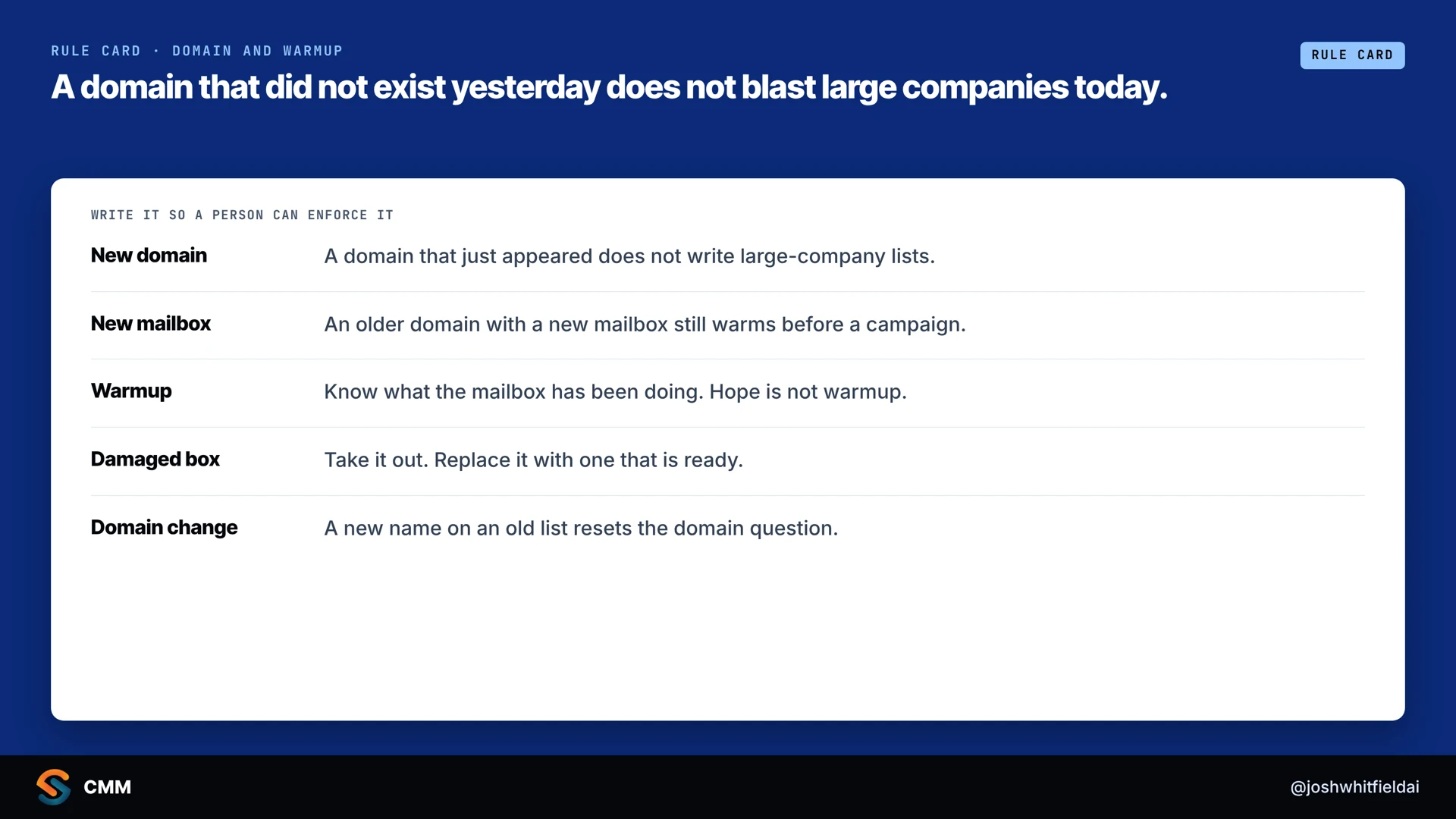
A domain that has just been created does not get to write large-company lists. Hold those rows until a human says the domain has earned the right to carry that risk.
A new mailbox on an older domain still warms before it carries a campaign. Domain age does not replace mailbox warmup.
Warmup is traffic that looks like a mailbox coming to life, not a silent progress bar you ignore until it turns green. If you do not know what the mailbox has been doing, you are not warmed. You are hopeful.
When a mailbox looks damaged, you take it out of the campaign and replace it with one that is ready. The Instantly case study on CMM's site describes swapping damaged mailboxes for pre-warmed ones so outreach does not have to stop. That is operations. It is not a reason to skip the hold.
Changing the domain under an active campaign resets the domain question. You do not inherit the old domain's history by pointing a new name at the same list.
If someone asks "how many days," the honest answer is: long enough that blasting a Fortune 500 list would not be the first thing this domain ever did. If you need a number in a config file, put one in, label it as your floor, and let a human override it upward for higher-stakes lists. Do not copy a blog's "14 days" and call it science.
Rule: a domain that did not exist yesterday does not blast large companies today.
A reply-first scoring rubric
Opens are a vanity metric. I said I empirically believe the number one way you are going to have success in cold email is to drive replies. Per CMM's Instantly case study, the public scoreboard is built that way: 7.35 million emails sent, a 4.76 percent reply rate, 22,000 opportunities and $49,882,371 in pipeline over 12 months, across 17,000+ mailboxes. That is not a reason to send more. It is a reason to measure the thing that matters.
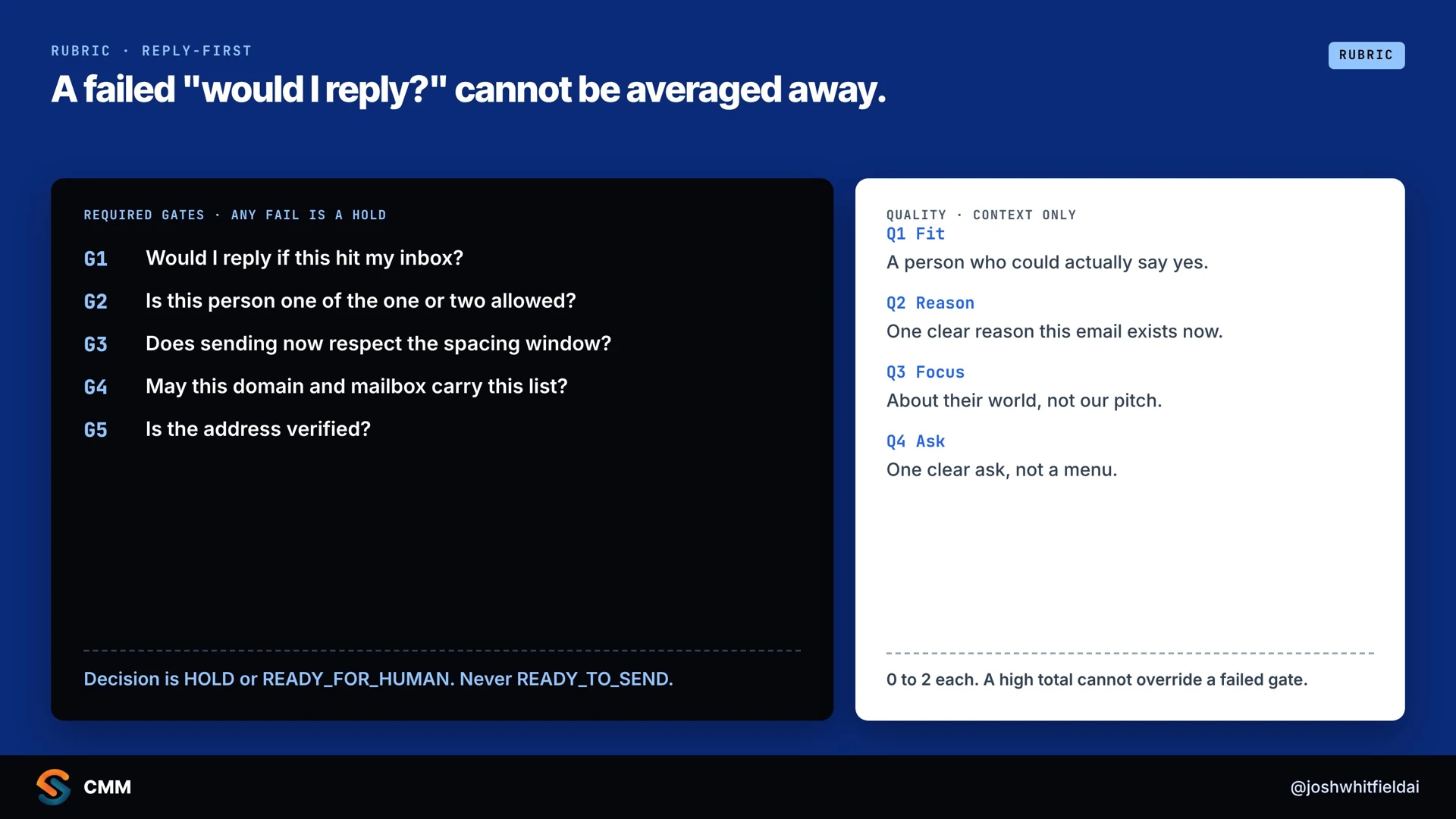
Score a draft against replies, not against how clever the first line sounds. The required gates below are binary. If any of them fail, the draft does not send. The quality rows are optional context for a human. They are not a way to average your way past a gate.
A high quality total with a failed G1 is still a hold. That is the whole point of passing your own bar. The agent can fill the rows. The agent's fill is context, not approval.
I can tell you what a reply-first campaign sounds like when people say no. If you have a good campaign, good targeting and good messaging, they say no thanks, not a good time, I don't have budget, hit me up in a few weeks. If you have a bad campaign, they say go to hell, leave me alone, how did you find me. The polite no is a signal you are close. The angry no is a signal the list or the message is the problem, and sending more of it will not fix the gateway.
Rule: score the draft on replies. A failed "would I reply?" cannot be averaged away.
Pass your own bar: the pre-send check
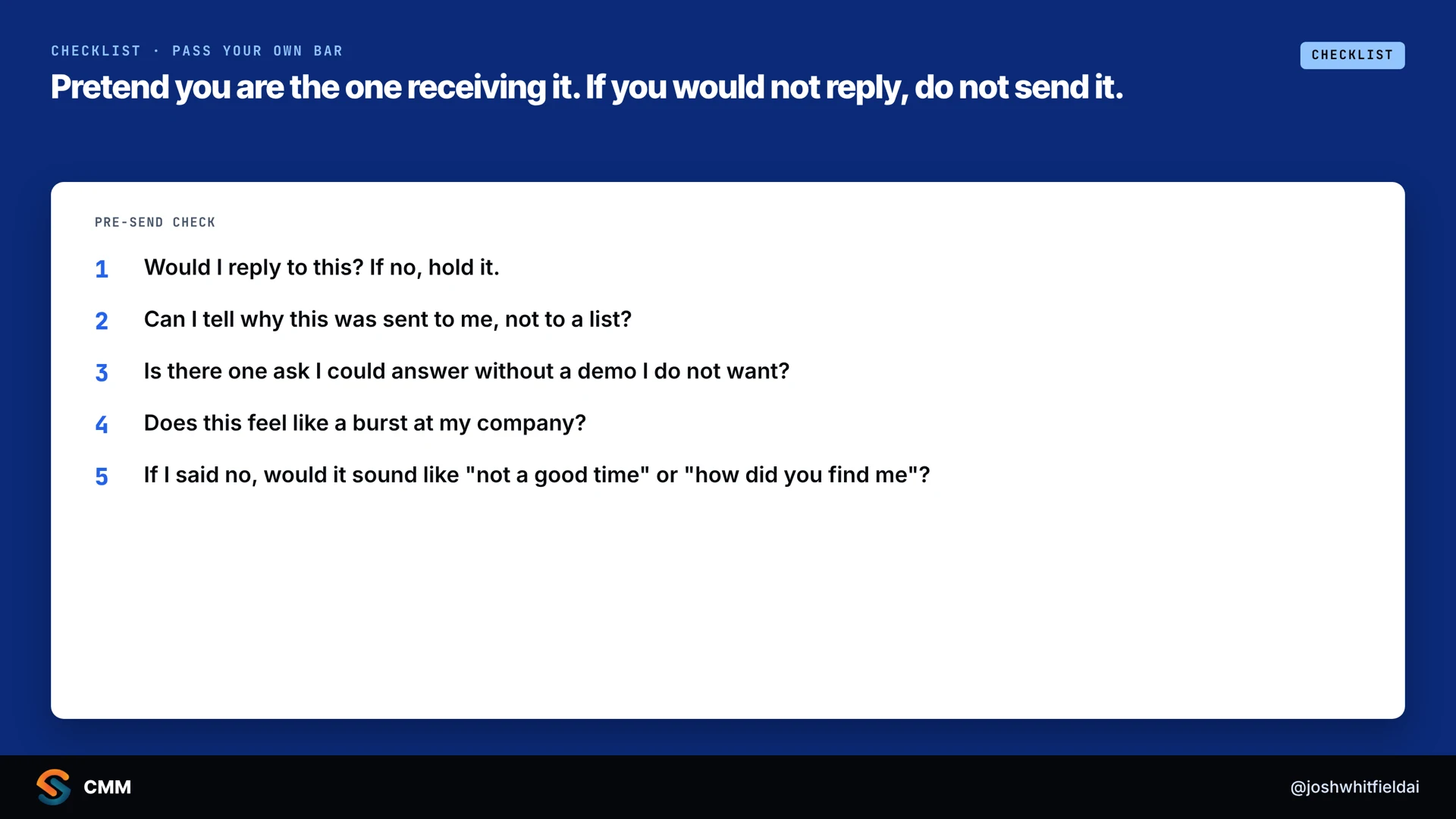
This is the check I teach first, before anyone launches a big personalized campaign. Read the emails. Pretend you are not the one sending them. Pretend you are the one receiving them. Ask yourself: would I really reply to that? If you cannot pass your own bar, then don't send it.
Put that in writing so it survives a busy afternoon.
Read a sample, not only the row you are proud of. If you cannot pass your own bar on the worst row in the sample, the batch is not ready. Agents can pre-sort so a person reads the worst ones first. The agent's sort is context. The human's verdict is the one that ships.
Rule: if you cannot pass your own bar, don't send it.
Copy-paste config for caps and spacing
Here is a config you can drop into a workflow, a checker, or a specialist handoff. The numbers that encode "one or two people" and "a couple of days" are taken from the rule set above. The 50 and the 16 sit in the file as the burst pattern to refuse, not as targets. If you change a number, change the schema version so later logs do not blend two different rule sets.
The same rules as a function, so you can test a proposed send before anything leaves:
Notice what the function never does. It never lets a good sentence override a cap. It never treats a same-day second first-touch as spacing. It never sends because the domain "should be fine." And it never returns SENT. ALLOW means the row may go to a human.
Rule: the workflow enforces the cap. A human still approves the send.
What always goes to a human
Humans get the questions where the answer depends on judgment, context or consequences.
The send itself. No specialist, no coordinator and no rubric marks sent.
Any override of a cap, a spacing hold, or a new-domain hold. If the rule is going to be broken, a person breaks it on purpose and writes down why.
"The rule is wrong." Maybe this motion should allow one person, not two. Maybe the window should be wider. That button is how the playbook improves.
Relationship-shaped companies. An existing client, a former client, a partner, a competitor of a client.
A sample that fails the "would I reply?" check, including when the rest of the batch looks fine.
Angry replies of the "how did you find me?" kind. That is not a copy tweak only. It is a list and risk review.
A mailbox that starts looking damaged. Taking it out is an operations call, not an agent's improvisation.
The reviewer gets a card, not a blank screen.
APPROVE_SEND is its own button, used by a human after they pass their own bar. Agents do the boring work so a human can make the campaign better.
Failure modes, with fixes
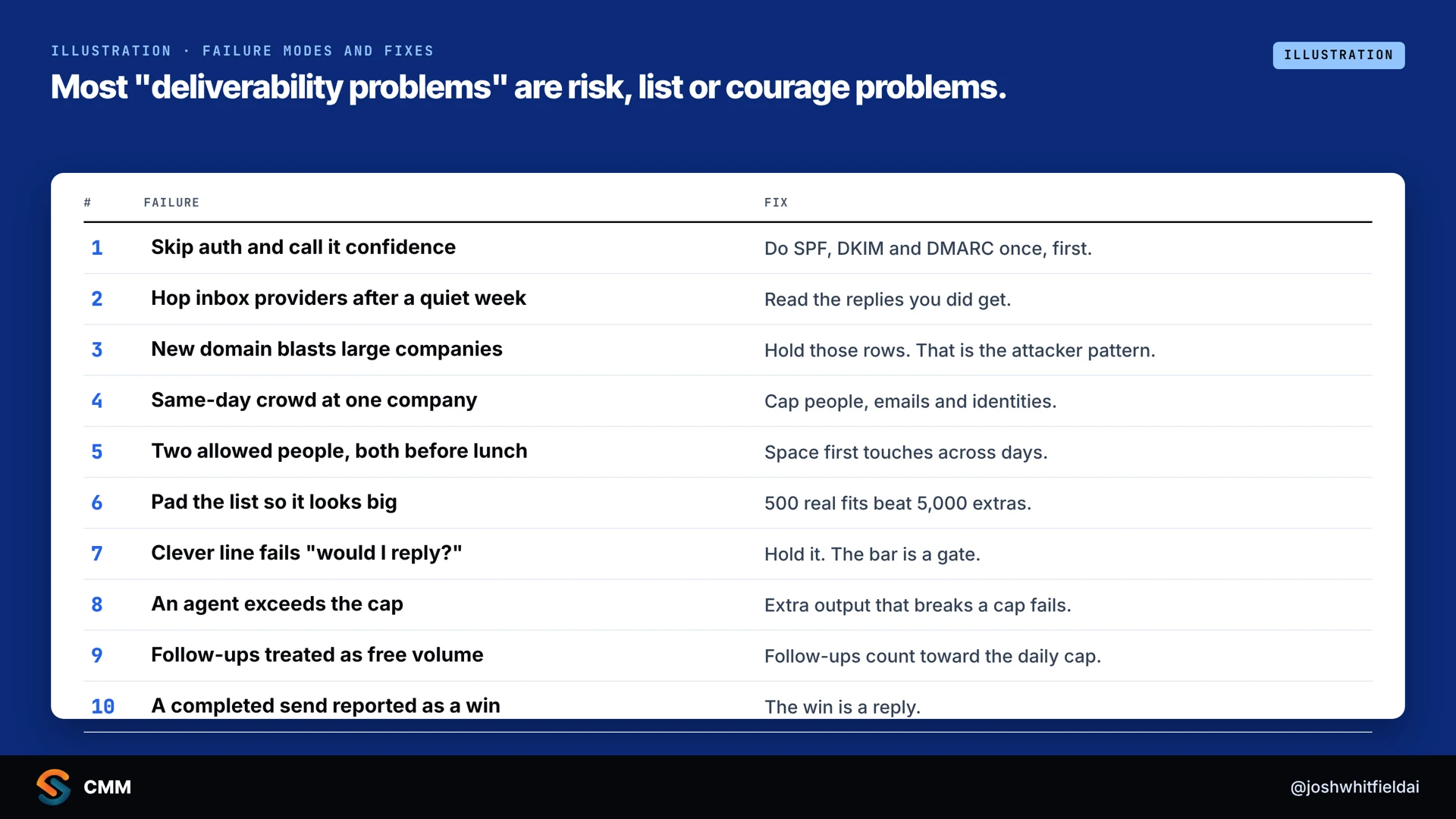
These are the ways a "deliverability problem" is usually a risk problem, a list problem or a courage problem. Each one has a written fix. The examples are patterns, not live incidents.
You skip authentication and call it confidence. Fix: the basics list. SPF, DKIM and DMARC are done once, before the first campaign email.
You hop inbox providers because last week's campaign did not earn replies. Fix: read the replies you did get. If they sound like "how did you find me," the list or the message is the issue, not the logo on the inbox.
A new domain blasts large companies on day one. Fix: the domain rule. Hold those rows. That pattern is what attackers use.
Many people at one company, same day, many sender identities. Fix: the caps. One or two people. At most two emails and two identities per company per day. Refuse the 50-from-16 burst pattern.
Two allowed people, both emailed before lunch. Fix: spacing. Spread first touches over a couple of days.
The list was padded so the campaign would look big. Fix: the 500-versus-5,000 rule. Extra rows that will never reply are risk, not volume.
A clever first line fails the "would I reply?" test. Fix: hold it. Passing your own bar is a gate, not a suggestion.
An agent exceeds a cap because the extra persona "fit too." Fix: extra output that breaks a cap fails verification even if the copy is good.
Follow-ups are treated as free extra volume. Fix: follow-ups count toward the company's daily email cap.
A completed send is reported as a win. Fix: the win is a reply. Completed is a process ending. Sent is not the same as earned.
Glossary
Basics: authentication, a real sending identity, warmup, verified addresses and a send log. Done once, then stopped as a topic of panic.
Risk: how your email looks to the receiving organization. A new domain blasting large companies, or a same-day burst from many versions of you, looks like an attack.
Security gateway: software that tries to keep an inbox safe. It matters to some extent. It is not the main thing to obsess over once the basics are done.
Per-company cap: at most one or two people at a company, with daily limits on emails and sender identities.
Spacing: putting the allowed sends on different days so they do not land as one burst.
Burst pattern: the example of 50 emails to one company on the same day from 16 sender identities. Refuse anything in that family.
Pass your own bar: reading the email as the recipient and asking whether you would reply. If you would not, don't send it.
Reply-first: scoring the work on replies, not on opens or on how complete the send log looks.
Polite no: "no thanks, not a good time, I don't have budget." A sign the campaign is close.
Angry no: "go to hell, how did you find me." A sign to review the list and the risk, not to add volume.
ALLOW: the workflow says the row respects the written rules. It is not a send.
HOLD: the row waits. Held is not done, and held is not sent.
Agent report: what a specialist claims about the batch. Context, never approval.
Clay workflows: where the companies, the caps, the log and the replies live. Not a second spreadsheet of "what we meant to send."
Start here: your first week
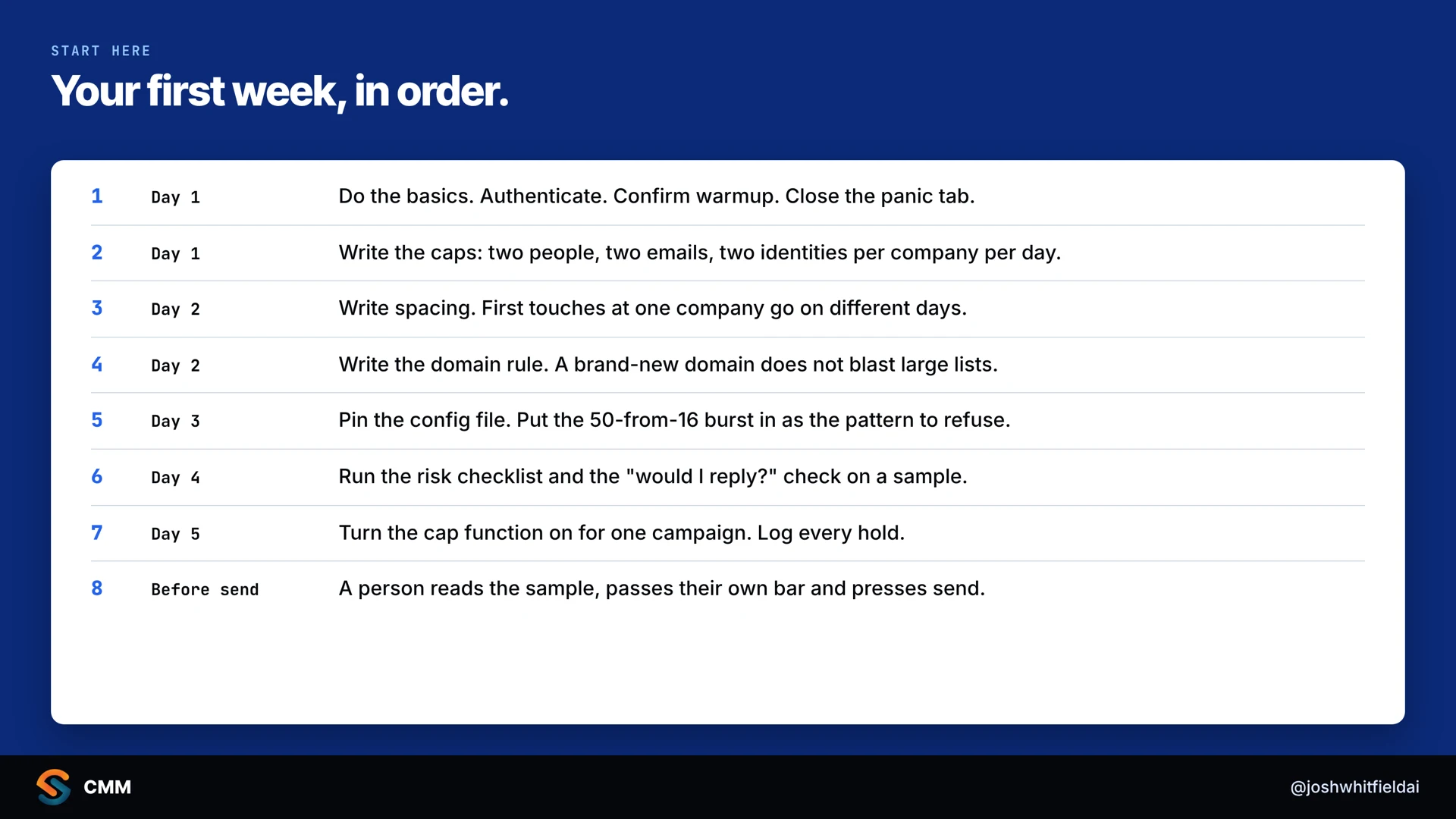
If you're starting from zero, do it in this order.
Day 1: do the basics. Authenticate the domain. Confirm warmup. Write down that you did both. Then close the tab on gateway panic.
Day 1: write the caps: at most two people per company, at most two emails and two sender identities per company per day.
Day 2: write the spacing rule. First touches at the same company go on different days. Follow-ups count.
Day 2: write the domain rule in plain language. A brand-new domain does not blast large-company lists.
Day 3: pin the config file. Add the schema version. Put the 50-from-16 burst in the file as the pattern to refuse.
Day 4: run the risk checklist and the "would I reply?" check on a small sample. Practice holding a clever email you would not answer.
Day 5: turn the cap function on for one campaign. Log every hold and every human override.
Before anything ships: a person reads the sample, passes their own bar and presses send themselves. A passed check is not a send.
Do that and you'll have something the panic crowd doesn't: a send that does not look like an attack, a cap you can enforce, and a bar you actually pass. The number you should care about after that is replies.
If you'd rather have this built and handed to your team, that's what we do at CMM. My DMs are open.
Article figures