Google Built an AI That Can't Write. Here's Why It's the Missing Piece in Outbound (Full Lab)
What did the Gemini Decisions API do well in outbound tests?
In CMM’s launch-day tests, Gemini classified 132 replies with 86% accuracy against 61% for CMM’s rules engine. It also caught all 64 fabricated personalization lines in the test set.
In this article
- 1. Why this is a big deal (and why nobody in outbound is talking about it yet)
- 2. What Google actually launched
- 3. How we tested it (copy this part)
- 4. Test 1: reply classification (the big one)
- 5. Test 2: the hallucination gate
- 6. Test 3: it can't write, but it can choose
- 7. Test 4: company fit, and who goes first
- 8. Test 5: SaaS homepage and pricing screenshots
- 9. Test 6: local business photos
- 10. Test 7: Meta Ad Library screenshots
- 11. Test 8: founder interviews on YouTube
- 12. Test 9: product demo videos
- 13. Test 10: PE and M&A screening from press releases and PDFs
- 14. Bonus: signals from 10-Ks, RFPs and case studies
- 15. What broke (the honest part)
- 16. The rules we're keeping
- 17. Where it's going in our stack, and where a human stays
- 18. Copy this in your first week
Google shipped an AI yesterday that can't write a single word. I spent the whole day with it and I'm honestly more excited about it than most of the models that can.
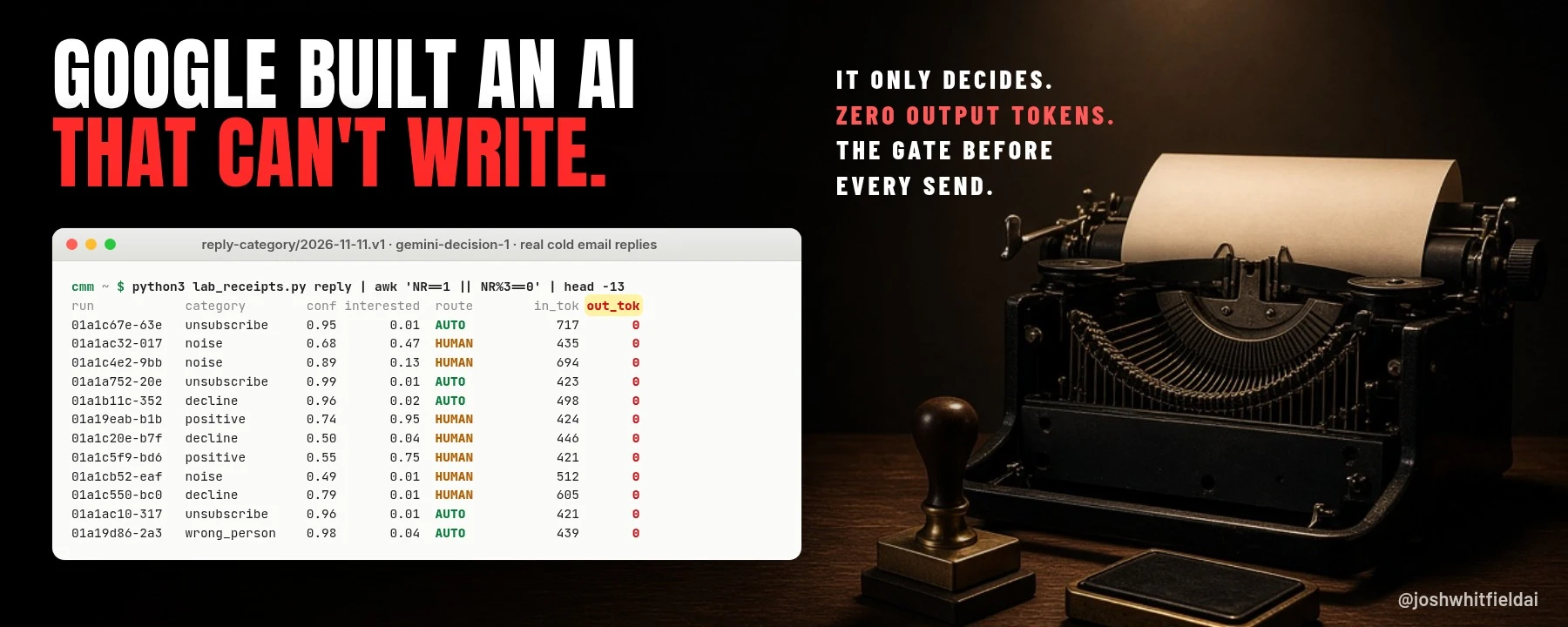
It's called the Gemini Decisions API, running on a new model called Gemini Decision 1. You give it one input and a list of questions. It answers every question with a probability and a confidence score. That's the whole product. No emails, no openers, no "here's a personalized line for you."
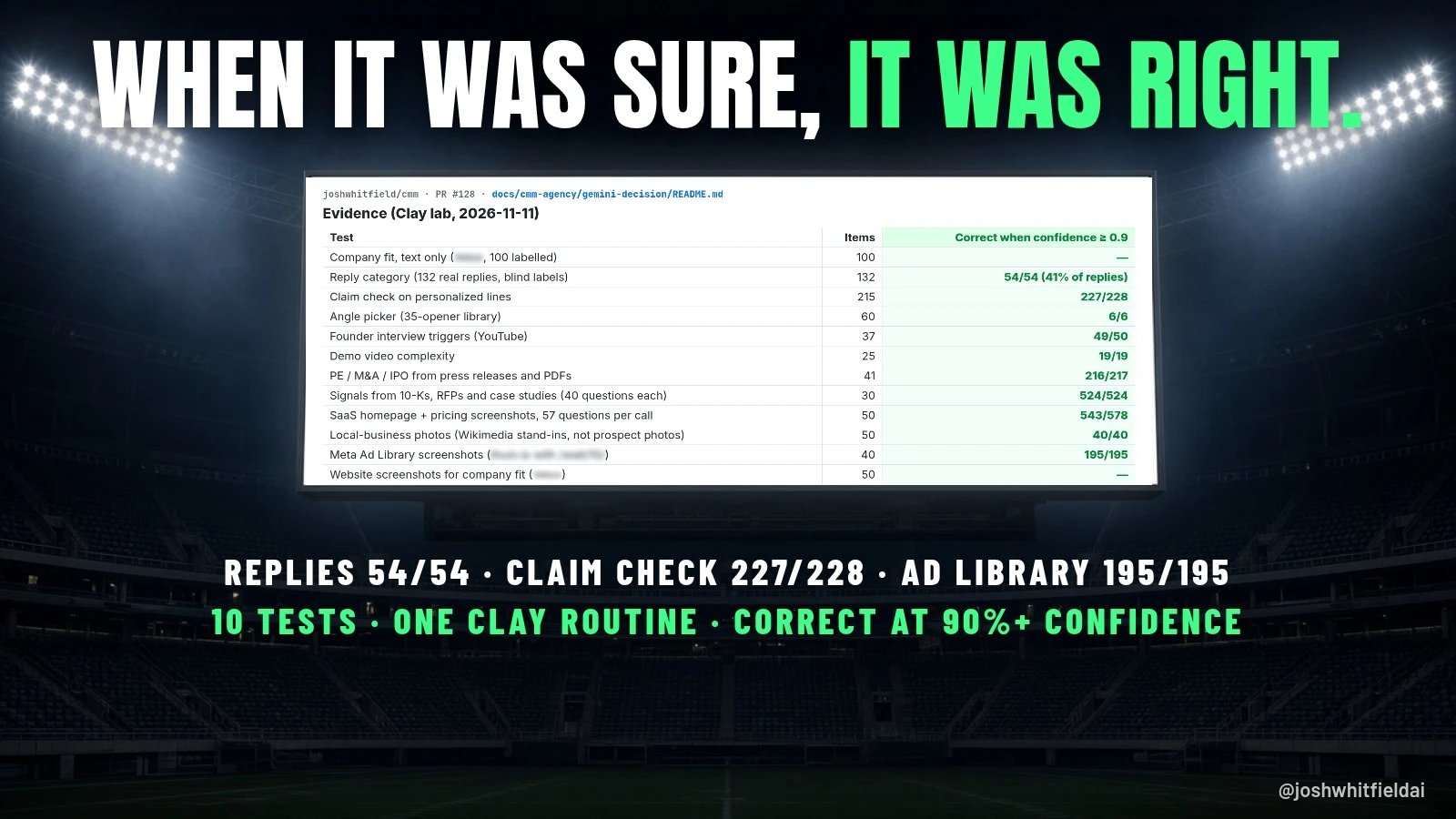
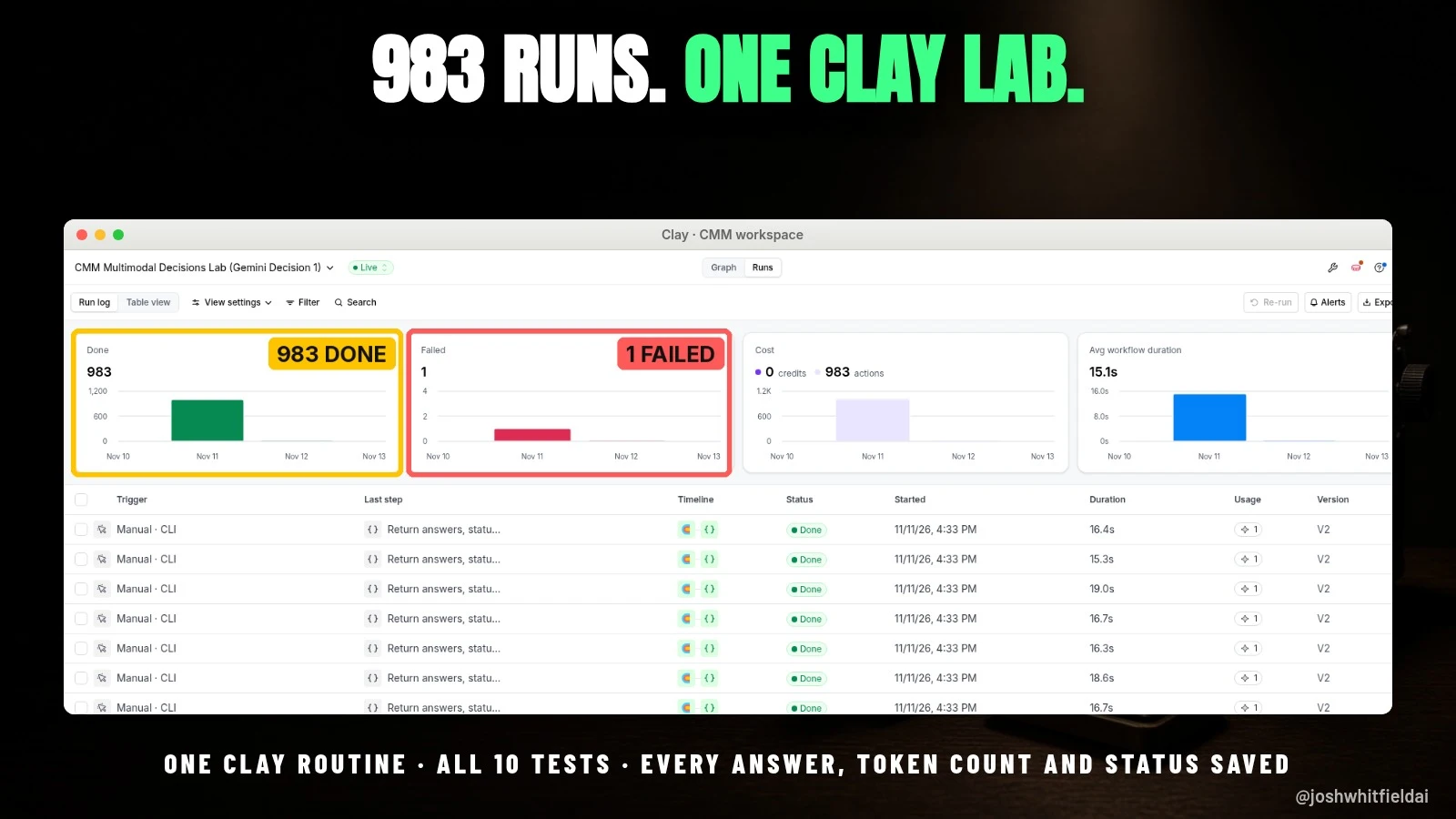
We ran it through 10 cold email tests on launch day. About 830 real items: text, screenshots, storefront photos, YouTube videos, press releases and PDFs. It sorted 132 real cold email replies at 86% when our own rules engine got 61%. It caught 64 out of 64 made-up personalization lines. And when it said it was 90% sure, it was basically never wrong.
Claude Code built the harness and wrote every result into our repo. Clay ran every single bulk job. We use Claude Code WITH Clay, never instead of it, and that's the only reason I trust these numbers enough to post them.
Here's everything. What it is, why it matters for outbound, every test, what broke, and exactly how we're rolling it out with a human still on the send button.
1. Why this is a big deal (and why nobody in outbound is talking about it yet)
Look, most of outbound isn't writing. Everybody's obsessed with the copy because that's the part you can screenshot. But a real campaign is hundreds of tiny judgment calls per lead before anybody types a word.
1) Is this company actually a fit?
2) Did it just get bought?
3) Is this personalized line true?
4) Is this reply interested, a referral, or an out of office?
5) Which approved opener fits this lead?
Right now teams answer those one of two ways. Brittle keyword rules that miss half of what humans actually say. Or a big writing model, asked to "respond with yes or no", that sometimes writes a paragraph anyway, costs you output tokens, and gives you a different answer when you run it again.
Google's docs say it better than I can: "Generative models produce text for people to read. When your code needs a judgment to branch on, generating and parsing text adds latency and brittle parsing logic."
That's the missing piece. Every gate in our stack is a yes/no question. Fit gate. Claim gate. Deal gate. Reply gate. We've been building those gates for two years out of rules, review queues and expensive models that were never designed to just decide. Now there's a model that only decides, tells you how sure it is, and costs almost nothing to ask.
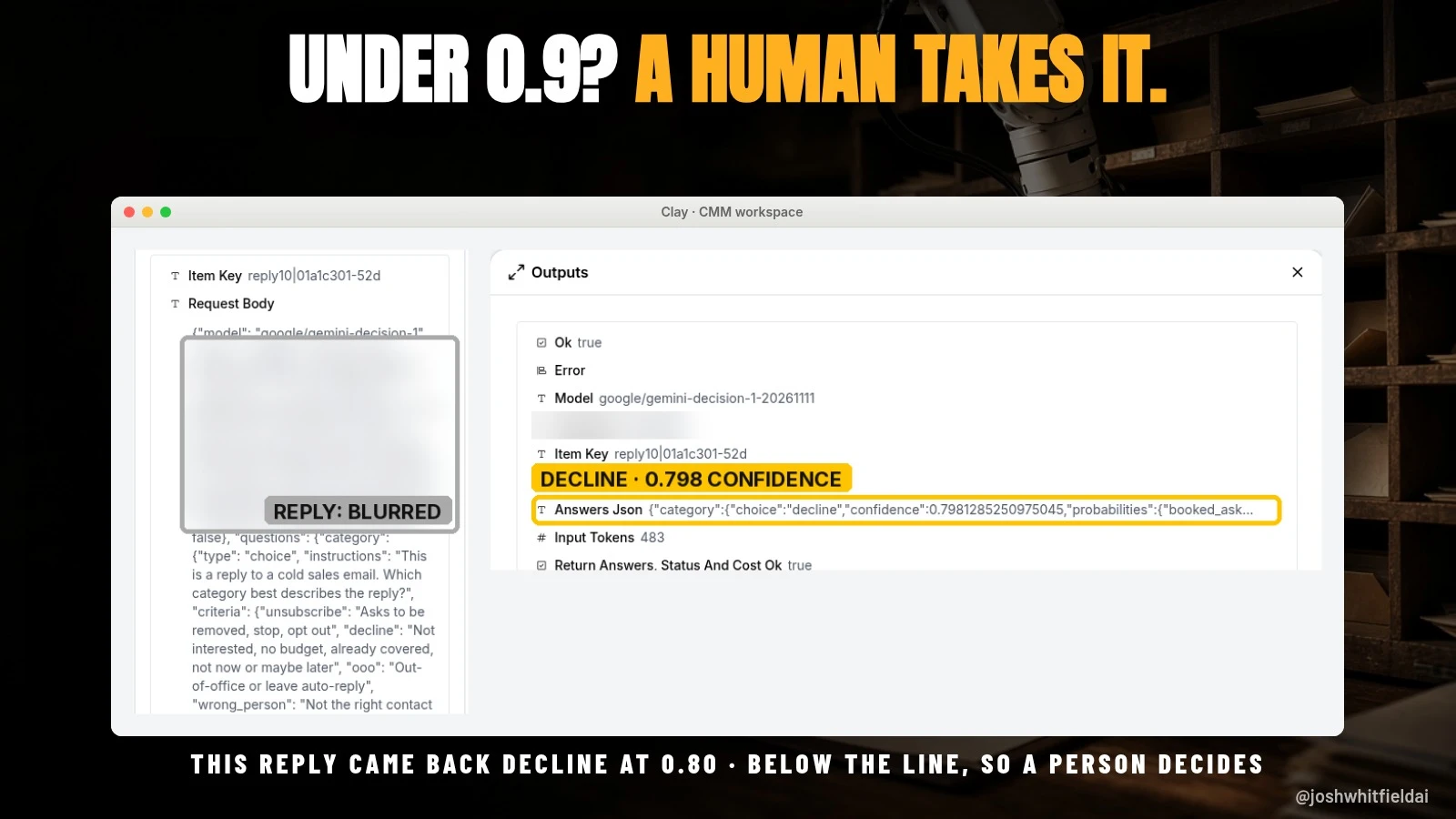
And the confidence score is the part that gets me. Google built it so "your code can route ambiguous cases to a fallback or human reviewer." That's literally how we run CMM. The agent handles what it's sure about. A person handles the rest. Now the model hands you the line to draw.
2. What Google actually launched
Straight from Google's launch post and docs, Nov 11 2026:
1) Three question types. Yes/no (they call it noul) returns the probability the answer is yes. Choice picks one of 2 to 255 options and gives a probability for every option. Score grades the input on a rubric you write, levels starting at 0.
2) Up to 1,000 questions per request, all against one shared input. Google: "Questions can't see each other, and latency stays nearly flat when you ask multiple questions."
3) Any media in one pass. Text, images, audio, video and PDFs, up to 256K tokens. Their example pairs "a call recording with account metadata."
4) Confidence on every answer, from 0 to 1, so your code decides whether to act or escalate.
5) Fast. Google says 150 to 250 ms end to end, because it "scores your candidate options in a single forward pass" instead of writing token by token.
6) Billing on input only. "Zero output tokens billed." The shared input counts once per request no matter how many questions you ask. Google puts it at nearly 5x cheaper than Gemini 3.5 Flash-Lite across their benchmark suite.
7) Calibrated. Google says it leads their benchmark suite "with the lowest calibration error." Calibrated means when it says 90%, it's right about 90% of the time. That's the claim we wanted to check.
8) Where it lives. Gemini API in Google AI Studio, plus integrations rolling out across OpenRouter, LangChain, Vercel, LiteLLM and others.
The use cases Google named are all control plane stuff: routing queries to the right model tier in Gemini Notebook (up to 40% lower latency), picking an emoji from 200+ options in CC, and a safety layer for MCP tools in Search. Notice none of them are sales. That's the opening.
3. How we tested it (copy this part)
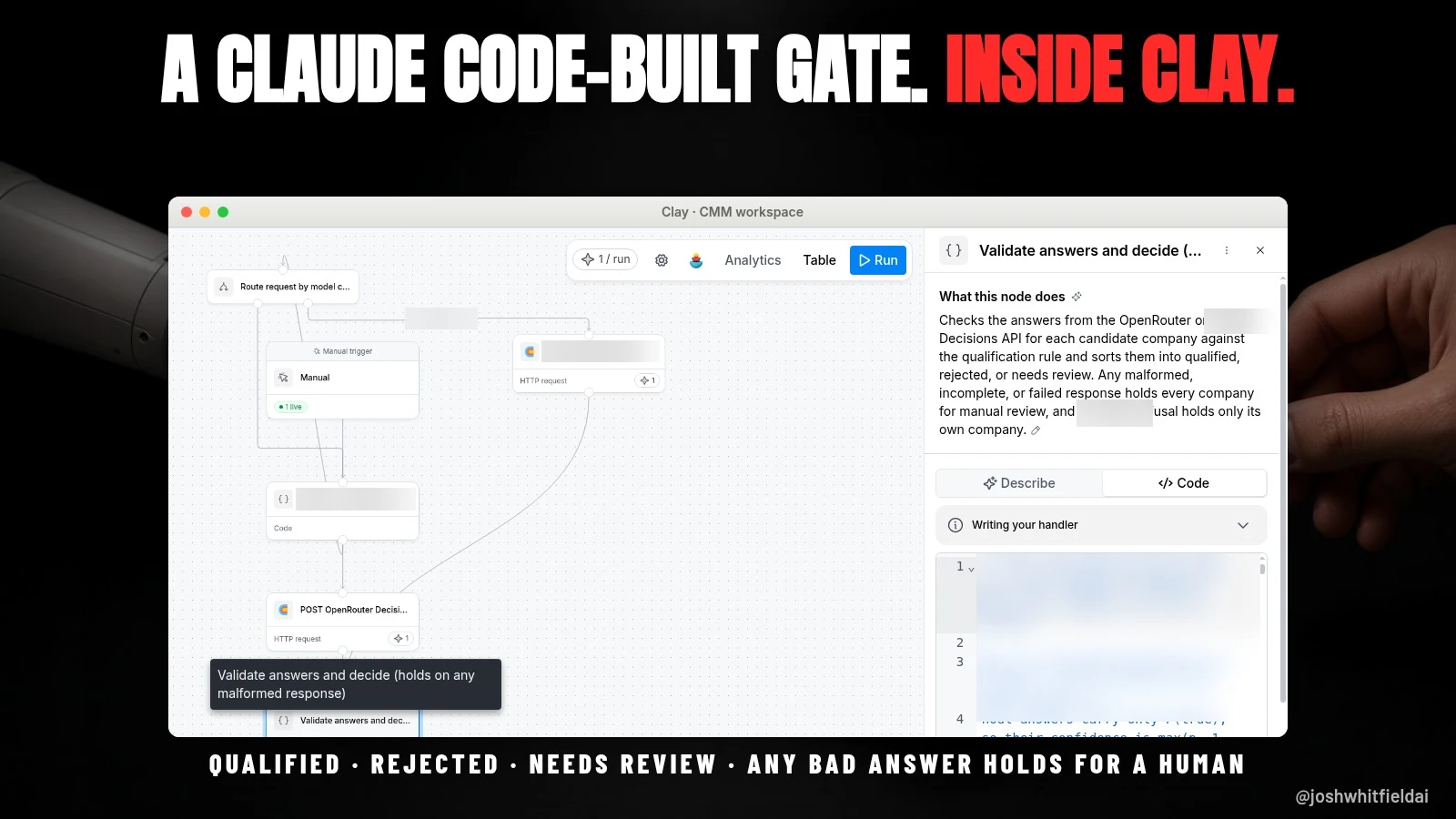
1) One Clay workflow for everything. It takes any request, posts it to OpenRouter, and saves the answers, the cost and the token count. Every test ran through it as a bulk job. Ten tests, one routine.
2) Answer keys first. Built before any model output existed. Reviewer labels, blind labels, or how the item was built, like lines we falsified on purpose. Google's docs say the same thing: "Set thresholds using labeled examples from your own traffic." If you grade after you see the answers, you're grading yourself.
3) Two scores every time. Overall accuracy, then accuracy only where the model was at least 90% sure. The second number decides what you can automate.
4) Privacy before anything leaves. We stripped emails, names, phones, signatures and quoted threads. Company names and public videos are fine. People's data isn't.
5) Every question set is versioned in Git. Claude Code wrote six of them as JSON files, like reply-category/2026-11-11.v1. Change a question, it's a new version. Boring, and it's the reason the numbers mean anything.
One more thing we checked: determinism. We re-ran identical requests and got identical probabilities every time. Same input, same answer. When a client asks why a lead got dropped, you can show them.
4. Test 1: reply classification (the big one)
What we fed it: 132 real cold email replies, cleaned of names, emails, links and signatures, blind-labelled into 11 categories.
The real question we asked: "This is a reply to a cold sales email. Which category best describes the reply?" Options included unsubscribe, decline ("Not interested, no budget, already covered, not now or maybe later"), ooo, wrong_person, referral, positive, question, booked_ask, pitch ("Pitches their own product or service back to us"), confusion ("who are you, what is this") and noise. Plus one yes/no: "Does the person show any openness to a conversation or to receiving more information?"
What came back:
1) 114 of 132 right (86%). Our rules engine: 81 (61%).
2) On replies with a clear answer: 83 of 86.
3) At 90%+ confidence: 54 of 54. That covered 41% of all replies.
4) It resolved 11 of the 18 replies our rules had punted to review.
What it means: this is Google's calibration claim showing up in our own data. When it was sure, it was right. Every time. So the confident 41% can route itself and the rest goes to a person.
What didn't work: we also asked whether a reply "needs a human." It got 95 of 132. Not good enough, so it doesn't get that job. The model sorts. A human answers anything that matters, in Slack, same as today.
5. Test 2: the hallucination gate
This is the one I'd steal first.
What we fed it: 215 AI-written first lines, each with the company facts and homepage screenshot it was supposedly based on. Some true, some with a fact we made up, some naming the wrong company.
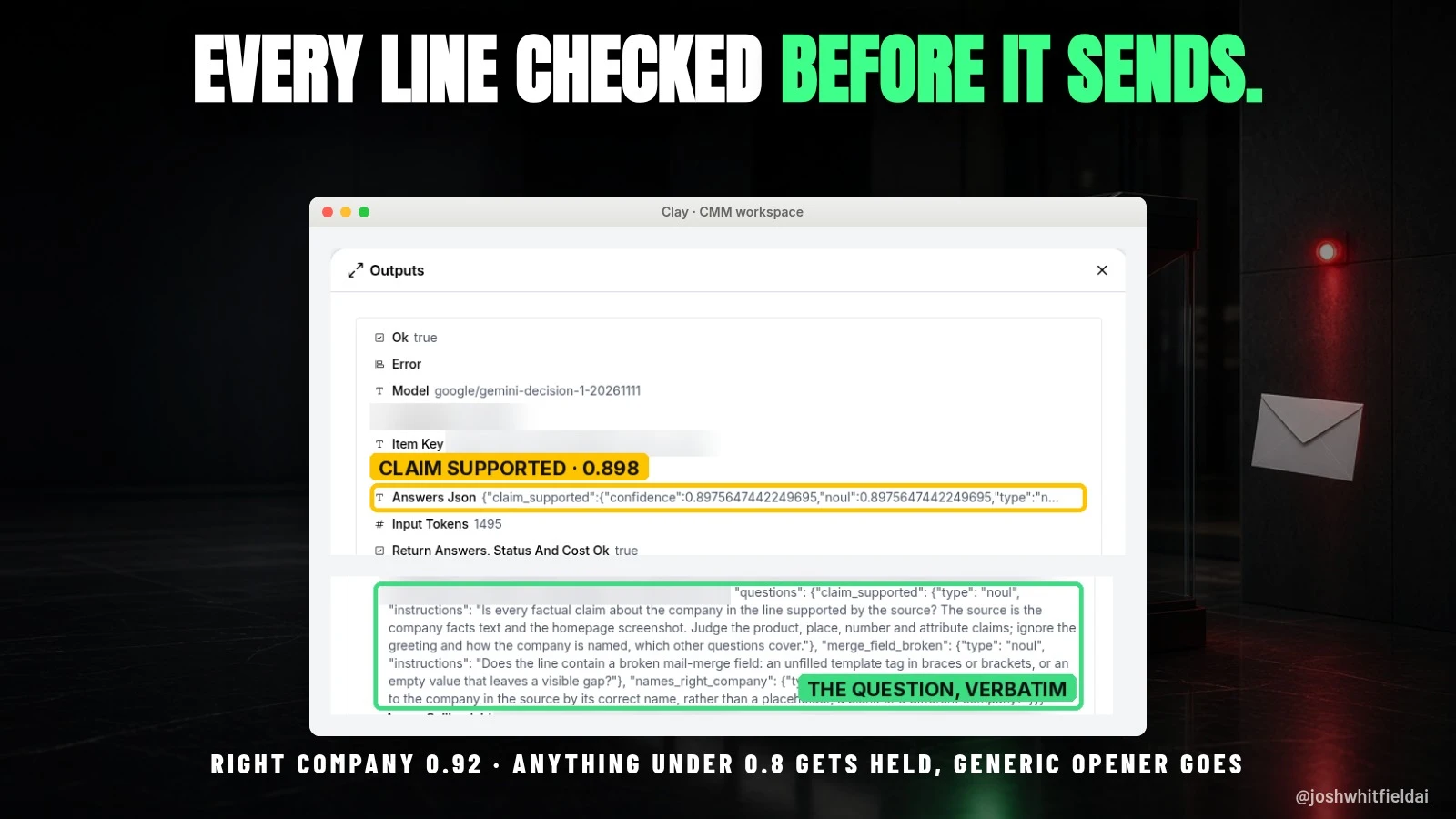
The real question we asked: "Is every factual claim about the company in the line supported by the source? ... Judge the product, place, number and attribute claims." Plus "Does the line refer to the company in the source by its correct name, rather than a placeholder, a blank or a different company?"
What came back:
1) Made-up claims caught: 64 of 64.
2) True lines passed: 50 of 50.
3) Wrong company caught: 50 of 50.
4) At 90%+ confidence: 227 of 228.
What didn't work: broken merge fields like {{first_name}}. 145 of 214. A regex catches that perfectly, so a regex does that job. Don't use AI for what code does better.
How it runs now: any line under 0.8 on either question gets held. A held line falls back to the generic opener, the lead still goes. And it doesn't replace our copy grading. One checks facts, the other checks quality. Both run.
Think about what that means. Everybody's racing to AI-personalize every email, and almost nobody checks if the line is true before it goes out under your client's domain. Now the check costs almost nothing and takes a fraction of a second.
6. Test 3: it can't write, but it can choose
What we fed it: 60 leads and a library of 35 openers a human already approved. One choice question: which opener fits this lead best?
What came back: 54 of 60 picks were acceptable. 6 of 6 right at 90%+.
Why I love this one: the model never writes anything new. So there's nothing to hallucinate. Human-written library, machine picker. We only use the pick at 0.7 or higher, otherwise the default opener goes. Talk like a human, at scale, without letting a robot freestyle.
7. Test 4: company fit, and who goes first
What we fed it: 100 real companies, hand-labelled fit or not fit for a real ICP, each with a short homepage description.
What came back:
1) Gemini Decision 1: 91 right, 7 wrong, 2 unsure.
2) A web-searching decision API: 89 right, 9 wrong, 2 unsure.
3) An older specialised model: 82 right, 12 wrong, 6 unsure.
At the threshold we actually deploy, 0.65, Gemini was 86 right, 3 wrong, 11 held. The web-search route was 89 right, 9 wrong, 2 held. So Gemini makes fewer mistakes when it decides, it's about 13 times cheaper, and it gives the same answer every run. The web-search model is better on companies with thin or missing descriptions because it goes and looks.
So the build order is cheapest first:
1) Deterministic rules, everyone.
2) A free homepage pull for anyone without a description.
3) Gemini on everything with a description.
4) The web-search model only for what Gemini holds.
5) A human for whatever is still held.
Claude Code put this into our qualification runner with three new tests, 40 of 40 passing. It sends one company per request, every answer lands as qualified, rejected or needs_review, and it flat out refuses any threshold under 0.65. The routine is versioned in Clay, this is version 5, and new batches are still held for approval before anything moves.
8. Test 5: SaaS homepage and pricing screenshots
What we fed it: 50 companies, two screenshots each, 57 questions in one call. B2B or B2C, category, self-serve or sales-led, outbound fit, contact-sales button, and more.
What came back: 1,125 of 1,400 labels right (80%), and 543 of 578 when confident (94%). B2B vs B2C 47 of 50. Category 49 of 50. Outbound fit 50 of 50. Self-serve 9 of 9.
What didn't work: case studies 6 of 42, integrations 13 of 32. Not the model's fault. That stuff lives below the fold and the screenshot only sees the top 1,000 pixels. Ask page-wide questions of the page text.
This is where "questions can't see each other" matters. 57 questions, one screenshot, paid once, and question 40 doesn't get confused by question 3.
9. Test 6: local business photos
What we fed it: 50 storefront and street photos (openly licensed stand-ins, not prospect photos). Real questions: Is there a fleet of vehicles? A storefront? A parking lot? Is the roof visible? What condition is the property in?
What came back: 625 of 648 right (96%), 40 of 40 when confident. Fleet vehicles 48 of 48. Storefront 45 of 46. Parking lot 44 of 45. Roof visible 31 of 33.
What didn't work: storefront condition, 19 of 25. "Condition" is a judgment, and judgments are harder than "is there a truck."
Roofing, fleet, signage, landscaping offers can now qualify, and open, on what the building actually looks like. Real prospects need Google Maps imagery, that's the next piece of plumbing.
10. Test 7: Meta Ad Library screenshots
What we fed it: 40 brands, a screenshot of each brand's Ad Library page. Are they running ads? How many? What kind of offer? Should the pitch be "you're already spending" or "you're not spending yet"?
What came back: 386 of 398 right (97%), 195 of 195 when confident. Running ads 39 of 40. Ad count band 40 of 40. Offer type 38 of 39. Paid angle routing 36 of 40.
What didn't work at first: the Ad Library page needs about 10 seconds to render. Screenshot it too early and you're grading a loading spinner.
11. Test 8: founder interviews on YouTube
What we fed it: 37 founder podcast and interview videos. The real question for one trigger: "Does the founder/CEO describe their own company struggling to hire, recruit or retain people, or urgently needing to hire or build out a team? Generic hiring advice with no own-company struggle or need does not count."
What came back: 287 of 333 labels right, and only 3 false alarms in 333. Funding 36 of 37. AI adoption 34 of 37. Sales challenges 34 of 37.
What didn't work: hiring pain, caught 1 time in 13. It's precise, not thorough. When it says yes, believe it. When it says no, it might just have missed it.
Note: through OpenRouter, the YouTube links went straight in for us. Google's own docs say their direct Decisions API doesn't take YouTube URLs, so check your route before you build on it.
12. Test 9: product demo videos
What we fed it: 25 demo videos. The real question: "How complex is it for a new customer to get started with the software shown in this product demo or walkthrough?" Scored 0 ("Self-serve: a user is productive within minutes") to 4 ("Needs an implementation partner or consultants").
What came back: simple tools averaged 0.66, complex platforms 2.65. One cut line at 1.75 got 23 of 25 right, and 19 of 19 when confident.
So you know whether to lead with "set up in a day" or "we'll run the rollout" before you write a word.
13. Test 10: PE and M&A screening from press releases and PDFs
What we fed it: 41 press releases and deal documents, with today's date in the input. The real question: "Was the subject company acquired, or did it sign a definitive agreement to be acquired or have a controlling (majority) stake bought ... within the last 24 months? ... The company acquiring someone else does not count."
What came back: 237 of 243 labels right. Deal type 41 of 41. 216 of 217 when confident.
Drop the companies that just got bought before you pay to find contacts at them. Simple, and it saves a stupid amount of wasted enrichment.
14. Bonus: signals from 10-Ks, RFPs and case studies
What we fed it: 30 public documents, 40 questions each. Real ones: "Is the named organisation implementing, replacing, consolidating or procuring an ERP or CRM system?" "Does the document describe a recent change of CEO or CFO?" "If this is a procurement solicitation, is the response deadline between today and 30 days from today?"
What came back: 563 of 568 right. 524 of 524 when confident.
40 questions, one PDF, input paid once. That's the batching thing in real life.
15. What broke (the honest part)
I broke more stuff than you'd think on launch day. Every single break was plumbing, not the model.
1) PDF links had to end in .pdf. Download-style links got rejected.
2) Very large or unusual PDFs threw errors. Keep them under about 15 MB.
3) Screenshot services failed about 10% of the time or hit bot walls. Add a "did the page load?" question to every screenshot call.
4) JavaScript-heavy pages need a render wait.
5) Long videos get close to the token limit. Our interviews averaged about 106K tokens. Keep clips under 40 minutes.
6) Screenshots only see what's above the crop.
7) Merge fields: regex. Said it twice now.
Input plumbing mattered more than prompts. That's GTM in general to be fair.
16. The rules we're keeping
1) Confidence is the product. Above 90% it was near perfect in almost every test. Automate above the line, send the rest to a human or a fallback.
2) Trust a yes, never trust a no. Never write "they're not hiring" because the model didn't find hiring.
3) Batch your questions. Ask 40 questions of one PDF, not one question 40 times.
4) Give every choice question a way out ("none", "noise", "other"). Google's docs warn choice questions "always distribute probability across your options, even when none fits."
5) It pairs with writers. A writer or a human library, plus Gemini Decision 1 as the gate and the picker.
6) Version every question set. One receipt per request: model, cost, tokens, answers.
7) No personal data in the request. Ever.
17. Where it's going in our stack, and where a human stays
Here's where I'm the annoying one in the room. One great test day doesn't earn a model the right to touch live sends. Google's own docs say to "treat input as untrusted" and "keep a human or a second check on high-stakes actions." A cold email reply from a real buyer is a high-stakes action.
1) Campaign builds: company fit first pass, the claim check on every personalized line before enrollment, the PE/M&A disqualifier, the opener picker. Code and tests are in, the routine is versioned in Clay, and new batches are held for approval.
2) Reply engine: shadow mode first. It logs its answer next to the rules for 200+ replies before it changes a single category, label, draft or send. Even after that, unsubscribes and out of offices stay on the rules, and a model "decline" becomes a draft for a human, not an auto-send.
3) Pre-call research: it reads the prospect's interviews, demos, press releases and filings. Only answers at 90%+ reach the workbook, never phrased as "they don't have X". Report only for the first 3 packs.
4) Signals: one call per account across homepage, screenshot, ad library and PDFs, returning a score and one verified personalization fact. Next build.
Suppression, verification, caps and send gates don't change. Clay still holds every new batch for approval.
That's complex GTM end to end. Not one magic agent running wild. A cheap gate at every step, a receipt for every decision, and a person on the stuff that matters. The pure autonomy crowd can keep letting agents freestyle into their clients' inboxes. Good luck.
18. Copy this in your first week
1) Pick one judgment call you make all day. Reply category is the easiest.
2) Pull 100+ real examples and label them before you run anything.
3) Wire one Clay workflow that posts to the Decisions API and saves the answers, cost and tokens.
4) Score it overall and at 90%+. Only the second number earns automation.
5) Run it in shadow next to what you use today. Change nothing for a couple hundred items.
6) Then let it act above the line, and route everything below it to a person.
Google built an AI that can't write, and it made our writers safer. Now it's time to wire it into every gate we've got. I believe in receipts:)
Article figures