GTM Is a Science: How We Decide Who Gets Emailed, Who Gets a Human, and Who Gets Dropped
Which outbound leads should go to a human for review?
CMM routes each company to outreach, human review or rejection. Fixed rules run first, and a hand-checked confidence threshold determines which model decisions can proceed.
In this article
- Why two outcomes fail
- The three outcomes, in exact rules
- Rules before models
- Writing yes/no questions for agents
- What goes to a human
- The decision schema
- The routing formulas
- Choosing your confidence floor
- Log every verdict
- Lower bounds, not totals
- Name the state honestly
- Pass your own bar before send
- What this costs you
- Glossary
- Start here: your first week
Keep telling me GTM isn't a science, and that you can solve it all with a cheap CLI provider and a prompt. I'll keep writing the decision rules down.
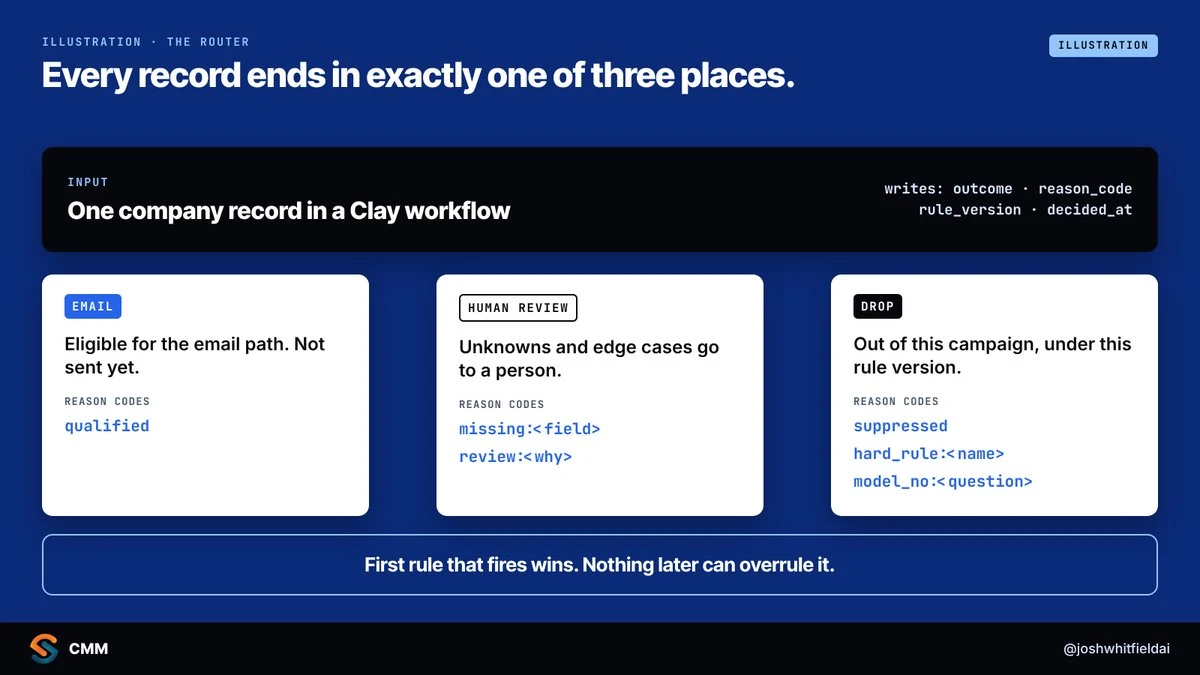
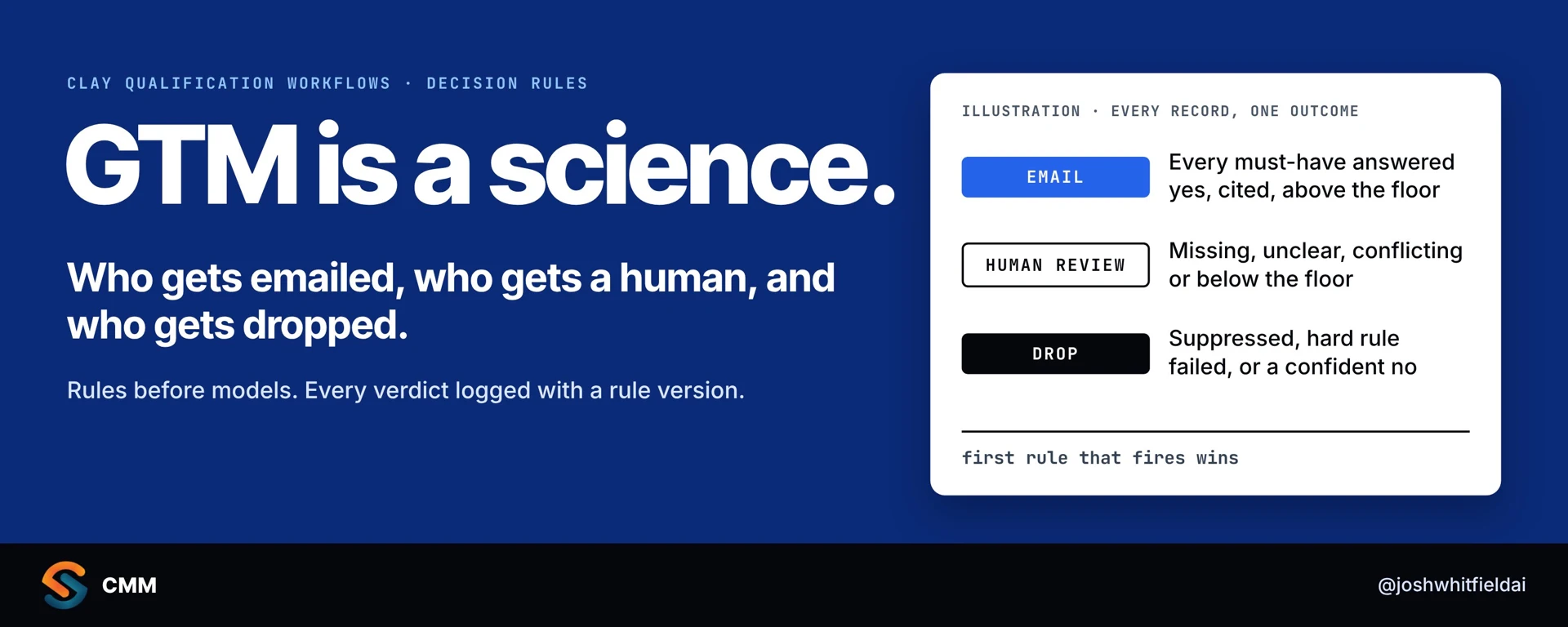
Every company that comes through one of our Clay workflows ends up in exactly one of three places. It gets emailed. It goes to a human. Or it gets dropped. Not "maybe." Not "the agent thought it looked good." One of three, with a written reason, a timestamp and the version of the rule that put it there.
That's what I mean by science. Not lab coats. A hypothesis about who should hear from you, a rule that tests it, a log you can read back, and a hand-check that tells you when the rule is wrong.
This Article is the method. The routing rules, the questions we let agents answer, the ones we never let them answer, a decision schema you can copy, the formulas, and a template for picking your own confidence floor.
If you want the story of how this ran at scale, that's in the Nov 7 Article on judging 15,000+ companies: 15,000+ Companies Judged in Clay: Jev, Decisions API and Parallel Decisions.
If you want the inventory side, counting what you own before you source anything, that's the Nov 8 Article: Count What You Own First: How We Built 155,833 Leads in Clay in One Week.
This one is the decision layer in between, written so you can rebuild it.
Clay is the backbone. The records, the verdicts and the logs live in Clay workflows. Agents feed it answers. They don't replace it.
Why two outcomes fail
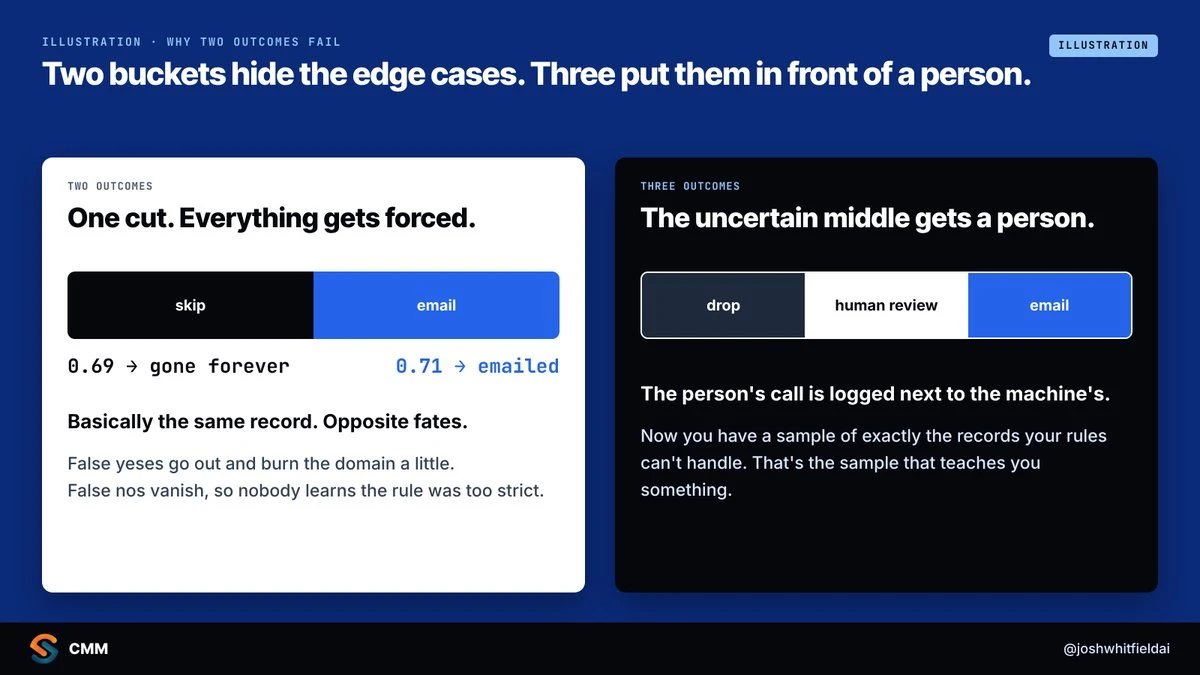
Most qualification setups have two buckets. Yes or no. Send or skip. It feels clean, and it's wrong.
With two outcomes, every uncertain record has to be forced into one of them. So you pick a threshold, and everything just above it gets emailed and everything just below it gets thrown away. The record at 0.71 and the record at 0.69 are basically the same record. One gets a cold email from your client's domain. One disappears forever.
Two things go wrong after that.
The false yeses go out. These are the companies that look right on paper and aren't. Wrong segment, wrong motion, a parent company that doesn't buy the thing. They don't just fail to reply. They burn the domain a little, and they make your client look like they didn't do their homework.
The false nos vanish. Nobody ever sees them again, so nobody learns the rule was too strict. Your list shrinks and you blame the data provider.
A third outcome fixes both. The uncertain middle goes to a person. The person makes the call, and their call gets logged next to the machine's. Now you have a sample of exactly the records your rules can't handle, which is the only sample that teaches you anything.
The edge cases are where the money is. Two buckets hide them. Three put them in front of a human.
The three outcomes, in exact rules
Here are the rules, in the order they run. The first rule that fires wins. Nothing later can overrule it.
Suppressed or already in an active campaign: drop. Reason code suppressed. On one build we checked every company against 69,793 domains we were already emailing before we looked for a single person (historical receipt from the Nov 8 Article).
A hard rule fails (outside the geography, outside the size band, an excluded industry, no website that resolves): drop. Reason code hard_rule:<name>.
A field the decision depends on is missing and can't be filled: human review. Reason code missing:<field>. Missing means unknown, and unknowns go to people.
The model answers "no" on a must-have question, above your confidence floor, with evidence: drop. Reason code model_no:<question>.
The model answers "yes" on every must-have question, every answer is above your floor, and every answer cites its own evidence with no hedge words: email. Reason code qualified.
Everything else: human review. Below the floor, conflicting answers, a hedge word in the rationale, an "unclear", a parent and subsidiary that disagree. Reason code review:<why>.
Two things about "email". First, it means eligible for the email path, not sent. The contact still has to be found and the address still has to come back valid. On our security build, catch-alls were held, not sent (historical, from the Nov 4 Article). Second, "drop" means dropped from this campaign under this rule version. The record stays in Clay. If the rule changes, it gets judged again.
Rule: first rule that fires wins, and every outcome carries a reason code.
Rules before models
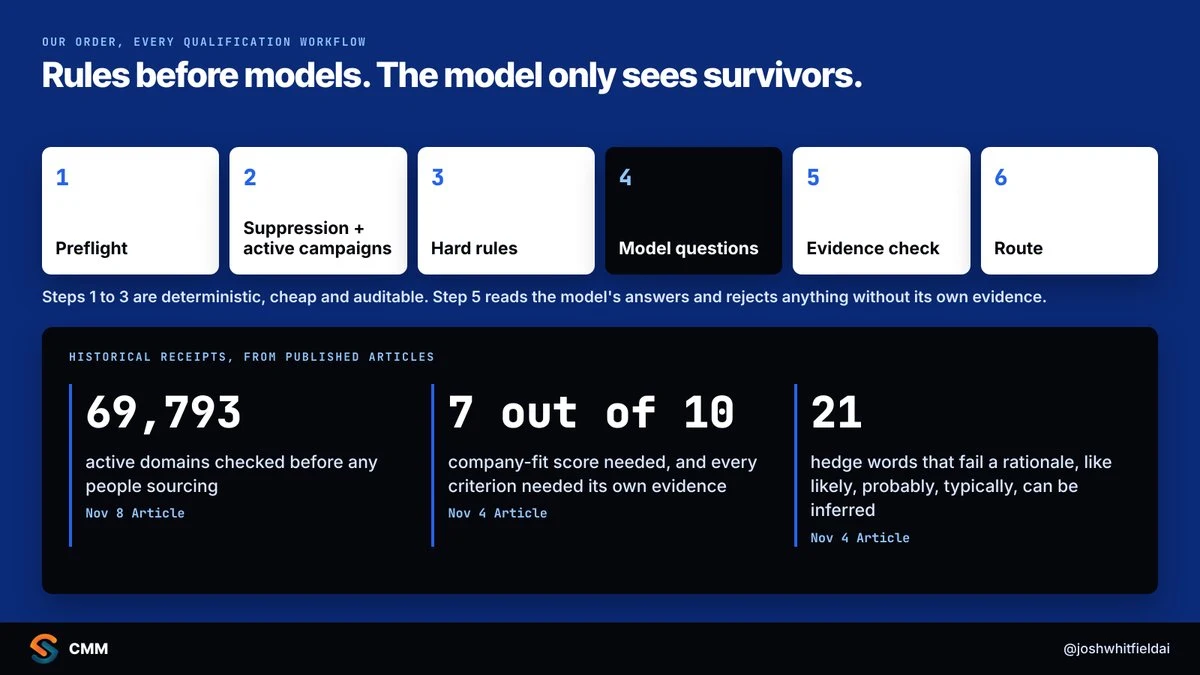
Order matters more than people think. The cheap, certain checks run first. The model only sees what survives them.
Why bother? Three reasons.
Rules are deterministic. A suppression hit is a suppression hit. You don't need a model's opinion on whether a domain is on a list.
Rules are cheaper and faster than any model call, so running them first shrinks the pile the model has to read.
Rules are auditable. When something goes wrong, a rule tells you exactly why. A model gives you a paragraph.
Our order, on every qualification workflow:
Preflight: is this record complete enough to judge at all?
Suppression and active-campaign check.
Hard rules: geography, size band, excluded industries.
Model questions: the yes/no checks that need reading.
Evidence check: a code step that reads the model's answers and rejects anything without its own evidence.
Route: email, human review or drop.
That evidence check is the part the cheap CLI shortcut skips. On our 24-step Clay workflow, the company-fit score needed 7 out of 10, and the score alone wasn't enough. Every criterion needed its own evidence, and a rationale with words like "likely", "probably", "typically" or "can be inferred" failed. We keep 21 hedge words on that list (historical receipts from the Nov 4 Article).
A model that's guessing will tell you it's guessing, if you look for the words.
Writing yes/no questions for agents
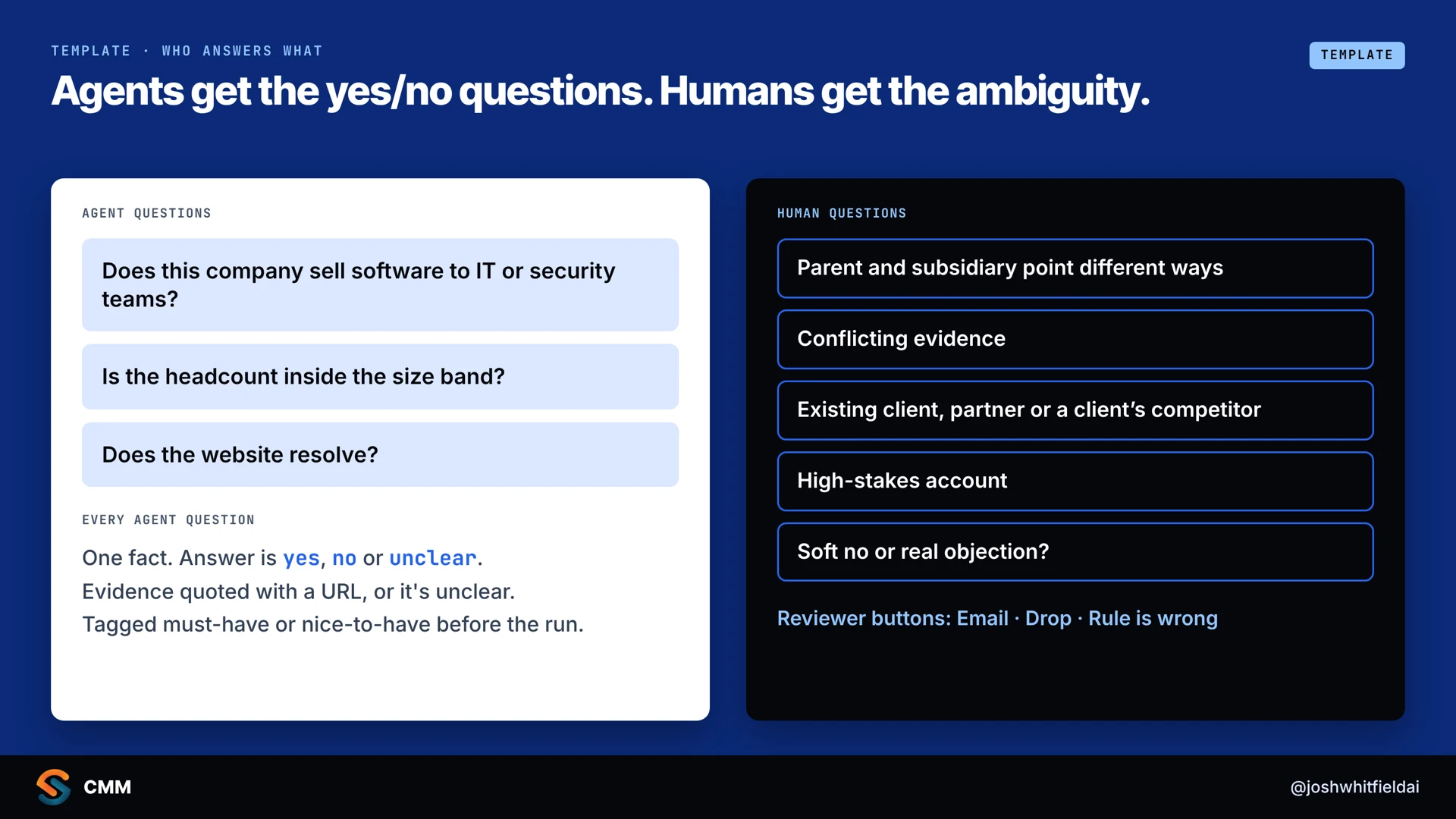
I said it on a podcast and I'm sticking with it: agents get the yes/no questions, humans get the ambiguity. I'm not willing to blow a big deal for a client because an agent doesn't understand ambiguity. That was a hypothetical $100K deal, by the way, risk framing, not a loss we took. The point stands.
So the craft is in writing questions an agent can actually answer. A good agent question has five properties.
One fact per question. "Do they sell to IT teams?" Not "Are they a good fit for our security offer?"
Answerable from evidence you can point to. A page, a job post, a product listing, a field on the record.
A fixed answer set: "yes", "no" or "unclear". Always give it an exit. An agent with no "unclear" option will invent a yes.
A required citation. No evidence, no answer.
A must-have or nice-to-have tag, written down before you run it, not after you see the results.
Bad questions are opinions dressed up as questions. "Would they benefit from outbound?" "Are they innovative?" "Is this a strong fit?" Every company benefits from something. Those go to humans, or they go in the trash.
Here's the prompt template we start from. Anything in {braces} is a template variable, filled per record. Swap the question in [brackets] for yours. Keep the structure.
Rule: one fact, fixed answers, evidence or "unclear"
What goes to a human
Humans get the questions where the answer depends on judgment, context or consequences. Our list:
Ambiguous identity. The parent company and the subsidiary point in different directions. Two companies share a domain. A rebrand halfway through.
Conflicting evidence. One source says they sell to IT teams, another says they're a services shop.
Anything relationship-shaped. Existing client, former client, a partner, a competitor of a client. An agent can match a list. It can't tell you the history.
High-stakes accounts. If a bad email to this one company would cost more than the whole campaign is worth, a person looks at it no matter what the score says.
Reply interpretation. Is that a soft no or a real objection? That one's a person every time.
The reviewer doesn't get a blank screen. They get a card: the company, the rule that sent it to them, the model's answers with evidence links, and three buttons. Email, drop, or "rule is wrong". That third button matters most. It's how the rules improve.
Agents do the boring work so a human can make the campaign better. That's the whole split.
The decision schema
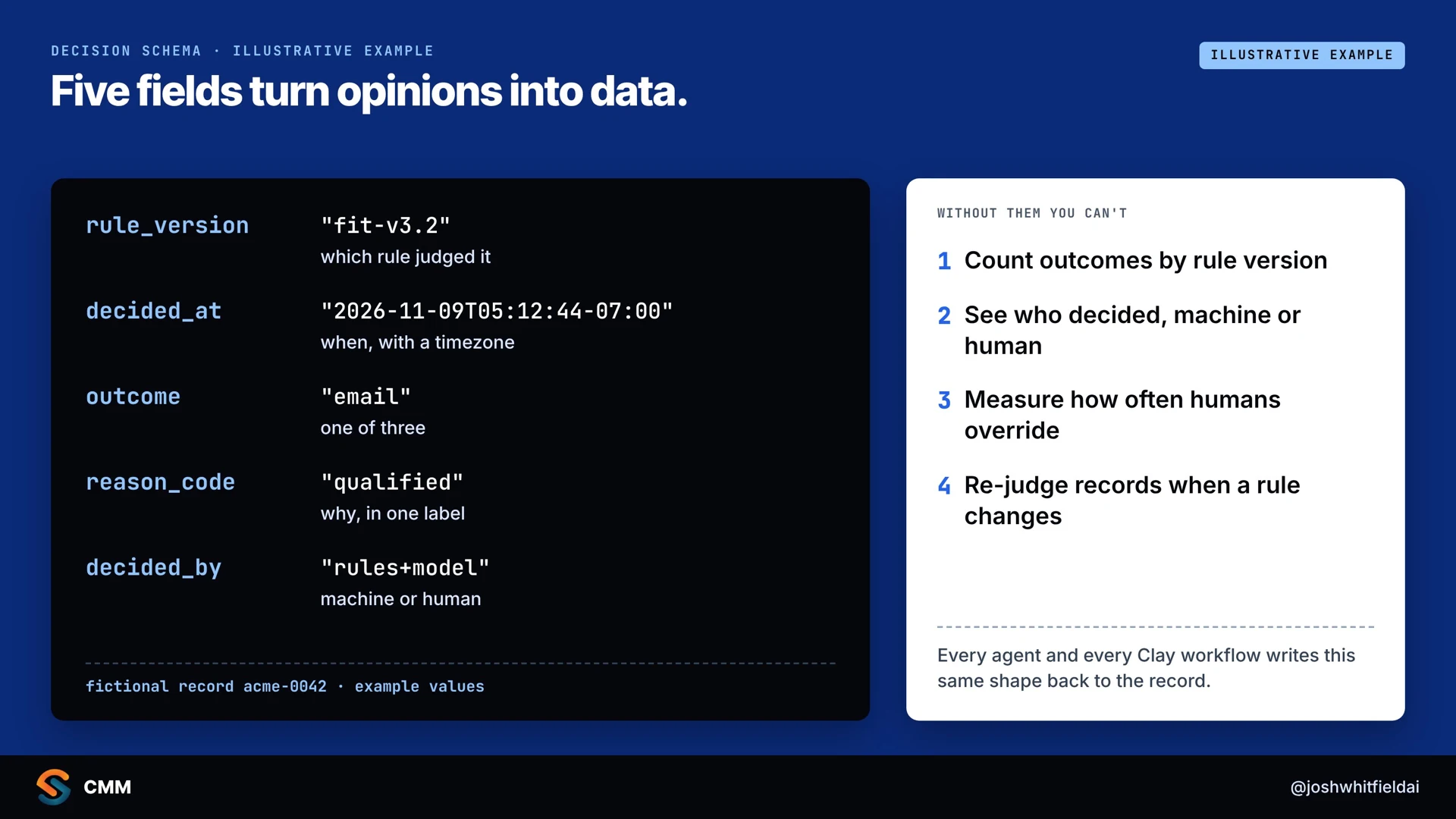
Every verdict writes the same shape back to the record. If two agents or two Clay workflows write different shapes, you can't count anything later. So we fix the schema first and make everything else fit it.
That's an illustrative record. Acme Robotics, the campaign and the URL are fictional, and the 0.80 floor is the example floor from the worked example below, not ours. Five fields matter most: rule_version, decided_at, outcome, reason_code and decided_by. Without those five you have opinions, not data.
The routing formulas
The router is one formula field. It reads the hard-rule results, the missing fields and the lowest confidence across the must-have questions, then writes the outcome. Here it is in Clay formula style, where {{Field}} is a field reference. Template, rename to your fields:
Same logic as a spreadsheet, if you want to test rules on an export before touching the workflow. Columns: A record_id, B suppressed (TRUE/FALSE), C hard_rule_failed, D domain, E employee_count, F q1_answer, G q1_conf, H q2_answer, I q2_conf, J evidence_count, K hedge_words. The floor lives in one named cell, conf_floor, so you change it in one place.
Choosing your confidence floor
This is the part where most people pick a number because it sounds right. Don't. Your floor is a measurement, and you measure it with a hand-check.
The method:
Run the workflow on a few hundred records with the router switched off. Everything gets a verdict and a confidence, nothing gets routed yet.
Split the results into confidence bands. 0.90 to 1.00, 0.80 to 0.89, 0.70 to 0.79, 0.60 to 0.69 is a fine start.
Pull a random sample from each band. At least 30 per band, more if you can stand it. Random, not the first rows, not the ones that look interesting.
A person checks every sampled record against the same question the agent answered, without looking at the agent's answer first. A half-ass hand-check is worse than none, because it hands you a number you'll trust.
Work out the accuracy of each band: right divided by checked.
Decide your target before you look at the results. How often can you live with being wrong on an email that goes out? Write it down.
Your floor is the bottom of the lowest band that still meets your target. Everything under it goes to a human.
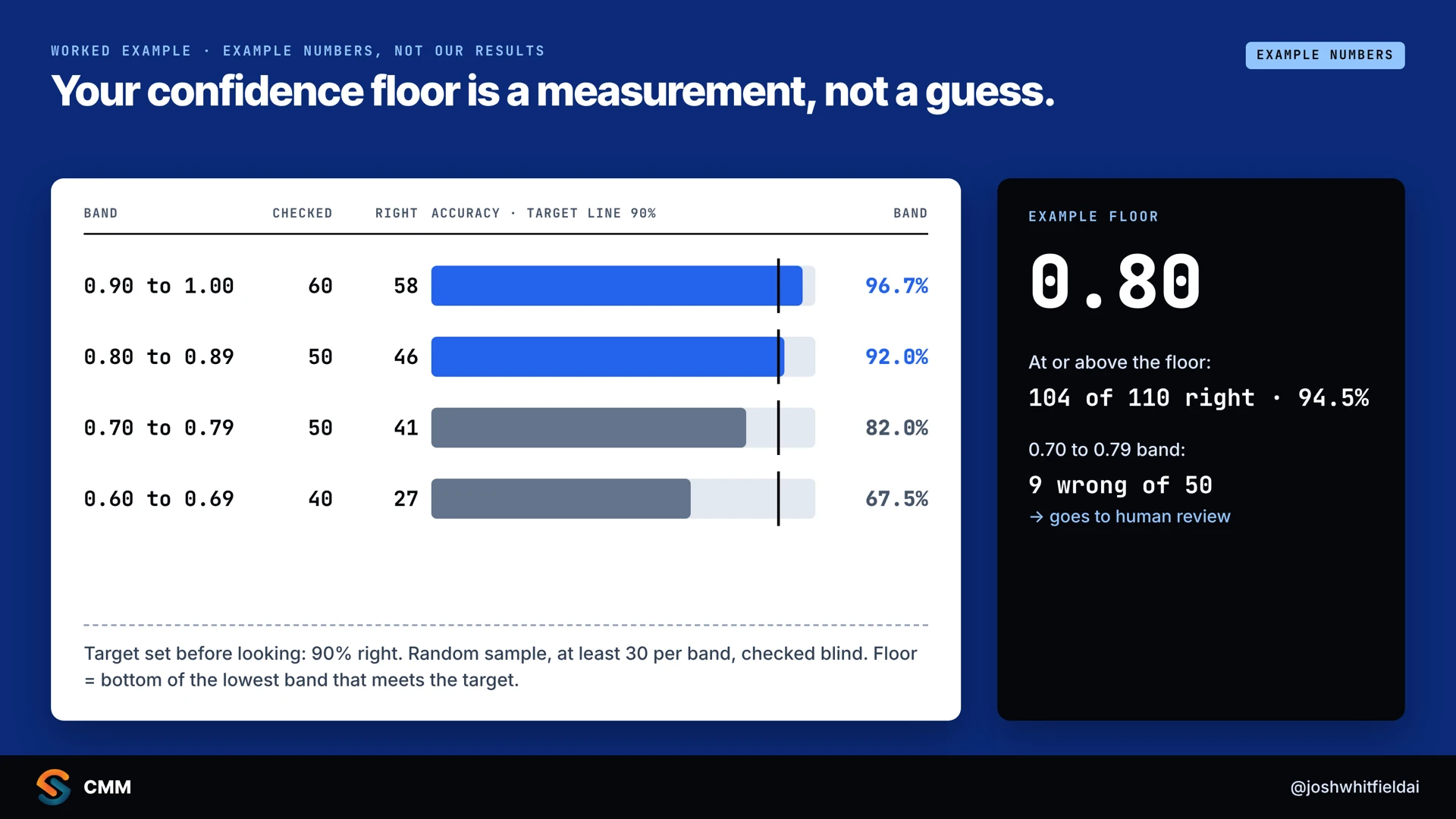
Here's a worked example so you can see the arithmetic. These are example numbers, not our results. The target in this example is 90% right.
0.90 to 1.00: 60 checked, 58 right, 96.7%. Meets 90%.
0.80 to 0.89: 50 checked, 46 right, 92.0%. Meets 90%.
0.70 to 0.79: 50 checked, 41 right, 82.0%. Misses.
0.60 to 0.69: 40 checked, 27 right, 67.5%. Misses.
In this example, the floor is 0.80. The two bands at or above it combine to 104 right out of 110 checked, 94.5%. The 0.70 band misses the target, so those records go to a human even though most of them are right. That's the trade. You pay a reviewer to catch the 9 wrong ones out of 50 in that band.
The sheet formulas for the calibration tab, template:
Three rules for the floor.
Bands are checked separately. A great top band can hide a terrible middle one if you only look at the overall number.
If a band has fewer than 30 checks, it doesn't get a verdict. It gets more checks.
Re-check when the rule version changes, when the campaign changes, or once a month, whichever comes first. A floor is only true for the rule and the list it was measured on.
No, I'm not giving you our floor as a magic number. It belongs to our rules and our lists. Yours has to pass your own hand-check.
Log every verdict
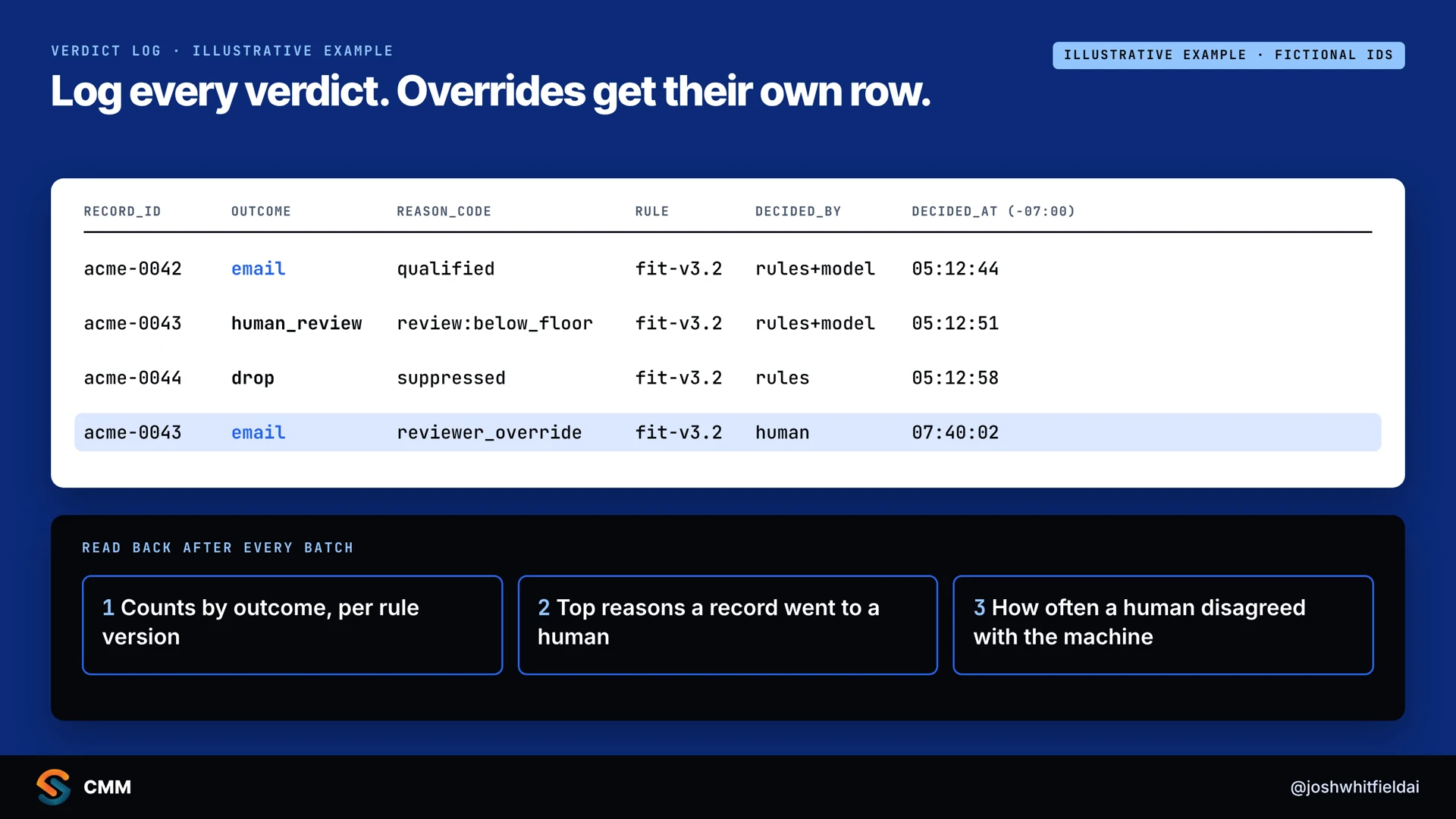
If it isn't logged, it didn't happen. Every routing decision writes one row: record, outcome, reason code, rule version, decided by, and a timestamp with a timezone. Human overrides write a second row. They don't overwrite the first one.
Why both rows? Because the gap between the machine and the human is your error rate. If reviewers keep flipping `review:below_floor` to email, your floor is too high. If they keep pressing "rule is wrong" on the same hard rule, the rule is wrong.
This is the read-back we run after every batch. SQL against an export of the verdict log, template:
Rule version goes on every row because rules change mid-campaign. When they do, you need to know which records were judged under the old rule, or your counts blend two different experiments together. That's not science. That's soup.
H
Lower bounds, not totals
When a run is still going, when a scan stopped early, or when you can only see part of the records, the number you have is a lower bound. Say "at least." Every time.
We say at least 15,000 companies judged in the Nov 7 Article. Not "15,000 companies", at least. We say 155,833 leads built in the Nov 8 Article, built not sent, because a built lead isn't a reply and none of those numbers are meetings. Both are historical receipts from those Articles.
The rule for your own reporting:
Exact total: the run finished, the read-back query matches the count you expected, and you can name the rule version.
Lower bound: anything else. The run is partial, a page failed, or you counted from a sample.
Never round a lower bound up into a total because it sounds better in a client update. It sounds great right up until somebody runs the query.
Name the state honestly
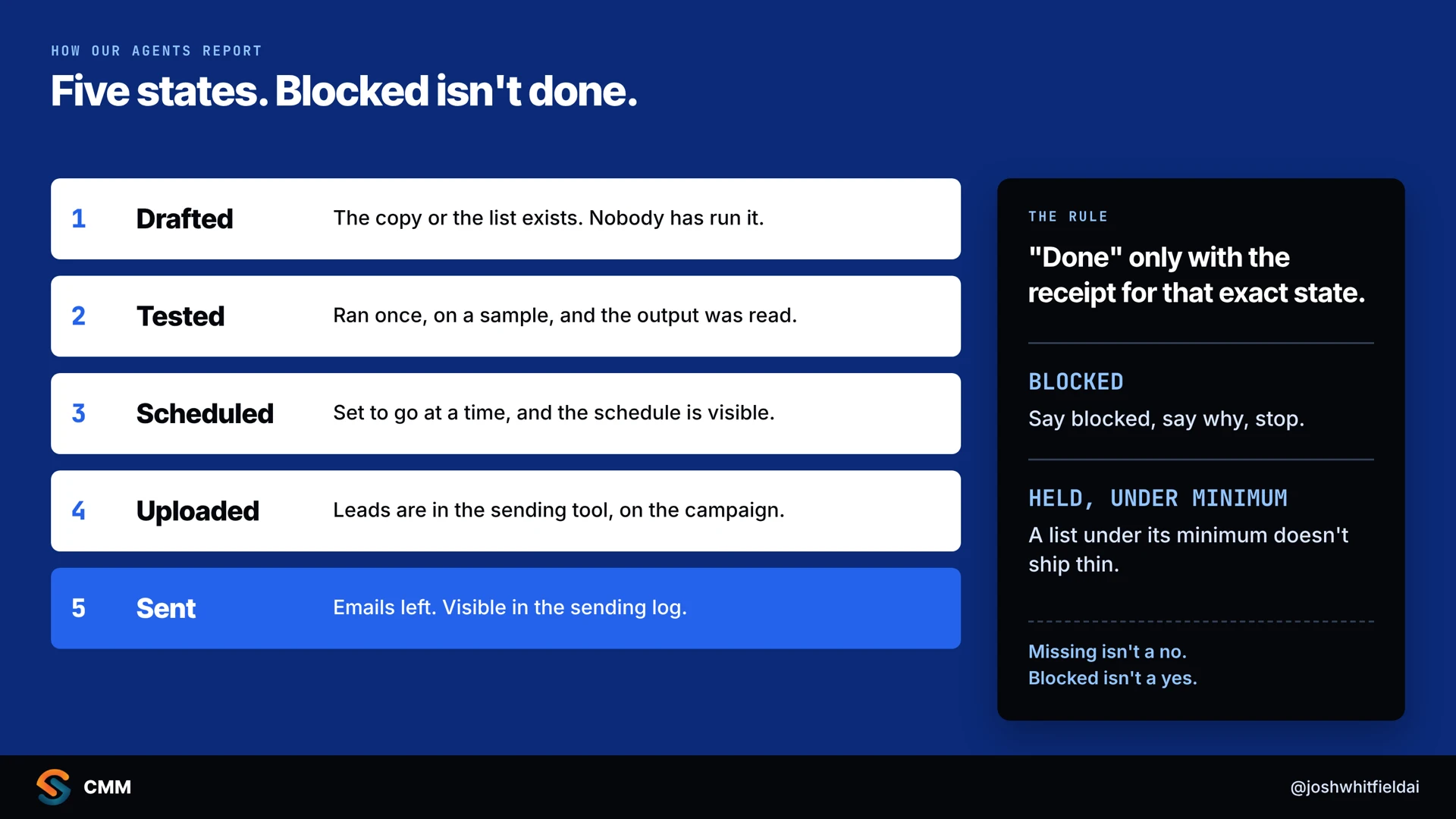
This one's about agents, and it's where a lot of "AI GTM" quietly falls apart. Drafted, tested, scheduled, uploaded and sent are five different states. Agents love to report the first one as the last one.
Drafted: the copy or the list exists. Nobody has run it.
Tested: it ran once, on a sample, and you looked at the output.
Scheduled: it's set to go at a time, and you can see the schedule.
Uploaded: the leads are in the sending tool, attached to the campaign.
Sent: emails left. You can see them in the sending log.
Our rule: an agent only says "done" when it can show the receipt for that exact state. A test run isn't a schedule. A list under its minimum doesn't ship thin, it gets held, and the agent says "held, under minimum" instead of "done".
Blocked isn't done. A missing permission, a failed upload, a workflow that stopped halfway: the agent says blocked, says why, and stops. Same discipline as the router. Missing isn't a no, and blocked isn't a yes.
Pass your own bar before send
The router decides who's eligible. It doesn't decide whether the email is any good. That's a read, and a person does it before anything goes out.
I said this on a podcast too: if you can't pass your own bar, don't send it. Read the email as if you're the one receiving it. Would you reply? Would you at least say "not now"? Good campaigns get polite no's. Bad ones get the kind of reply you don't forward to the client.
We sample emailed-eligible records from each campaign and read the final copy with the real merge fields filled in. If a first name is missing, a curly brace shows, or a signal line doesn't match the company, the campaign stays paused. Here's the read prompt we give an agent to pre-sort the sample, so the person reads the worst ones first. Variables in {braces} are filled per record:
The agent sorts. The human reads. The human's verdict is the one that ships.
What this costs you
Every part of this has a price.
Human review is slow and it's people time. The higher your floor, the bigger the review pile. You're buying fewer wrong emails with reviewer hours.
Hand-checks are boring. Somebody has to sit with a few hundred records and a rubric. That's the job, and it's worth it.
Strict evidence rules throw away true yeses that the model couldn't cite. Some of those were good companies. They go to review, not to the email path, and some get dropped there.
Logging every verdict means a bigger log and a read-back after every batch. It also means you can answer "why did we email them?" in one query instead of one meeting.
Three outcomes make your counts look smaller. Two buckets let you report a bigger email number. It's just a less true one.
The cheap CLI shortcut is cheaper on day one. It's more expensive the day a client asks why their biggest customer got a cold email.
Glossary
Outcome: one of three routing results. Email, human review, drop.
Reason code: the short label for why a record got its outcome, like suppressed or review:below_floor.
Hard rule: a deterministic check that doesn't need a model. Suppression, geography, size band, excluded industry.
Must-have question: a yes/no question where a "no" drops the record and an "unclear" sends it to a human.
Evidence check: a code step that rejects any model answer without its own citation, or with a hedge word.
Confidence floor: the lowest confidence at which you trust a model's answer without a person. Measured by hand-check, never picked.
Confidence band: a range of confidence scores you check as its own group, like 0.80 to 0.89.
Hand-check: a person checking a random sample of verdicts against the same question, blind to the model's answer.
Rule version: a label like fit-v3.2 written on every verdict, so you can tell which rule judged which record.
Lower bound: a count you know is at least this big. Say "at least".
Read-back: re-counting from the log after a batch to confirm the numbers you're about to report.
Pass your own bar: a person reading the final email as the recipient before it goes out.
Start here: your first week
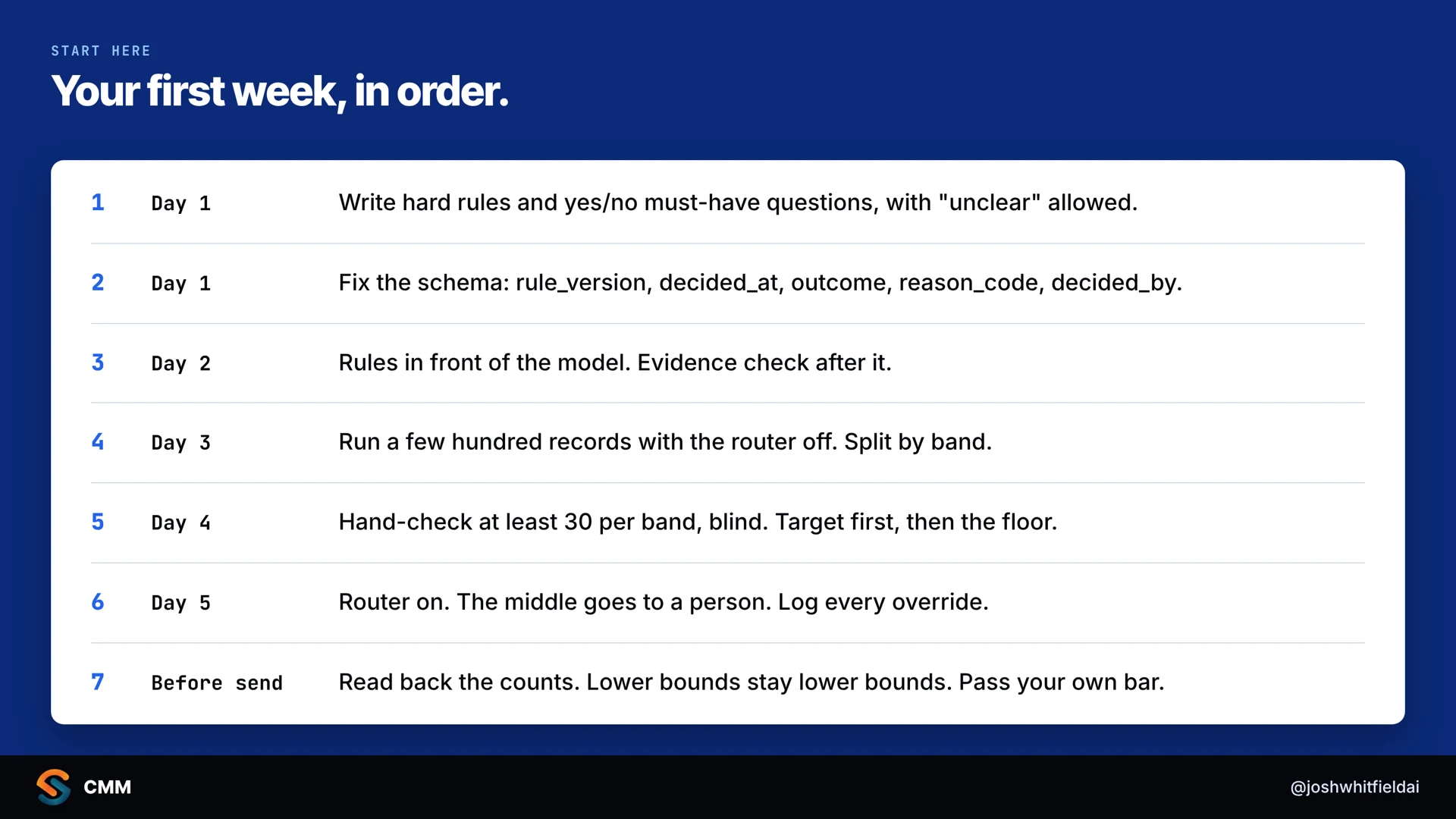
If you're starting from zero, do it in this order.
Day 1: write your hard rules down as a list, and your must-have questions as yes/no questions with "unclear" allowed. Tag each as must-have or nice-to-have.
Day 1: fix the decision schema. Add rule_version, decided_at, outcome, reason_code and decided_by to your Clay workflow before anything else runs.
Day 2: put the rules in front of the model. Suppression and hard rules first, model questions only on survivors, evidence check after the model.
Day 3: run a few hundred records with the router off. Split by confidence band.
Day 4: hand-check at least 30 per band, blind. Set your target first, then read your floor off the bands.
Day 5: switch the router on with your floor. Send the middle to a person with the review card. Log every verdict and every override.
Before the first send: run the read-back query, report lower bounds as lower bounds, and read a sample of final emails yourself. If you can't pass your own bar, hold it.
Do that and you'll have something the cheap CLI crowd doesn't: a number you can defend, and a log that tells you when it's wrong.
If you'd rather have this built and handed to your team, that's what we do at CMM. My DMs are open.
Article figures