Count What You Own First: How We Built 155,833 Leads in Clay in One Week
How did CMM build 155,833 leads in Clay in one week?
Across three builds, CMM counted existing records, applied suppression before paid lookups and checkpointed long scans. The playbook explains how to reuse each client’s company and people audiences.
In this article
- The week, in three builds
- Four terms, before anything else
- Rule one: one Audience pair per client, and it never moves
- Rule two: count what you own before you source anything
- Rule three: suppress before the first paid step, and count every cut
- Rule four: screen domains before you look anyone up
- Rule five: batch the work and pace it on purpose
- Rule six: long scans need checkpoints
- Rule seven: keep a reserve, re-check at build time, read it back
- Where Claude Code and agents plug into Clay
- What this costs you
- The pre-sourcing checklist
- Start here: your first Audience pair this week
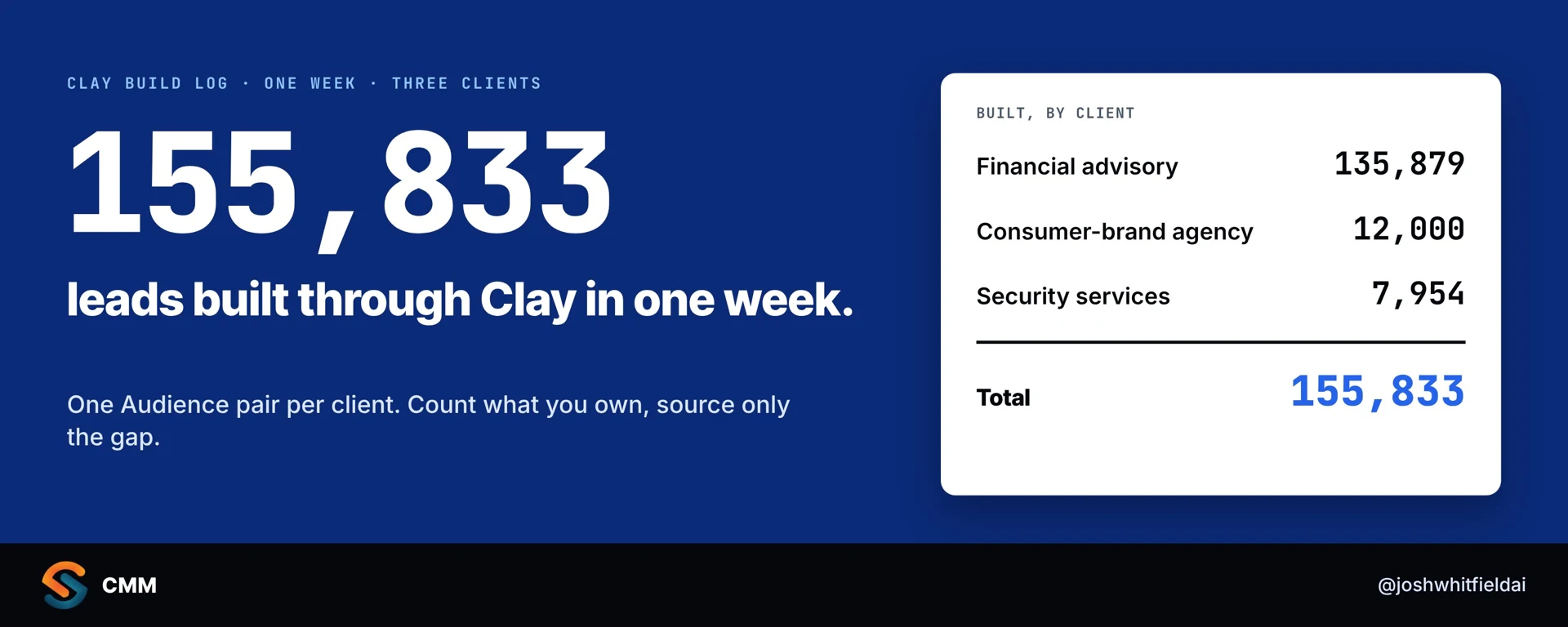
155,833 leads built through Clay in one week, across three client builds that finished between Tuesday, Nov 3 and Wednesday morning, Nov 4. 135,879 for a financial advisory client, 12,000 for a consumer-brand agency client and 7,954 for a security-services client. None of those builds started with a fresh list. Every one started by counting what was already sitting in that client's Clay Audiences, and sourced only the gap.
That's the system this Article walks through. It isn't a tool list. It's seven rules about how the data is organized and in what order the work happens, plus where the agents plug in, with the real numbers from those three builds, the exact Clay click paths, and the commands, filters and prompts we run. You should be able to rebuild it from this page.
Clay is the backbone of all of it. The companies, the people, the emails, the verification results and the campaign memberships live on Clay records. Claude Code and our agents do a lot of the work, but they work by reading and writing those records. Everything plugs into Clay.
The week, in three builds
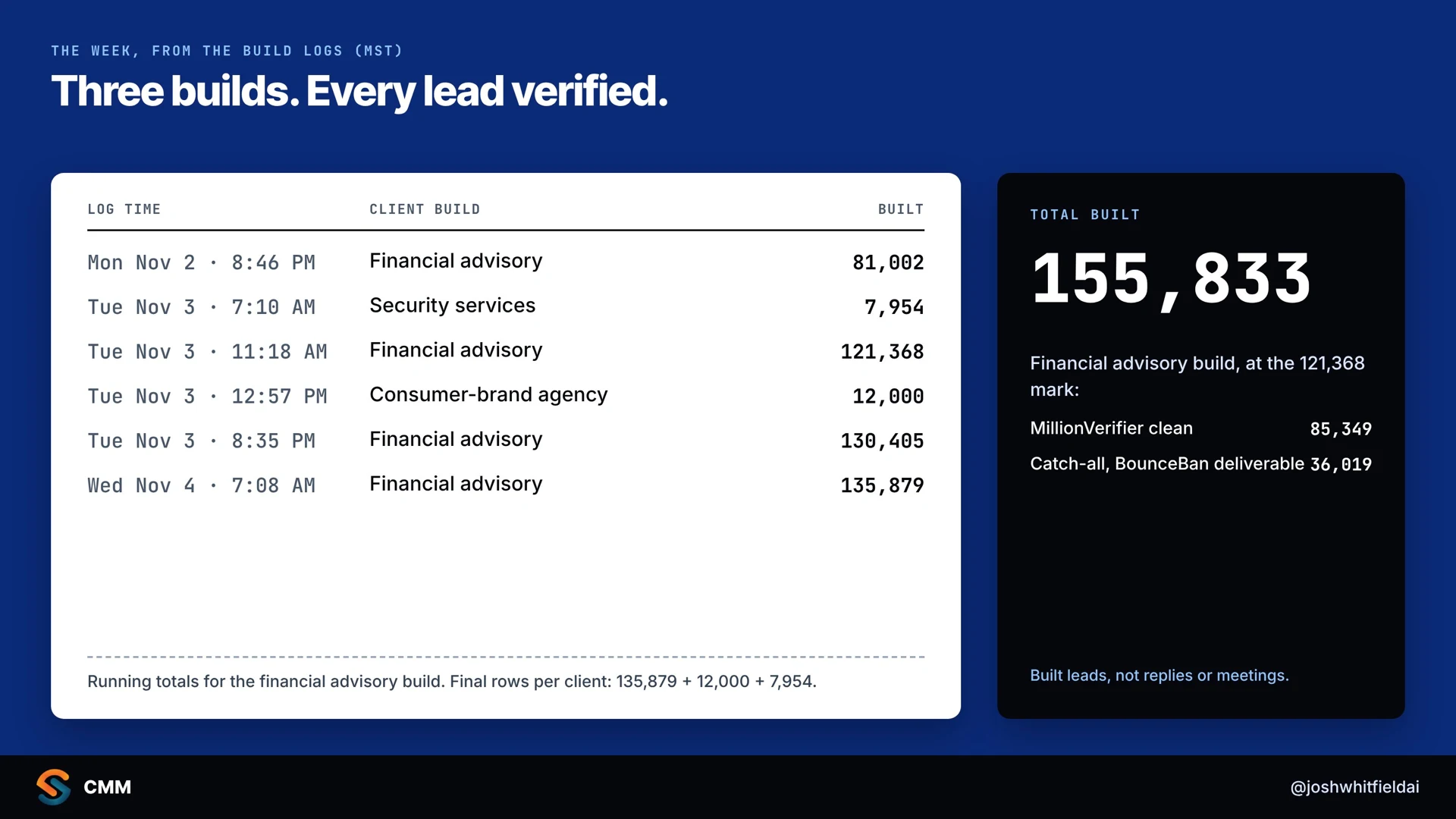
Here's what came out the other end, from our build logs. All times MST.
Financial advisory client: 135,879 leads built by Wednesday, Nov 4 at 7:08 AM. That's 3,121 short of the 139,000 target, and I'm counting what was built, not the target.
Consumer-brand agency client: 12,000 leads built on Tuesday, Nov 3 at 12:57 PM, into 3 paused campaigns of 4,000 each with no senders attached.
Security-services client: 7,954 leads built into a draft campaign, with nothing sent, by Tuesday, Nov 3 at 7:10 AM.
The financial advisory build is the one that shows the pace. It was at 81,002 on Monday at 8:46 PM, 121,368 by Tuesday at 11:18 AM, 130,405 by 8:35 PM, and 135,879 on Wednesday morning.
Verification runs before a lead is kept. On the financial advisory build, for example, at the 121,368 mark, 85,349 were clean on MillionVerifier and 36,019 were catch-all addresses that BounceBan marked deliverable.
What this doesn't prove: a built lead isn't a reply, and none of these numbers are meetings. This Article is about the build. It's the part most teams get wrong before a single email goes out.
Rule: count what you built, say what it doesn't prove.
Four terms, before anything else
If you're newer to Clay, these four terms carry the rest of the Article.
Audience: Clay's persistent database of companies and people. You don't create a new one per campaign. Records stay, and you filter them.
Segment: a saved filter over one entity type, either People or Companies. Nothing gets copied into it. It selects records live, so its membership changes as the records change.
Membership token: a short, pipe-wrapped tag on a record, like |acme|, that says which client or campaign a record belongs to.
Suppression: the list of people you must not contact right now, checked before you spend anything on a record.
Rule one: one Audience pair per client, and it never moves
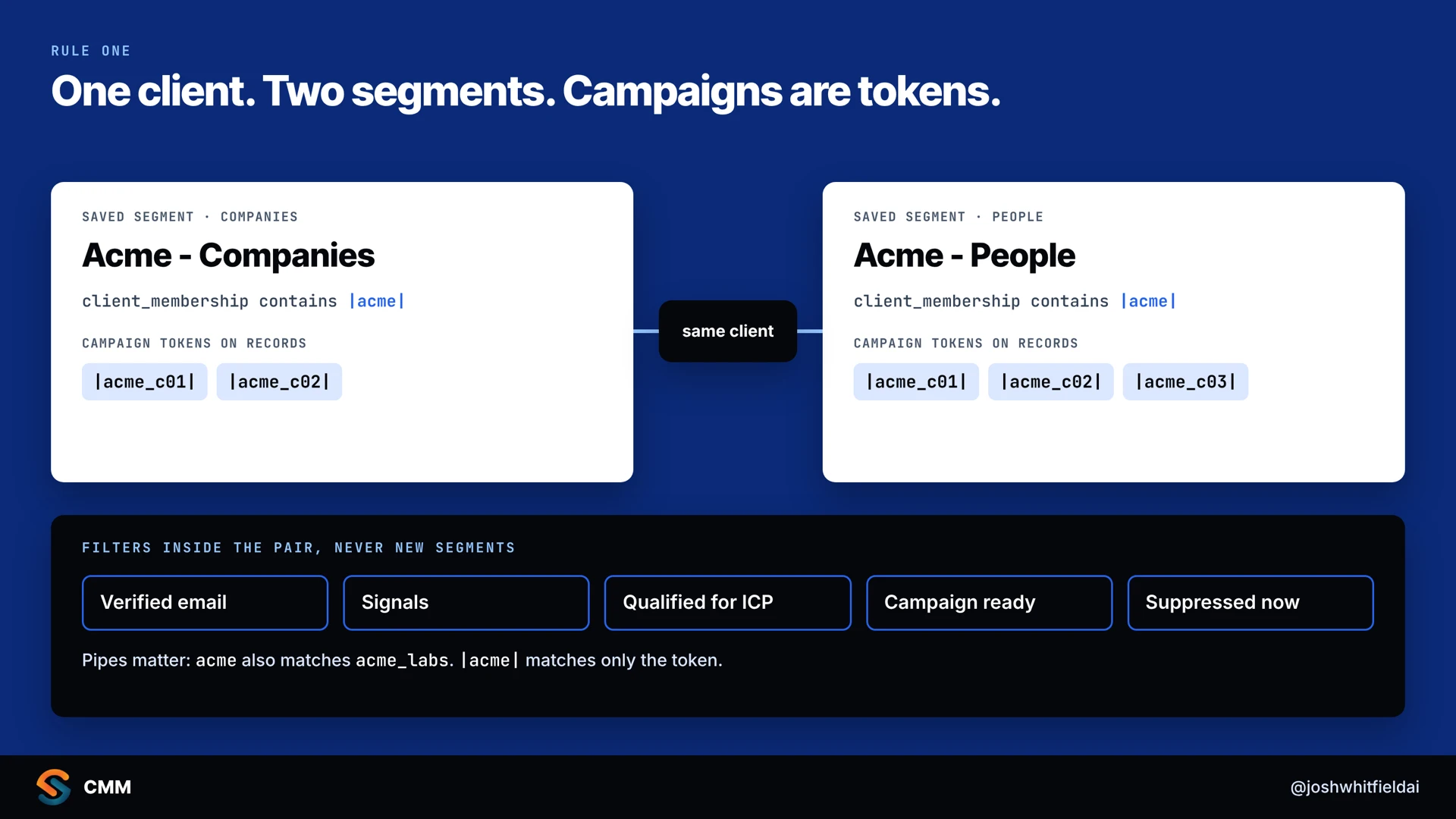
Every active client gets exactly two saved segments in our Clay workspace, and only two:
Acme - Companies
Acme - People
Campaigns are not new segments. A campaign is a membership token on records inside that pair. Verification status, signals, qualification and campaign readiness are filters inside the pair too. They never remove a record from the client's audience.
Why it matters: the pair is the client's full addressable market as we know it. Once it's set up, every campaign after the first one starts with an inventory instead of a cold search.
To set it up in Clay:
Click People in the left sidebar.
Click the + next to My Audiences.
Choose Criteria, then add a Filter.
Pick your client-membership field, choose contains, and type the token with both pipes: |acme|.
Name it Acme - People and save.
Repeat from Companies in the left sidebar for Acme - Companies.
Claude Code does the same thing from the Clay CLI, then reads the filter back to confirm it saved the way we meant. The key and data path below are placeholders. Copy the real ones from an existing segment with clay audiences get <segment-id> | jq .filter, because field IDs are specific to each workspace.
Why the pipes: Audiences filters match substrings. A filter for acme also matches acme_labs. A filter for |acme| matches only the token. The same goes for campaigns. A record in two campaigns carries |acme_c01|acme_c02|, and an exact-token filter picks out each one cleanly.
Before creating anything, list the existing segments and refuse duplicate names. If two segments are both called Acme - People, don't guess which one is real. Fix it first.
Rule: one client, two segments, campaigns as tokens.
Rule two: count what you own before you source anything
The most expensive habit in outbound is opening a search tool and pulling a new list for every campaign. The first job on every build is an inventory of what the client already has.
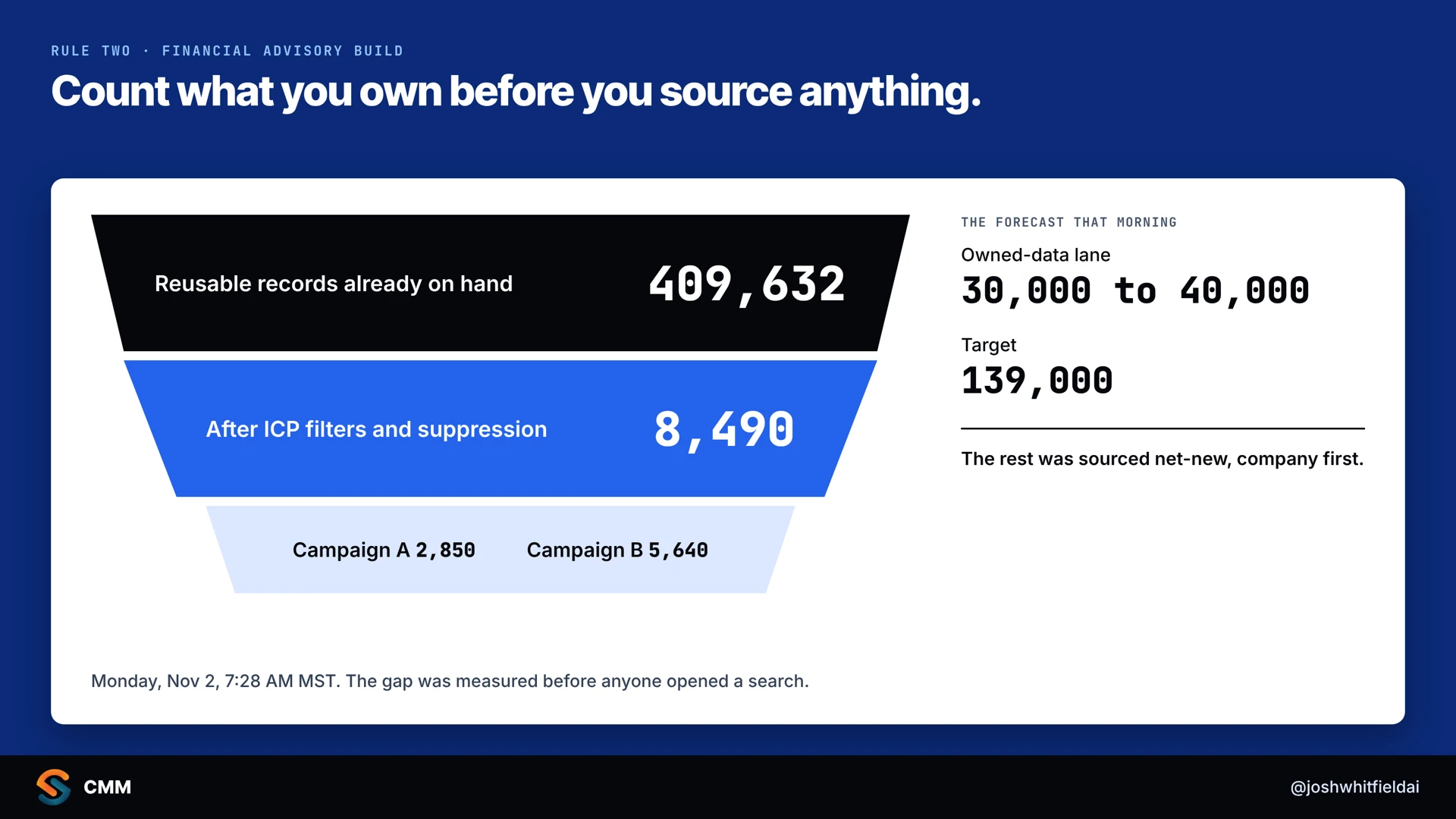
Worked example, financial advisory build: the inventory pass found 409,632 reusable records already on hand. After the ICP filters and suppression, 8,490 of them were usable, 2,850 for one campaign and 5,640 for the other. On Monday morning the forecast for the whole owned-data lane was 30,000 to 40,000 leads, well short of a 139,000 target, so the rest had to be sourced net-new. We knew the size of the gap before anyone opened a search.
Worked example, consumer-brand agency build: we read 18 of the client's sending workspaces, 4.19 million rows holding 2.54 million emails. We matched 1.68 million domains against Clay in chunks of 1,000 instead of doing a full pull of about 191,000 records, which would have taken around 2 hours.
Why owned data comes first: it verifies better. In our October measurements, emails we already had verified at about 93%, at roughly 60 seconds per 100. Net-new finds ran 30 to 35% verified for brand marketers and about 64% for ops roles.
The count happens server-side. Never download a database to count it:
The title and size band are an example, not a real ICP. Keep the count and the select identical apart from the first word, so the IDs you pull match the number you counted. For 1,000 people, ask for about 1,100 IDs to leave room for duplicates and rejects.
Two decision rules from our skill files that save the most rework:
If a revenue bucket straddles your floor, it's out. A bucket that crosses the floor can't prove the floor.
Predicates that must be true of the same company go inside one company.any(...). Split them, and the two conditions can be met by two different companies.
Rule: inventory first, then source only the measured gap.
Rule three: suppress before the first paid step, and count every cut
Suppression is cheapest at the start. If you find and verify emails first and suppress second, you pay for people you were never going to email.
Our order, applied before any paid step, with a count before and after each one:
Anyone emailed in the last 30 days.
Anyone in an active campaign, matched by email and by domain.
The blocklist and every unsubscribe.
Anyone who said not interested in the last 90 days.
Duplicates and placeholder names.
The per-company cap.
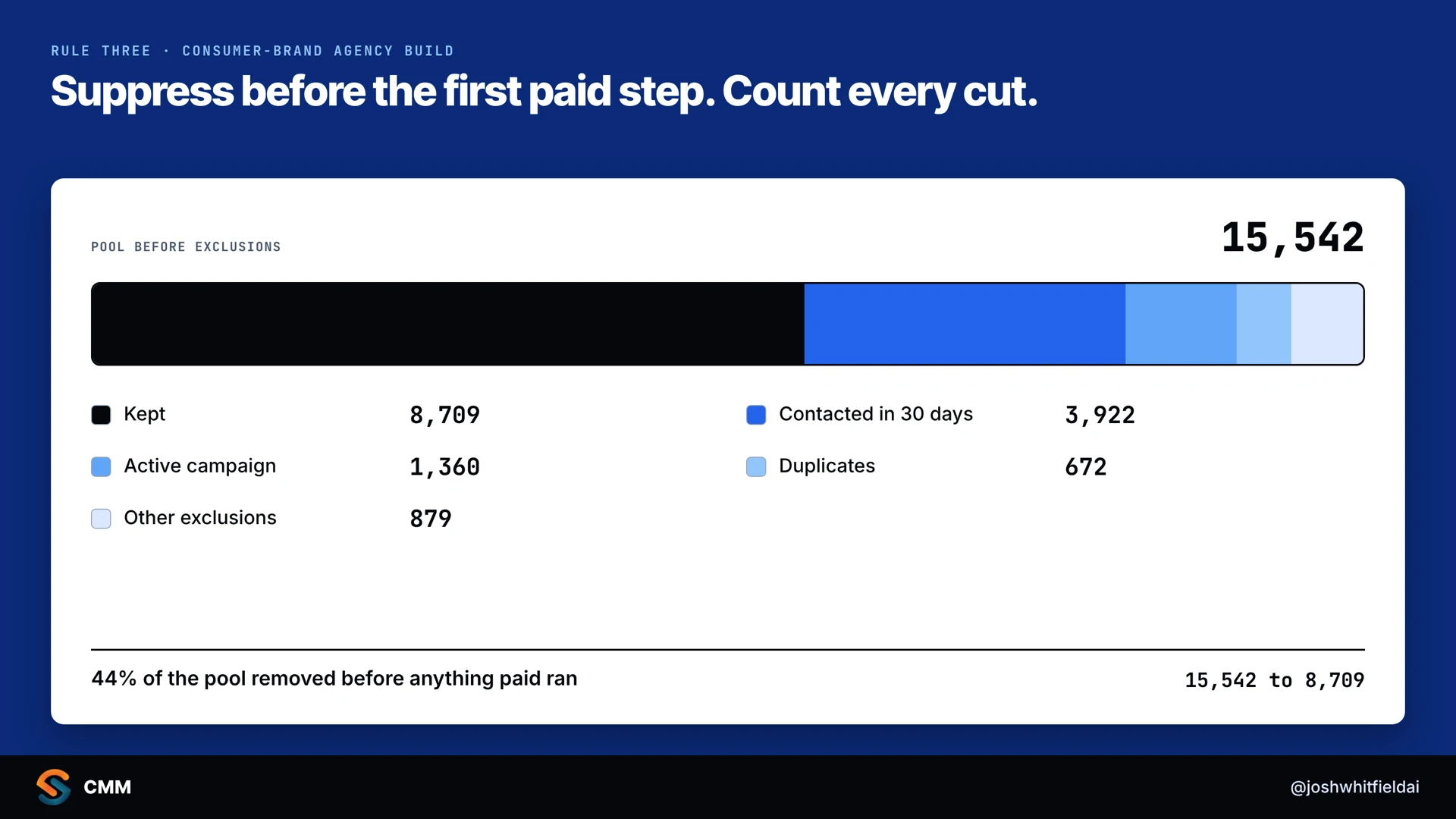
Worked example, consumer-brand agency build: a pool of 15,542 people became 8,709 after exclusions. The three biggest cuts were 3,922 contacted in the last 30 days, 1,360 already in an active campaign and 672 duplicates, with 879 more across the other exclusions. That's 44% of the pool gone before anything paid ran.
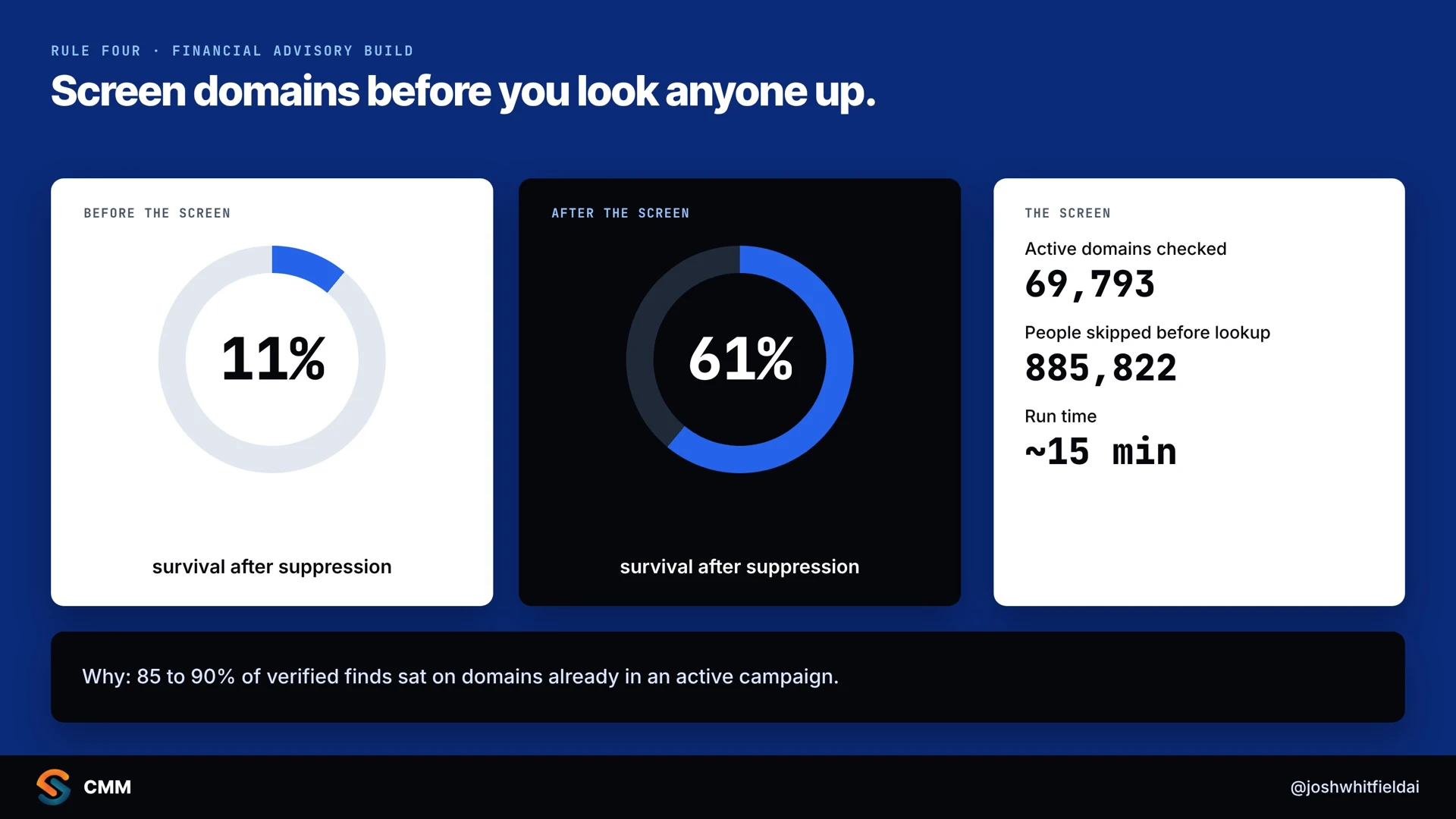
How big the index gets: on the financial advisory build, the suppression index held 274,142 emails contacted in the last 30 days, 136,878 in active campaigns, 604 unsubscribes, 855 recent not-interested replies, 69,793 active domains, and a blocklist of 3,307 domains and 24,649 emails.
We keep that index hashed. The raw export pages get deleted once the index is built, so there's never a local copy of a client's lead list sitting on disk.
This is the shape of the step, trimmed to the logic. It's a template, not our production file. Every cut writes its count to the build record:
On the per-company cap: on the financial advisory build we audited 5,383 rows at companies that already had people in active campaigns, and none were over the cap.
Rule: if you can't show where every row went, you didn't suppress, you guessed.
Rule four: screen domains before you look anyone up
This one came straight out of a bad Monday afternoon, and it's now a fixed step.
On the financial advisory build, round 13 produced only 419 new leads. When we looked, 85 to 90% of the verified emails we'd found belonged to domains that were already in an active campaign. We were finding and verifying people who were going to be suppressed anyway. Real yield was about 300 an hour.
The fix was a domain pre-screen that runs before any email lookup. It took the 69,793 active domains, ran in about 15 minutes, and skipped 885,822 people before we looked any of them up. Survival after suppression went from 11% to 61%.
It also tells you where not to look. On a later round, people with no company domain on the record kept 28%, while the screened group kept 61%. That's a number worth knowing before you spend a round on a group.
We ran ours as a code step against the hashed index. In a Clay workflow, the same rule is one formula column in front of the finder, with the finder set to run only when it's true:
To add it: scroll right, click Add column, pick Formula, paste the formula, and type / to insert your own column references. Then open the finder column, go to its run settings, and set Only run if to this column.
Whichever way you run it, the rule is the same: no lookup on a domain you can't email.
Rule: every lookup on a domain you can't email is wasted. Screen first.
Rule five: batch the work and pace it on purpose
At production scale, the speed of a build comes from how you batch and pace the work, not from how hard you push it. A build that runs flat out and then stalls is slower than one that runs steady. These are the settings we use, and they're written into the build skill so every session starts with them.
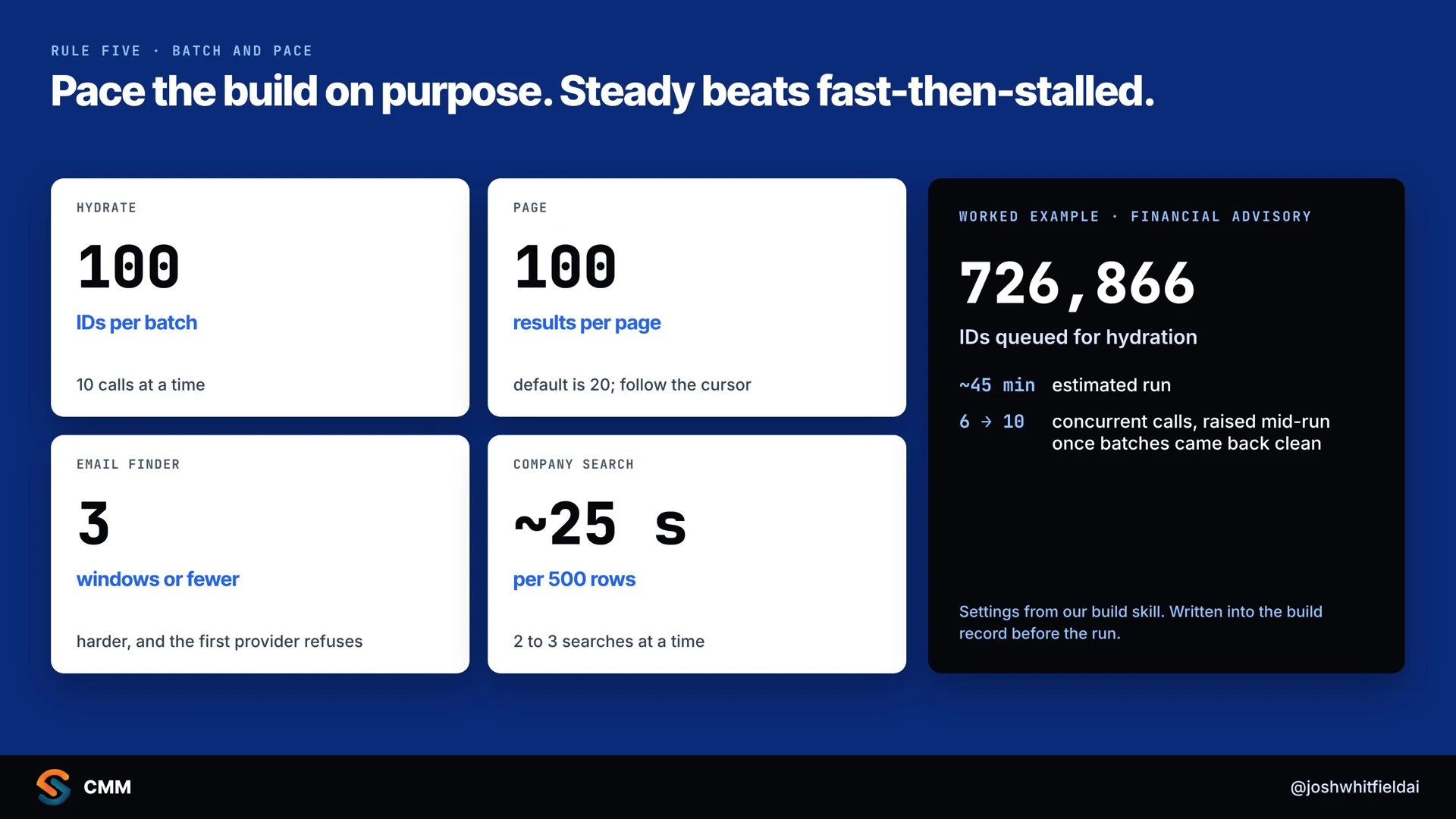
Hydrate records in batches of 100 IDs, 10 calls at a time. Hydrating means pulling the full record for an ID you already selected.
Results come back 20 per page by default. Ask for 100 per page, and follow the cursor every time until there isn't one.
Run the email finder in 3 concurrent windows or fewer. Push it harder and the first provider in the waterfall starts refusing requests, and the whole build slows down behind it.
Company search runs about 25 seconds per 500 rows. Run 2 to 3 at a time, and split a big search into segments so each one finishes on its own.
Load in blocks of 4,000 leads per sender. The consumer-brand agency build went out as 3 paused campaigns of 4,000 each, not one campaign of 12,000.
Worked example, financial advisory build: 726,866 IDs were queued for hydration, with an estimate of about 45 minutes. We started at 6 concurrent calls and raised it to 10 during the run once the first batches came back clean. We didn't start at 10 and hope.
This is the shape of the hydration step, trimmed to the logic. It's a template, not our production file. hydrate and write_to_index stand in for your own functions:
Two habits keep the pacing honest. Write the batch size and concurrency into the build record before the run starts, so the next session doesn't guess. And when a step slows down, lower the concurrency first and look at the provider second. More pressure is almost never the fix.
Rule: pace the build on purpose. A steady build beats a fast one that stalls.
Rule six: long scans need checkpoints
Some of these scans run for hours. Sessions end, containers restart, connections drop. If a scan can't resume from where it stopped, every interruption costs you the whole thing.
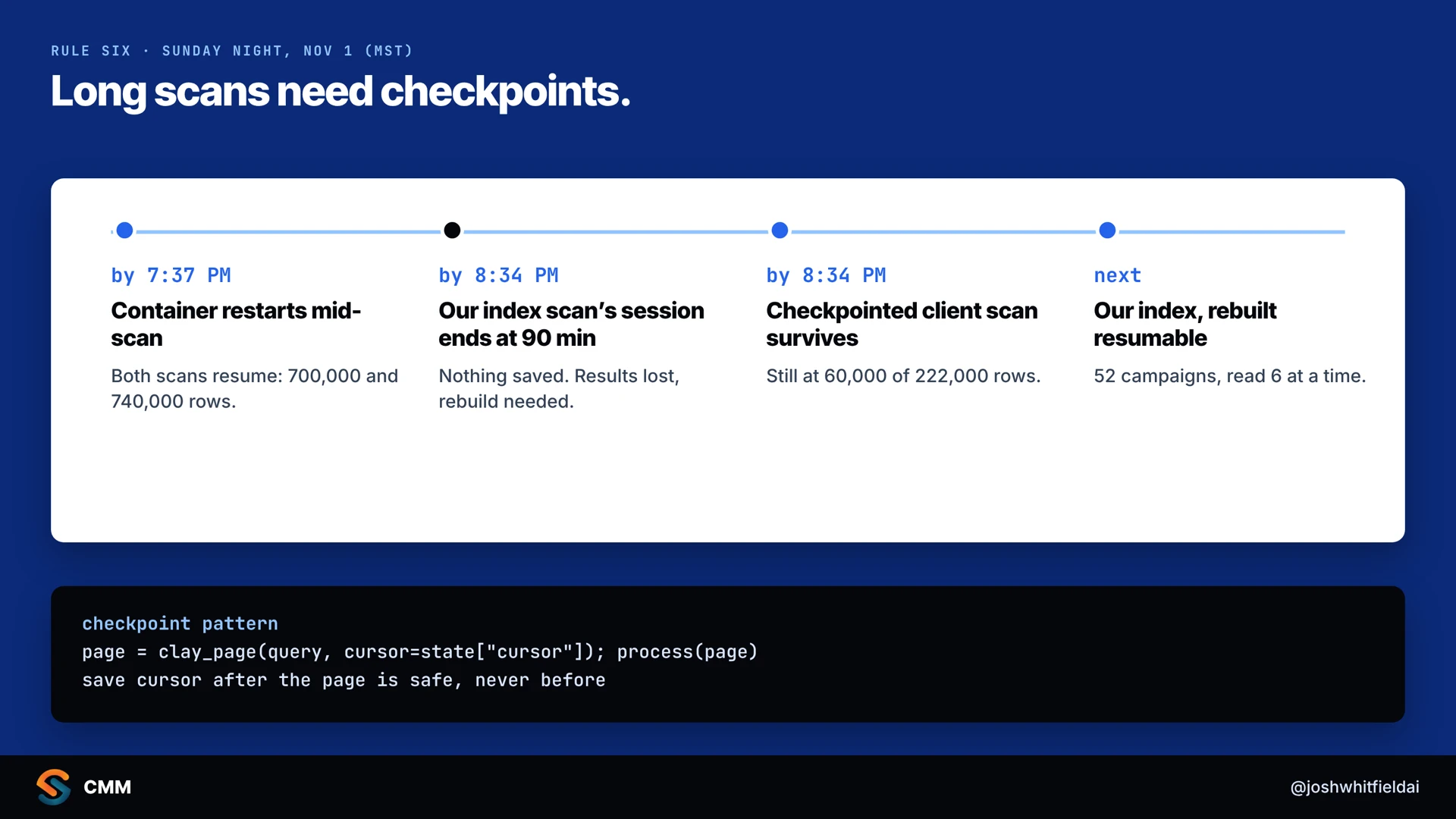
Worked example, Sunday night: the suppression index for our own workspace was running in a session that ended at the 90-minute mark, and the results were lost. It had to be rebuilt. The consumer-brand agency scan running alongside it was checkpointed, so it survived at 60,000 of 222,000 rows and carried on. We rebuilt ours as 52 campaigns read 6 at a time, each one resumable.
Earlier that evening, by 7:37 PM, the container had restarted mid-scan. Both scans resumed, the financial advisory scan at 700,000 rows and ours at 740,000.
This is the pattern, trimmed to a template. Save the cursor after each page, never before:
Two more habits that go with it. Save the handle for every Clay run before you start polling it, so a timeout doesn't make you submit the same run twice. And run one client build per session. A slow build should never hold up the next client.
Rule: if it runs longer than a coffee, it needs a checkpoint.
Rule seven: keep a reserve, re-check at build time, read it back
A list ages while you build it. Someone who was clean on Sunday can be in another campaign by Tuesday. So the last step re-runs suppression, and it needs spare leads to fill the holes.
Worked example, consumer-brand agency build:
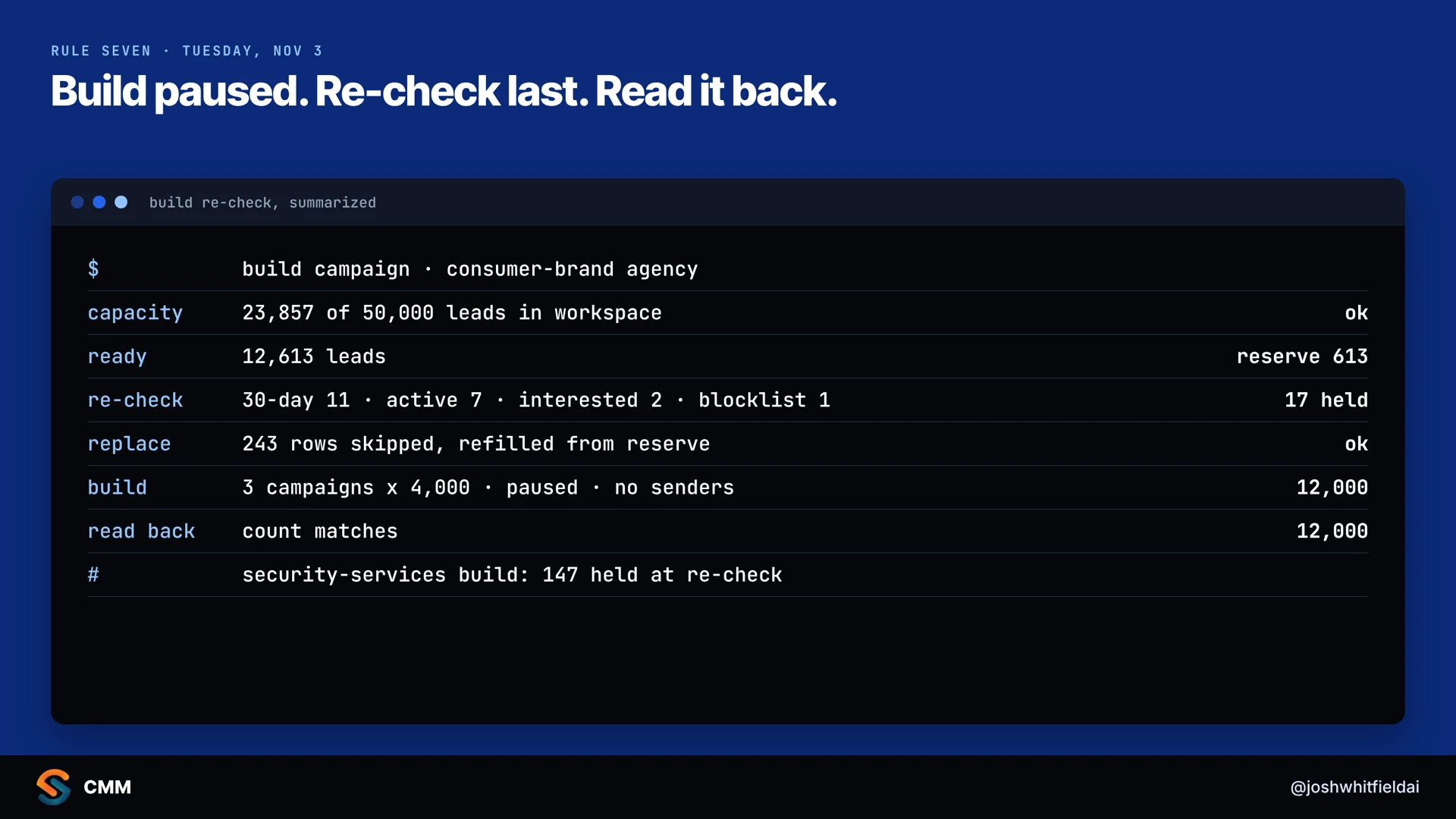
Capacity first. The sending workspace was at 23,857 of 50,000 leads, so 12,000 fit with room to spare.
12,613 leads were ready, which left a reserve of 613 over the 12,000 we built.
Suppression ran again right before the build. 17 people were held, for 11 contacted in 30 days, 7 in an active campaign, 2 already interested and 1 blocklisted. Some were held for more than one reason.
243 rows were skipped because they were already in other campaigns, and replaced from the reserve.
12,000 leads were built into 3 paused campaigns of 4,000 each, with no senders attached, and the count was read back.
On the security-services build, the fresh check right before loading excluded 147 people: 54 already in that client's sending workspace and 93 at companies with active campaigns.
Our build-step prompt for Claude Code, copy-paste ready:
Rule: build paused, re-check last, read it back.
Where Claude Code and agents plug into Clay
Agents speed every one of these rules up. None of them replace Clay as the place the data lives.
Claude Code runs the Clay CLI: counts, selects, hydration in batches, segment creation and read-backs. It also builds and tests the Clay workflows.
Research agents write signals onto Company records as fields, so a filter inside the pair can pick them up.
The shared email workflow in Clay finds and verifies missing emails and writes the result back to the same People record. MillionVerifier ok, or catch-all plus BounceBan deliverable. Nothing else passes.
Every rule change is a commit with tests that pass, and every decision lands in the build record. When I made a call on the financial advisory build on Monday night, it went into the build record as a commit, so the next session ran it the same way.
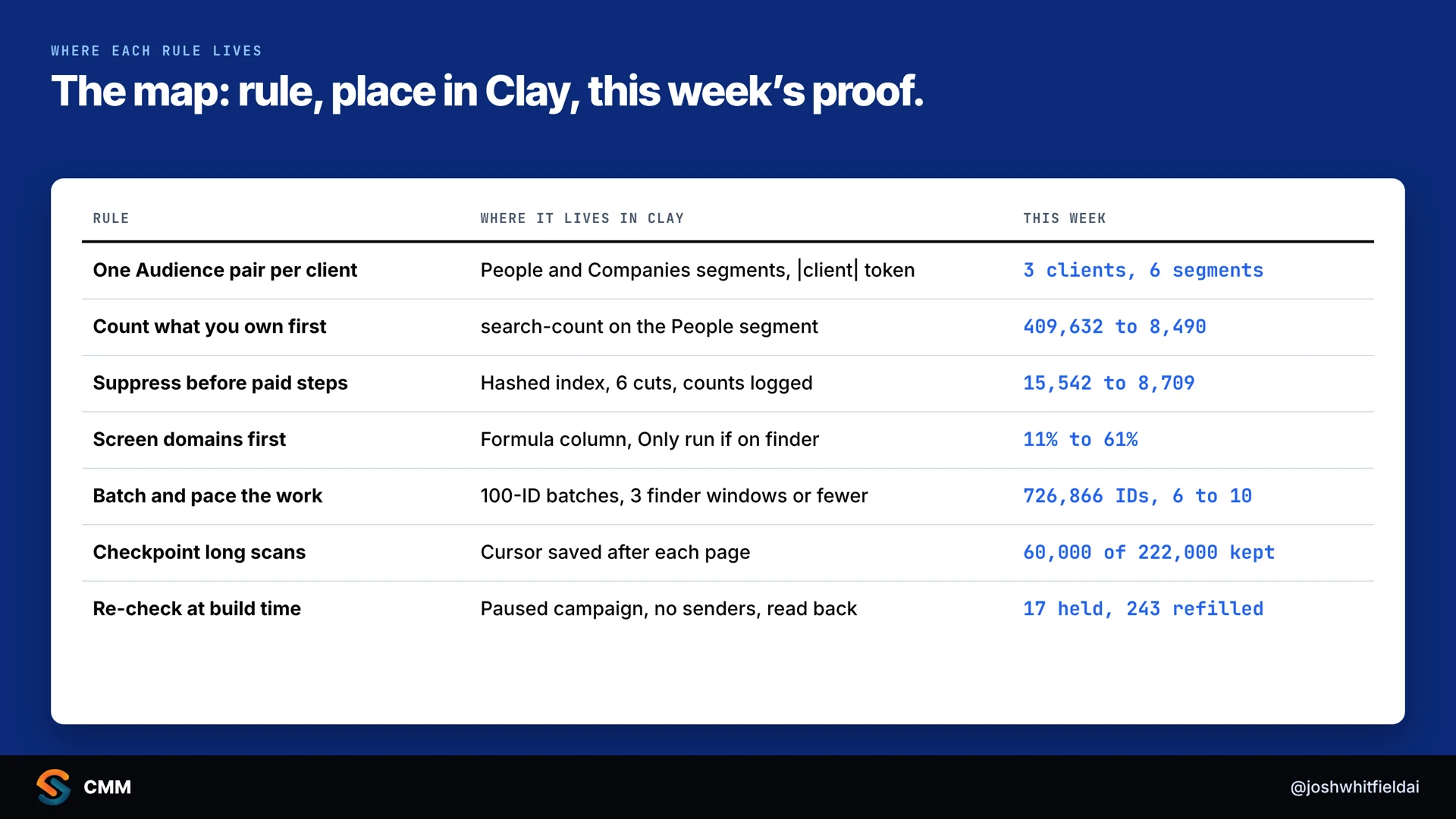
The map below is the one we use: each rule, where it lives in Clay, and this week's proof number.
Rule: agents feed Clay, Clay feeds the campaign.
What this costs you
Every part of this has a price. Here's what we pay.
The inventory pass takes time up front. On a fresh client with no history, it finds almost nothing, and you pay that time anyway.
Exact-token filters are strict. A token typed without its pipes, or with a typo, quietly matches nothing, so every filter gets read back.
Owned data is older. It goes through the same suppression and gets current verification, so age costs us yield, not safety.
Pacing means some builds run slower than they could. Three finder windows is slower than ten, and we'd rather be steady than have the first provider start refusing requests halfway through a build.
A reserve means sourcing more than you build. On the consumer-brand agency build, that was 613 extra leads.
Checkpoints add code to every long scan. One lost 90-minute run paid for all of it.
The pre-sourcing checklist
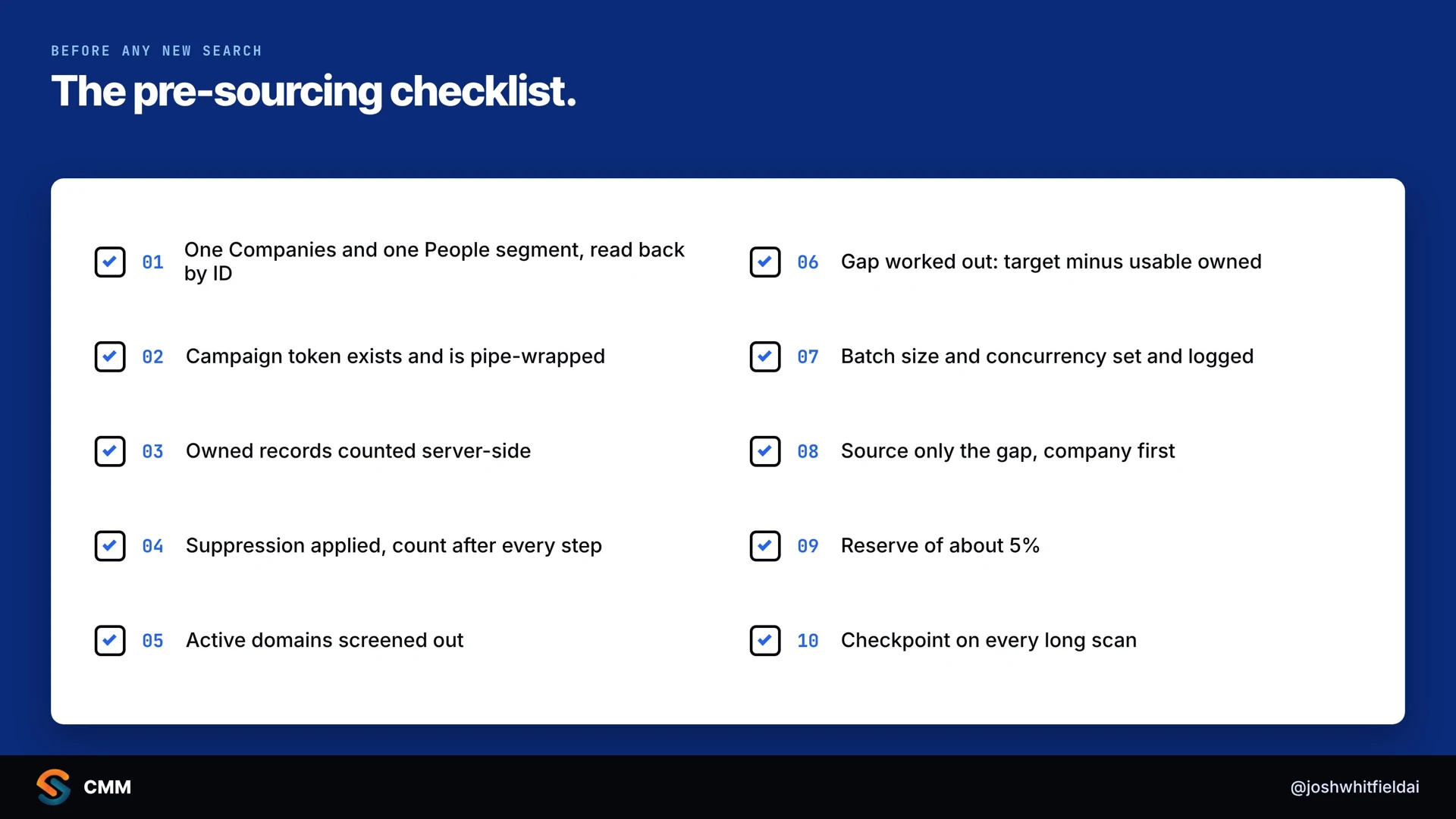
Run this before any new search, on any client.
Confirm the client has exactly one Companies segment and one People segment, read back by ID.
Confirm the campaign token exists and is pipe-wrapped.
Count the owned records that fit the ICP, server-side.
Subtract suppression and write the count after every step.
Screen out active domains.
Work out the gap: target minus usable owned records.
Set the batch size and concurrency before the run, and write them into the build record.
Source only the gap, company first.
Keep a reserve of about 5%.
Checkpoint every scan that runs longer than a few minutes.
Start here: your first Audience pair this week
If you're starting from zero, do it in this order.
Day 1: create the two segments for your biggest client with the click path above, and read the filters back.
Day 1: give every record you already have the client token, and every live campaign its own token.
Day 2: build the suppression index for that client, and write down the six counts.
Day 2: run the inventory count for your next campaign before anyone opens a search.
Day 3: add the active-domain formula in front of your finder, set Only run if, and compare the survival rate on 500 rows.
Day 4: build your next campaign paused, with no senders, re-check at build time, and read the count back.
Do those six things and the second campaign you run will start with a count instead of a search. That's where the speed comes from.
If you'd rather have this built and handed to your team, that's what we do at CMM. My DMs are open.
Article figures