One Coordinator, Many Specialists: How We Run a Fleet of GTM Agents Without Collisions
How can multiple GTM agents work on one campaign?
CMM assigns routing to one coordinator and gives specialists defined jobs. Each handoff records ownership and status so a draft, an approval and a completed action can be verified separately.
In this article
- Why one giant agent fails
- The coordinator's job versus a specialist's job
- What each specialist owns
- Routing rules, written as exact rules
- The handoff message schema
- Named status states
- Verification before anything ships
- What always goes to a human
- Failure modes, with fixes
- Clay is the backbone
- Log every handoff
- What this costs you
- Glossary
- Start here: your first week
Keep telling me you can run GTM with one giant agent and a cheap CLI provider. I'll keep writing down who does what, and who is not allowed to touch the rest.
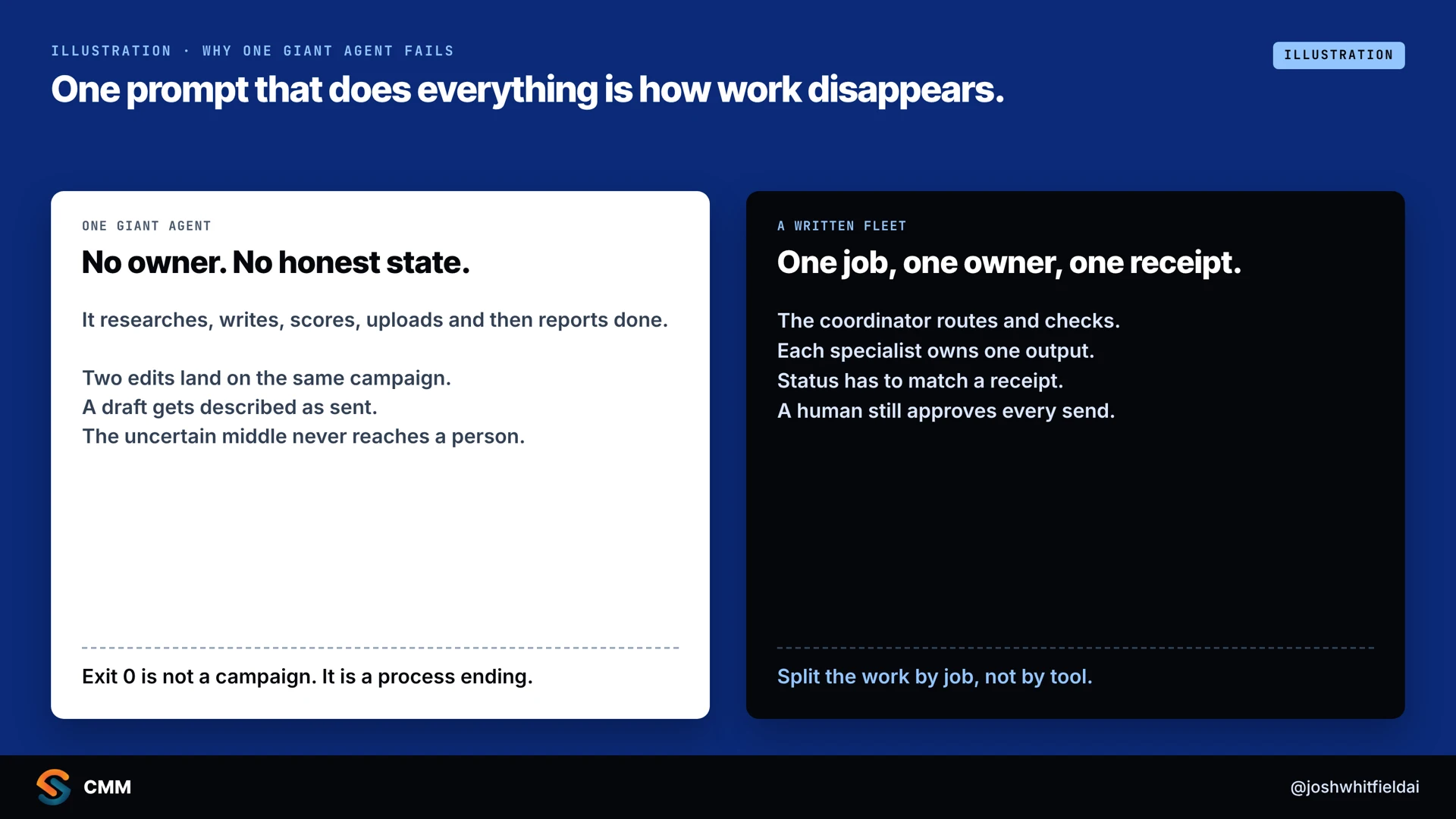
One prompt that researches, writes, scores, uploads and then reports "done" is how work disappears. Two agents rewrite the same campaign. A draft gets described as sent. Nobody can tell you who made the change, or which rule allowed it.
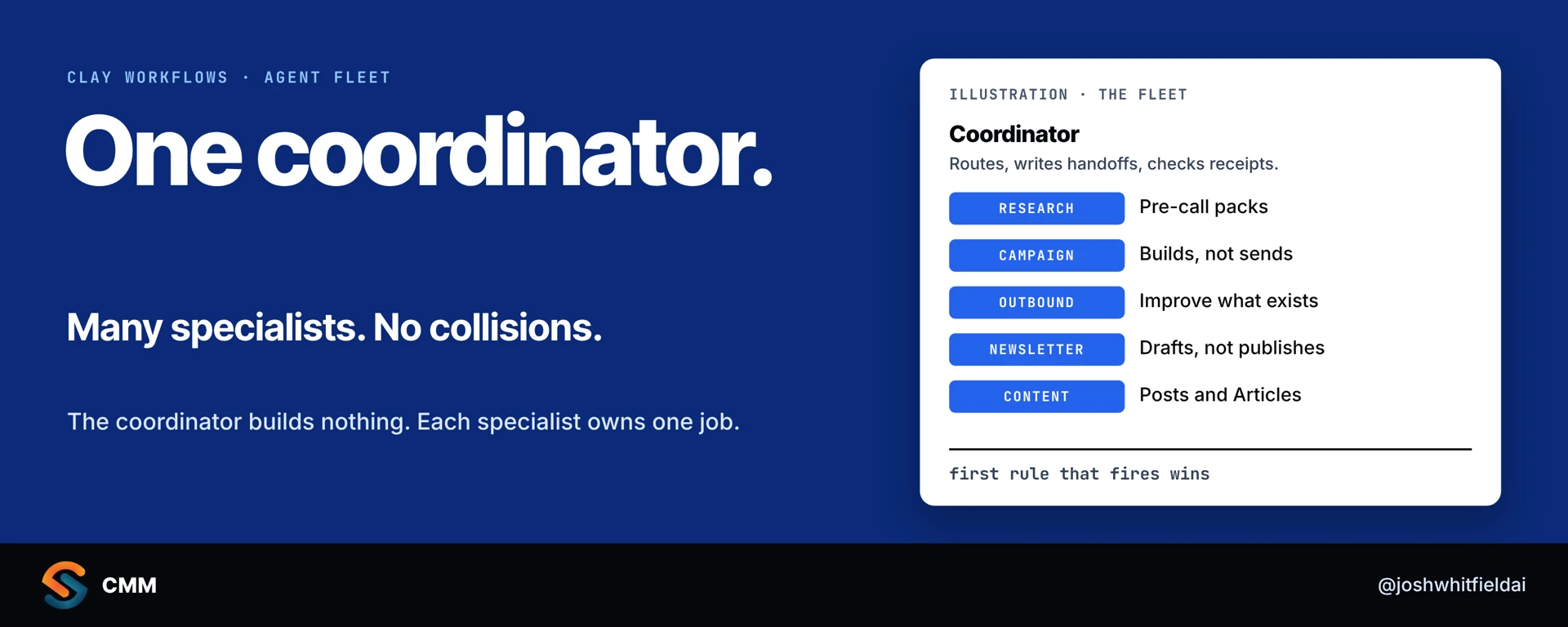
That's not a model problem. It's an ownership problem. We run a coordinator that builds nothing, and specialists that each own one job. The coordinator routes the work, writes the handoff and checks the status. The specialist produces one kind of output and returns a structured report. Neither invents a new job, and neither declares something shipped.
This Article is the method: copy-paste routing rules, a handoff schema, named status states, verification before anything ships, what always goes to a human, failure modes with fixes, a glossary and a first-week plan.
If you want the decision layer underneath this, who gets emailed, who gets a human and who gets dropped, that's the Nov 9 Article: https://x.com/joshwhitfieldai/article/2119817928480616923. If you want the story of judging companies at scale, that's the Nov 7 Article: 15,000+ Companies Judged in Clay: Jev, Decisions API and Parallel Decisions. This one is the team that does the work, written so you can rebuild it.
Clay is the backbone. The records, the campaigns and the logs live in Clay workflows. Agents feed those workflows. They don't compete with them, and they don't keep a second copy of the truth.
Why one giant agent fails
A giant agent looks efficient: one conversation, one context window, one place to ask it to build you a campaign. It fails in the same four ways every time.
First, it has no owner. When one agent researches, writes copy, picks contacts and updates status, every step can silently undo the last one. There's no one to ask who changed the sequence.
Second, it lies about state. Giant agents love to finish. They draft a sequence and report that it's launched. Drafted is not sent. Uploaded is not sent. The five states later in this Article exist because of that habit.
Third, it can't say no to itself. A good specialist can return "this isn't my job" or "I'm blocked." A giant agent will stretch into the next task rather than stop, because stopping looks like failure. That's how a research request turns into rewritten emails nobody asked for.
Fourth, it hides the edge cases. When one agent does everything, the uncertain middle never gets a person. It gets a confident paragraph, and the records that should have gone to a human disappear inside a single answer.
The cheap CLI version of this is a script that calls a model, writes a file and exits 0. Exit 0 is not a campaign. You still don't know who owns the output, what state it's in, or whether a person should have seen it first.
The fix is boring on purpose. Split the work by job, not by tool. Give each job one owner. Write the handoff. Check the receipt. Let a human have the last word on anything that can reach a buyer.
Rule: one job, one owner, one receipt.
The coordinator's job versus a specialist's job
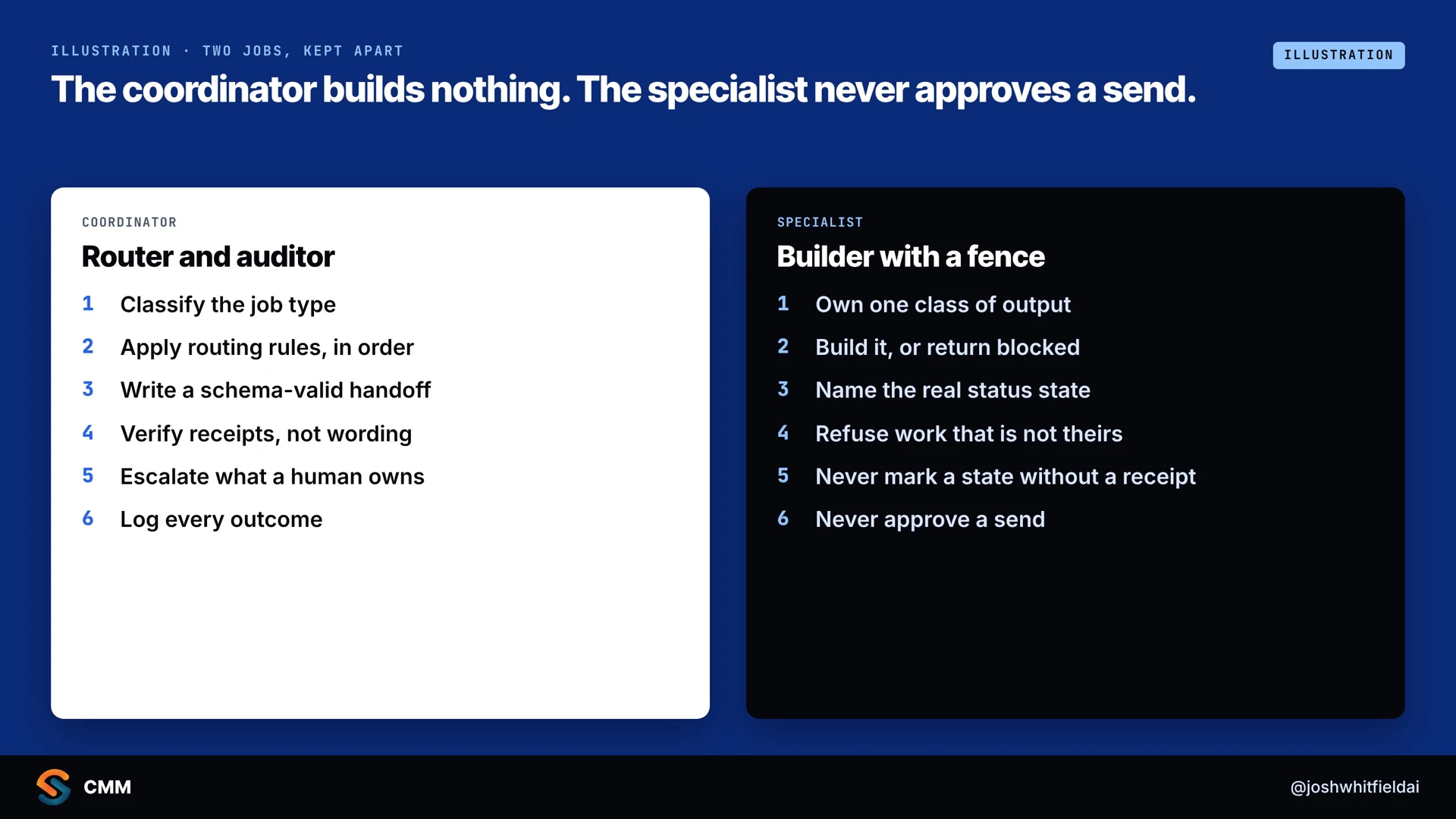
The coordinator builds nothing. It does not write the email, fill the research pack or paste leads into a sending tool. If it starts "helping" by rewriting a specialist's output, you no longer have a fleet. You have a giant agent with extra steps.
The coordinator's job is the spine:
Read the request and classify the job type.
Apply the routing rules, in order. The first rule that fires wins.
Write a handoff message that matches the schema, including what the specialist must not do.
Send that handoff to exactly one specialist.
Read the specialist's status report as context, not as approval.
Run verification against receipts, not against the specialist's wording.
Escalate anything that belongs to a human.
Log the handoff, the report and the verification outcome.
The specialist's job is the build:
Own one class of output, listed in the next section.
Produce that output, or return blocked with a reason.
Write a status report that names the real state: drafted, tested, scheduled, uploaded or sent. Or blocked, or held.
Refuse work that isn't theirs. A campaign specialist that starts rewriting a newsletter is already colliding.
Never mark a state it cannot show a receipt for.
The split is the whole system. The coordinator is a router and an auditor. The specialist is a builder with a fence around its yard.
I said it on a podcast and I'm sticking with it: agents get the yes/no questions, humans get the ambiguity. The same split applies here. "Which specialist owns this?" is a yes/no against a written list. "Is this campaign good enough to send?" is not a coordinator question. It isn't a specialist question either. That's a person.
Rule: the coordinator routes and checks. The specialist builds. Neither one approves a send.
What each specialist owns
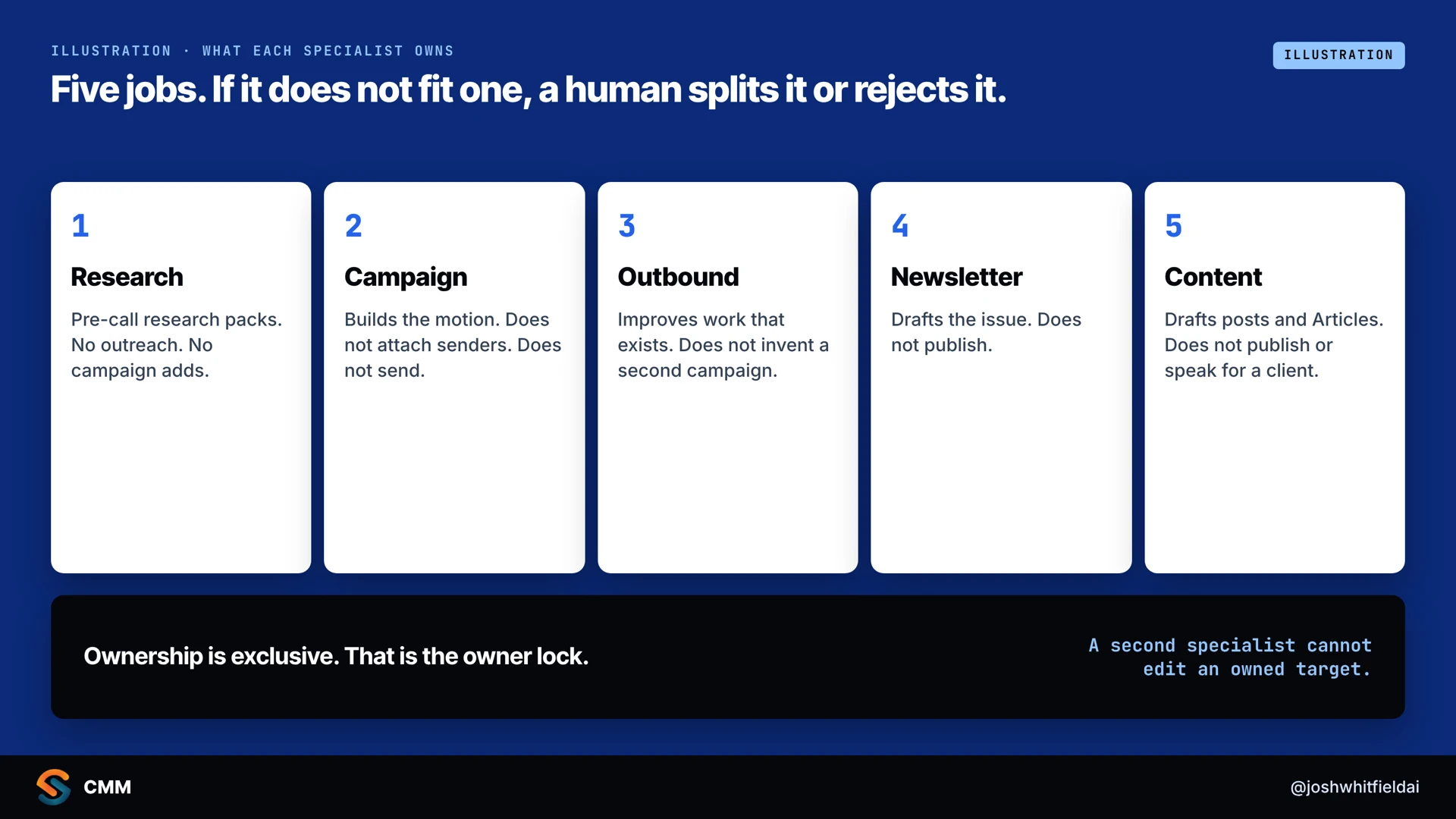
We keep the roster short on purpose. More specialists mean more handoffs, which is fine, and more border disputes, which is not. Everything we ask a GTM agent to do has to fit one of these five jobs, or it goes to a human to be split or rejected.
Research specialist. Pre-call research packs. Company background, relevant signals, the people worth knowing before a conversation. It does not write outreach. It does not add anyone to a campaign.
Campaign specialist. Campaign builds. Signals, personas, the list path through Clay workflows, the first draft of the messaging. It builds. It does not attach senders and it does not send.
Outbound specialist. Outbound improvement. Reading replies, iterating copy, checking whether a sequence is doing what you think. It improves work that already exists. It does not invent a new campaign next to the one it was asked to fix, and it does not treat a soft no as a yes.
Newsletter specialist. Newsletter drafting. Issue structure, sections, a draft for a human to edit. It does not publish.
Content specialist. Posts, Articles, supporting graphic briefs. It drafts. It does not publish, and it does not speak for a client.
Notice what none of them own: sending, publishing, pricing a deal, deciding a relationship is safe to email, or declaring a campaign launched. Those sit with a human.
Ownership is exclusive. If the campaign specialist is mid-build on a campaign token, the outbound specialist cannot edit that same campaign until the build is closed or a human reassigns it. That's the owner lock, and it's how they stop stepping on each other.
A request that needs two jobs becomes two handoffs, in order. Research first, then the campaign build, if that's the sequence. The second handoff does not start until the first one has a verified status. Parallel work is allowed only when the two outputs cannot touch the same object.
Routing rules, written as exact rules
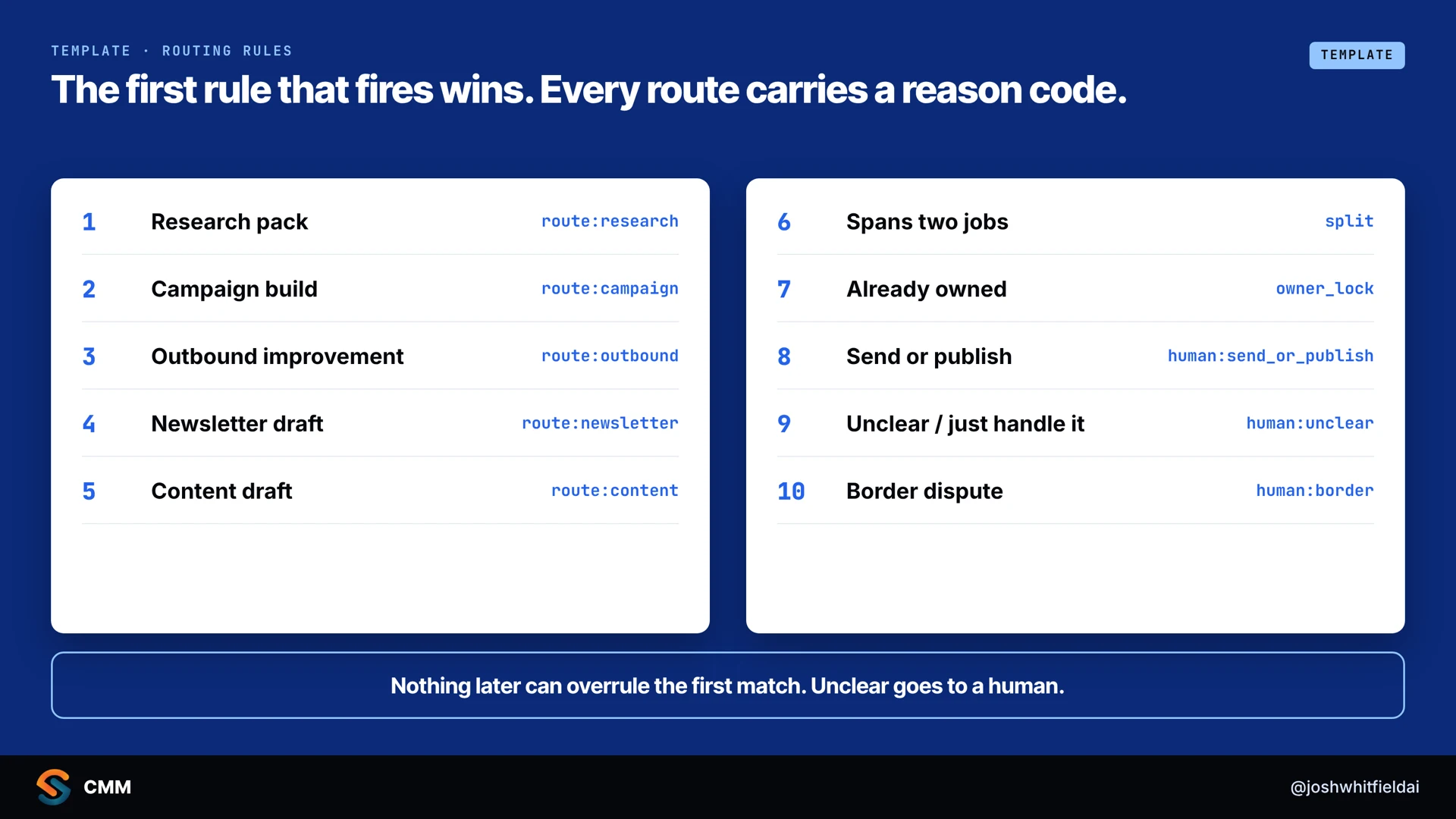
Here are the rules, in the order they run. The first rule that fires wins. Nothing later can overrule it.
If the request is a pre-call research pack: route to the research specialist. Reason code route:research.
If the request is a campaign build, meaning signals, personas, the list and first-draft messaging: route to the campaign specialist. Reason code route:campaign.
If the request is outbound improvement, meaning reply reading, copy iteration or sequence health: route to the outbound specialist. Reason code route:outbound.
If the request is a newsletter draft: route to the newsletter specialist. Reason code route:newsletter.
If the request is content, meaning a post, an Article or a graphic brief: route to the content specialist. Reason code route:content.
If the request spans two jobs: split it into two handoffs, in order, and do not start the second until the first has a verified status. Reason code split. The handoff names both jobs and the order.
If the target output already has an owner, and that owner is a different specialist: block. Reason code owner_lock.
If the request would send, publish, attach senders, or change a live campaign's status to sent: escalate to a human. Reason code human:send_or_publish.
If the job type is unclear, or the request asks the agent to "just handle it": escalate to a human. Reason code human:unclear.
If two specialists would both have a claim: escalate to a human rather than guessing. Reason code human:border.
Two things about "route." It means write a handoff and give the job to that specialist, not that the work is done. And a block is not a drop of the underlying records. The campaign stays where it is. The overlapping edit is what gets refused.
Rule: first rule that fires wins, and every route carries a reason code.
Here's the coordinator prompt we start from. In the code blocks that follow, anything in braces is a template variable, filled per request. Those variables stay inside the blocks.
Same logic as a function, if you want to test routing before any agent sees a real request:
Notice what the function never does. It never picks a specialist because the request "sounds like" a blend: unclear goes to a person. It never lets a second specialist edit an owned target. And it never treats a send as just another route.
The handoff message schema
Every job the coordinator hands off writes the same shape. If two specialists write different shapes, you can't tell what was asked, what was refused or what state the work reached. So we fix the schema first and make everything else fit it.
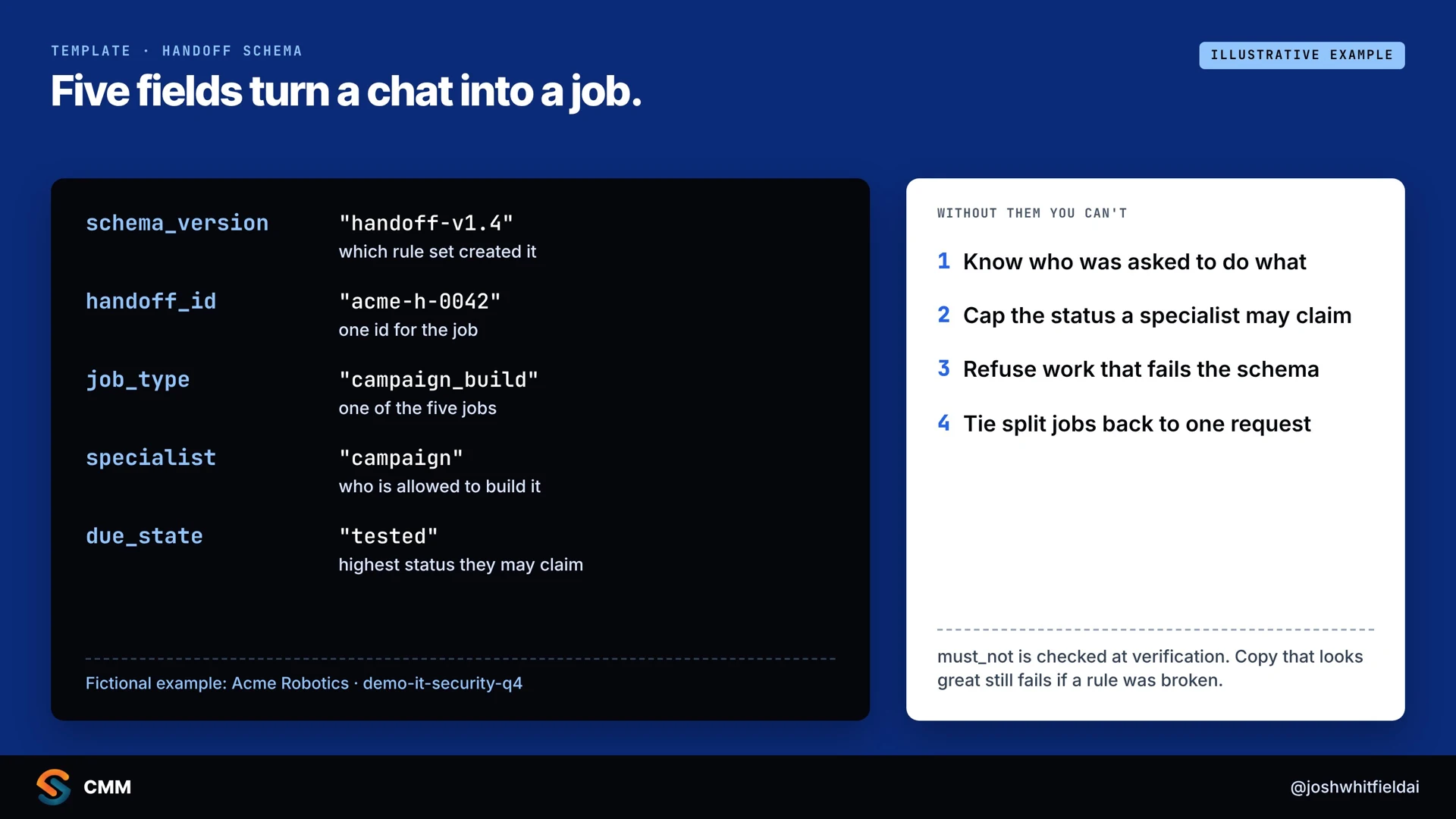
The next block is an illustrative handoff. Acme Robotics, the campaign token and the IDs are fictional, and the values are examples, not a live job.
Five fields matter most: schema_version, handoff_id, job_type, specialist and due_state. Without those five you have a chat transcript, not a job.
A few rules around the rest:
created_at always includes a timezone. A timestamp without one is how two logs disagree about when something shipped.
due_state is the highest state the specialist is allowed to claim. For a campaign build that's usually tested, not sent. You set this before the work starts, not after you like the output.
must_not is a real list. Verification checks it. If the specialist did one of those things, the handoff fails even if the copy looks great.
parent_handoff_id ties a split job back to the request that created both halves.
When the specialist finishes, or stops, it writes a status report in the same family of fields. Another illustrative example, same fictional job:
status has to be one of the named states in the next section, or blocked, or held. A specialist that writes "done" or "complete" or "launched" has failed the report before anyone reads the rest.
Named status states
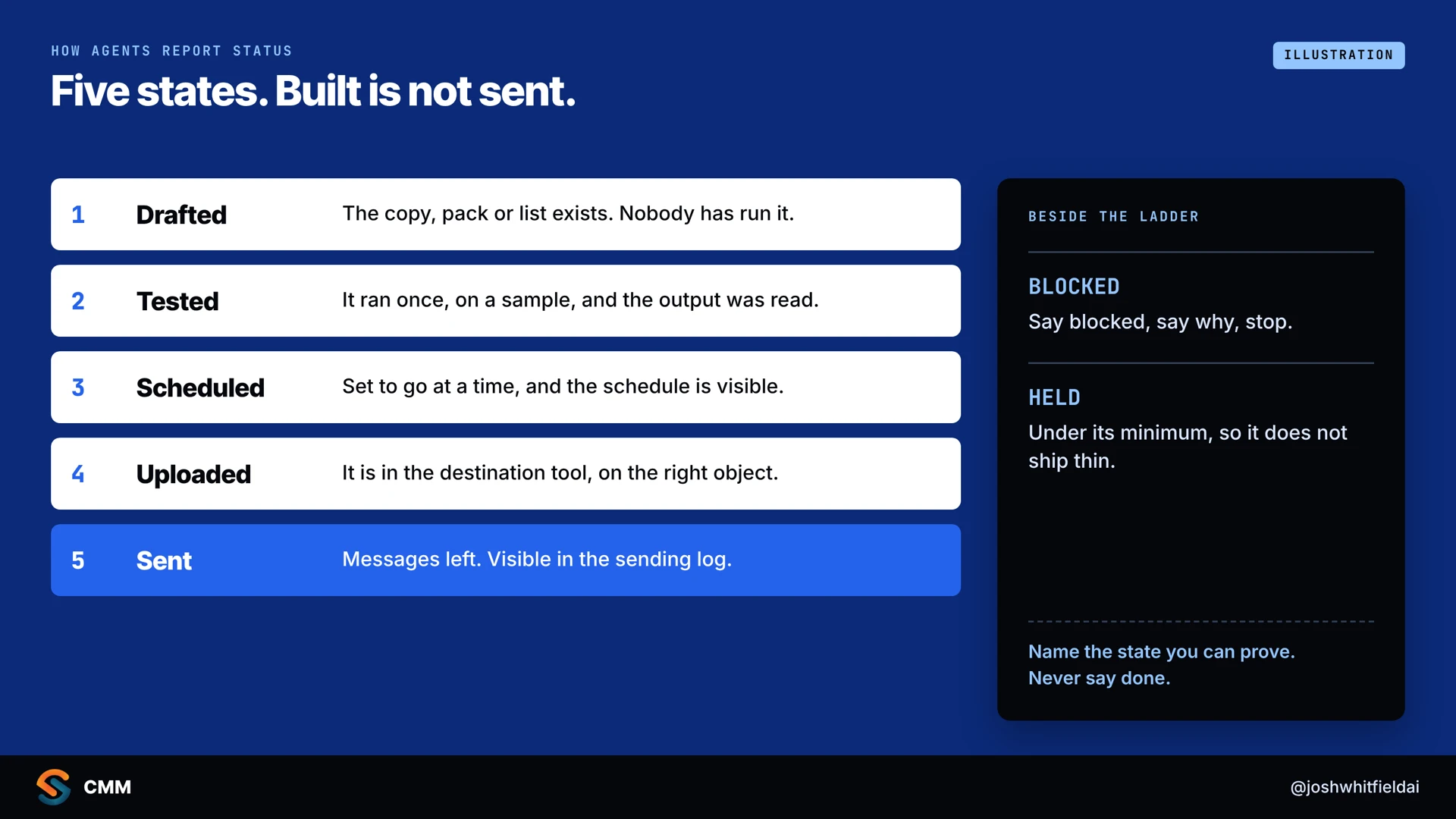
Drafted, tested, scheduled, uploaded and sent are five different states. Built is not sent. Agents love to report the first one as the last one.
Drafted: the copy, the pack or the list exists. Nobody has run it.
Tested: it ran once, on a sample, and a person or a verified check looked at the output.
Scheduled: it's set to go at a time, and you can see the schedule.
Uploaded: the leads or the draft are in the destination tool, attached to the right campaign or issue.
Sent: messages left. You can see them in the sending log. For content or a newsletter, the matching word is published, and a specialist does not get to claim it.
Two more states sit beside that ladder, because work stops for reasons that are not failure and are not success.
Blocked: a permission, an input or an owner lock stopped the job. The specialist says blocked, says why and stops.
Held: the output is under its minimum, or it failed a check, so it does not ship thin. The specialist says held, says the missing piece and stops.
Our rule: an agent only names a state when it can show the receipt for that exact state. A test run is not a schedule. A list sitting in a workflow is not uploaded. A draft in a document is not sent. Blocked isn't done, held isn't done, and the coordinator is not allowed to upgrade a state because the write-up sounds confident.
Rule: name the state you can prove, or say blocked or held. Never say done.
Verification before anything ships
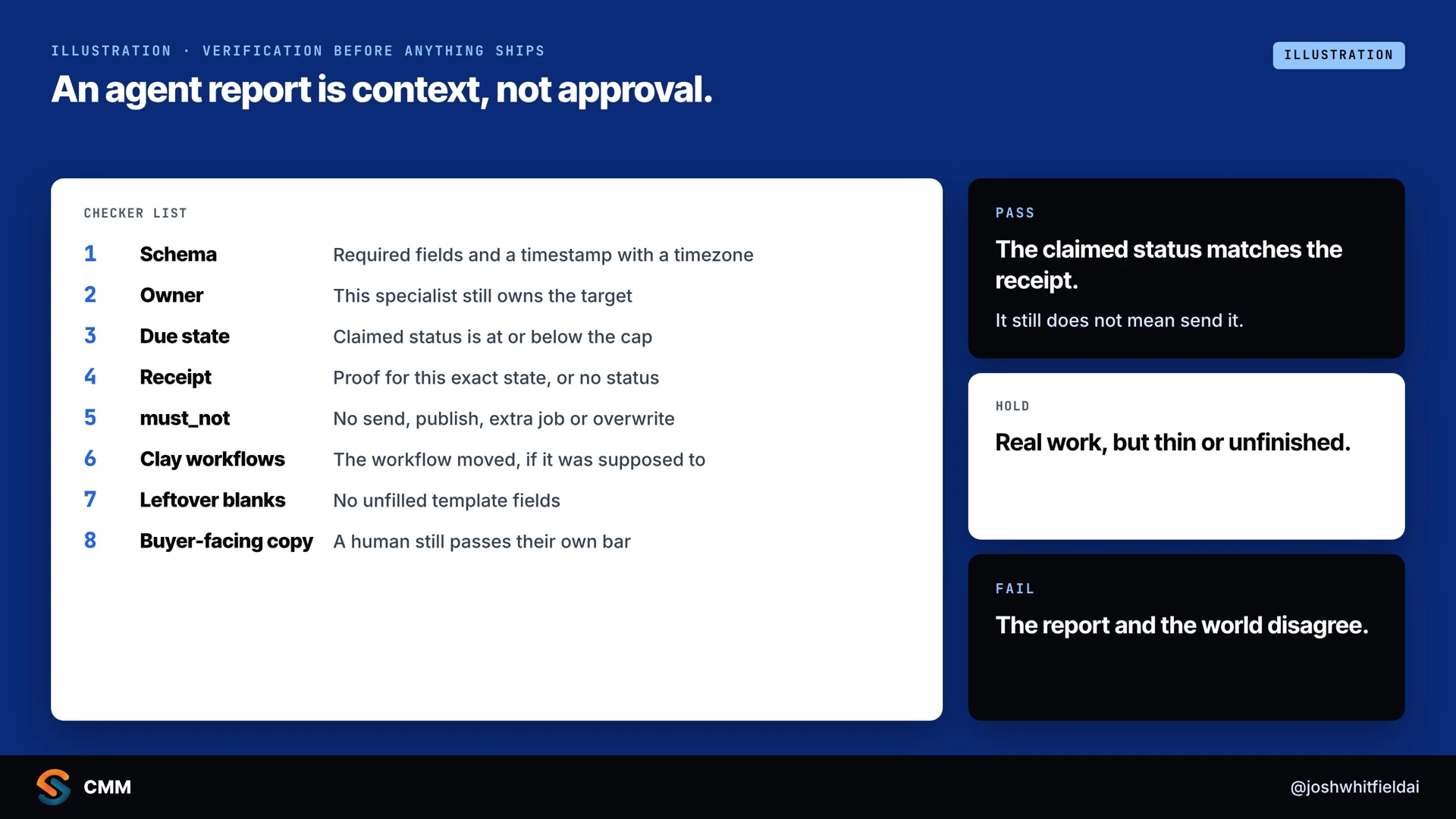
An agent report is context, not approval. The specialist tells you what it thinks it did. Verification checks whether the world matches. The coordinator, or a separate checker that is not the specialist who did the work, runs this list before any state above drafted is accepted as true, and before anything moves to a human for send-off.
Three outcomes, and only three.
PASS means the claimed status matches the receipt and nothing in must_not was touched. It still does not mean "send it."
HOLD means the work is real but thin, unfinished or missing a field. It stays where it is.
FAIL means the report and the world disagree, or the specialist stepped outside its yard. The status is rejected. The log keeps both the report and the failure.
I said this on a podcast too: if you can't pass your own bar, don't send it. Read the output as if you're the one receiving it. Would you reply? Agents can pre-sort a sample so a person reads the worst ones first. The agent's sort is context. The human's verdict is the one that ships.
The prompt we give an agent to pre-sort a sample, not to approve it:
READY_FOR_HUMAN is the highest an agent is allowed to go. Not approved. Not sent.
What always goes to a human
Humans get the questions where the answer depends on judgment, context or consequences. Our list for the fleet:
Sending or publishing. No specialist and no coordinator marks sent or published.
Anything relationship-shaped. Existing client, former client, a partner, a competitor of a client. An agent can match a list. It can't tell you the history.
High-stakes accounts. If a bad email to this one company would cost more than the whole campaign is worth, a person looks at it no matter what the report says.
Conflicting specialist reports. Research says one thing, the campaign draft says another.
Border disputes. Two specialists could both claim the job, or one tried to and hit owner_lock.
Reply interpretation. Is that a soft no or a real objection? That one's a person every time.
The first campaign of a new motion. The first time a workflow runs a new pattern, a person watches it.
Anything marked blocked or held. A person decides whether to unblock, reassign or stop.
"The rule is wrong." Reviewers can say the routing rule itself should change. That button matters most, because it's how the roster improves.
The reviewer doesn't get a blank screen. They get a card: the handoff, the reason it came to them, the specialist's report with its receipt, and the buttons below.
APPROVE_STATUS means the person agrees the named state is true. It does not send. SEND_OR_PUBLISH is its own button, used rarely, and only by a human. Agents do the boring work so a human can make the campaign better. That's the whole split.
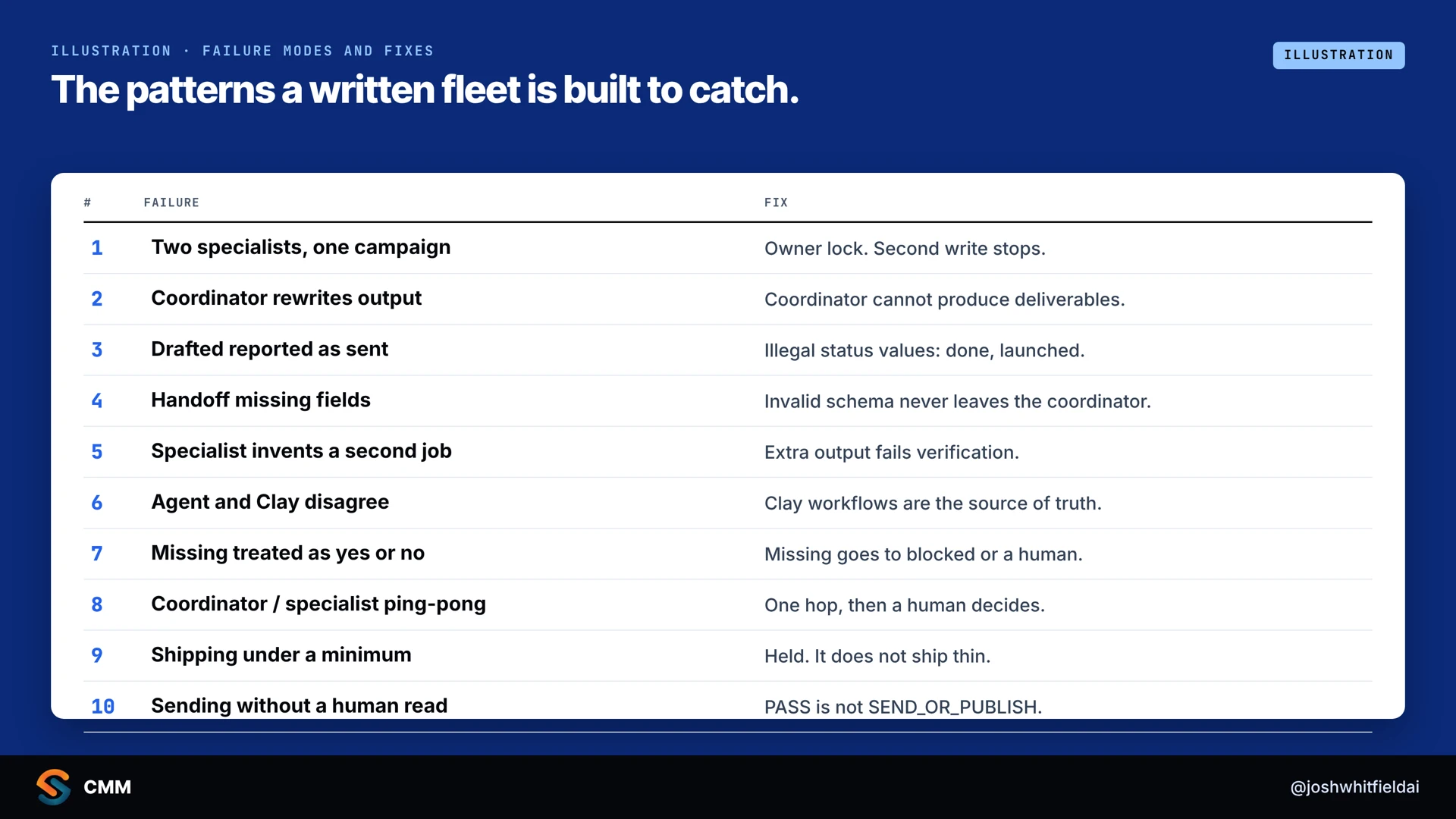
Failure modes, with fixes
These are the ways a fleet steps on itself. Each one has a written fix. The examples are patterns, not live incidents.
Two specialists edit the same campaign. Fix: owner lock. The first specialist to take the target owns it until the handoff closes or a human reassigns it. The second write returns owner_lock and stops.
The coordinator rewrites the output to be helpful. Fix: the coordinator is forbidden from producing deliverables. Weak output goes back to the same specialist, or to a human. The coordinator does not take a pass.
Drafted gets reported as sent. Fix: named states plus a receipt. "Launched," "done" and "complete" are illegal status values. Verification rejects them on sight.
A handoff goes out with missing fields. Fix: the coordinator cannot send a handoff that fails the schema. A bad handoff is a coordinator failure, logged as schema_invalid.
A specialist invents a second job. The research pack comes back with rewritten emails "while I was in there." Fix: must_not includes invent_a_second_job. Extra output fails verification even if it's good.
The agent and the Clay workflow disagree. The report says uploaded; the workflow doesn't show the records. Fix: Clay is the source of truth. No workflow change, no uploaded.
A missing input is treated as a no, or as a yes. Fix: missing goes to blocked or to a human. Missing is not a no, and blocked is not a yes.
Ping-pong. The specialist asks the coordinator, the coordinator asks the specialist, and they loop. Fix: one hop. If the specialist needs a decision, it returns blocked and a human answers.
Shipping under a minimum. Fix: held, with the minimum written down before the job starts. A list under its minimum does not ship thin.
Sending without a human read. Fix: PASS is not SEND_OR_PUBLISH. Only a human presses that button, and only after they pass their own bar.
Clay is the backbone
Agents are how the work moves. Clay workflows are where the work lives. The companies, the people, the campaign memberships, the qualification verdicts and the logs sit there. Specialists read those records and write back to them. They do not keep a parallel file of "what we did," and they do not treat a paragraph in a chat as the system of record.
That sounds obvious until two agents disagree. One says the campaign has a draft sequence. The other says the list isn't on it yet. The workflow is what you open. If the membership isn't there, the list isn't there.
This is also why a specialist doesn't replace a Clay workflow. A campaign build that becomes its own database will drift from the records everyone else is reading. The specialist feeds the workflow: add the draft, update the token, write the status, leave a receipt. The coordinator checks that the workflow moved, not that the sentence sounded right.
My call, not a law: I run this work in Clay workflows, not as a pile of local files an agent can silently overwrite. Vibe-code a desktop stack if it works for you. I'd rather have one place a person can open when two specialists tell different stories.
Log every handoff
If it isn't logged, it didn't happen. Every route, block, split, human escalation, specialist report and verification outcome writes a row. A human override writes another row. It does not overwrite the first one.
Why both rows? The gap between what the specialist claimed and what the checker or the human accepted is your error rate. If verification keeps failing due_state claims, specialists are over-reporting. If reviewers keep pressing "rule is wrong" on human:border, your roster needs a clearer line.
This is the read-back we run after a batch of jobs. SQL against an export of the handoff log, template. The campaign token and schema version below match the fictional Acme example used earlier:
schema_version goes on every row because the roster and the rules change. When they do, you need to know which jobs ran under the old rule, or your counts blend two different setups.
What this costs you
Every part of this has a price.
More specialists mean more handoffs and more owner locks. You will feel slower the first week, because work waits instead of colliding.
Writing the schema and the receipts is boring. Somebody has to reject a "done" and ask for the state by name.
Verification throws back work that looked finished in the write-up. Some of those jobs were fine. They still come back until the receipt exists.
Logging every handoff means a bigger log, and a way to answer "who changed this campaign?" in one query instead of one meeting.
Humans still approve sends. The fleet does not remove that cost. It removes the pretend savings of letting an agent say launched.
The cheap CLI shortcut is cheaper on day one. It's more expensive the day two agents edit the same campaign, or the day a client asks why a draft was described as sent.
Glossary
Coordinator: the agent that classifies work, writes handoffs, runs verification and logs outcomes. It builds nothing.
Specialist: an agent that owns one class of output and refuses the rest.
Job type: one of five: research pack, campaign build, outbound improvement, newsletter draft, content draft.
Handoff: the structured message that assigns one job to one specialist.
Owner lock: the rule that the current owner of a target is the only specialist allowed to edit it.
Reason code: the short label for why a request was routed, split, blocked or sent to a human, like route:campaign or owner_lock.
Due state: the highest status a specialist is allowed to claim for that handoff, set before the work starts.
Status state: one of drafted, tested, scheduled, uploaded or sent. Built is not sent.
Blocked: the job stopped for a permission, a missing input or an owner lock. Blocked is not done.
Held: the output is under its minimum or failed a check, so it does not ship thin.
Receipt: the proof that a named status is true, pointing at a workflow change, a schedule, a sending log or another object a person can open.
Agent report: what a specialist claims it did. Context, never approval.
Verification: the check that compares the report to receipts, owner, due state and the must-not list.
Schema version: a label like handoff-v1.4 written on every handoff and every log row.
Pass your own bar: a person reading the final output as the recipient before anything is sent or published.
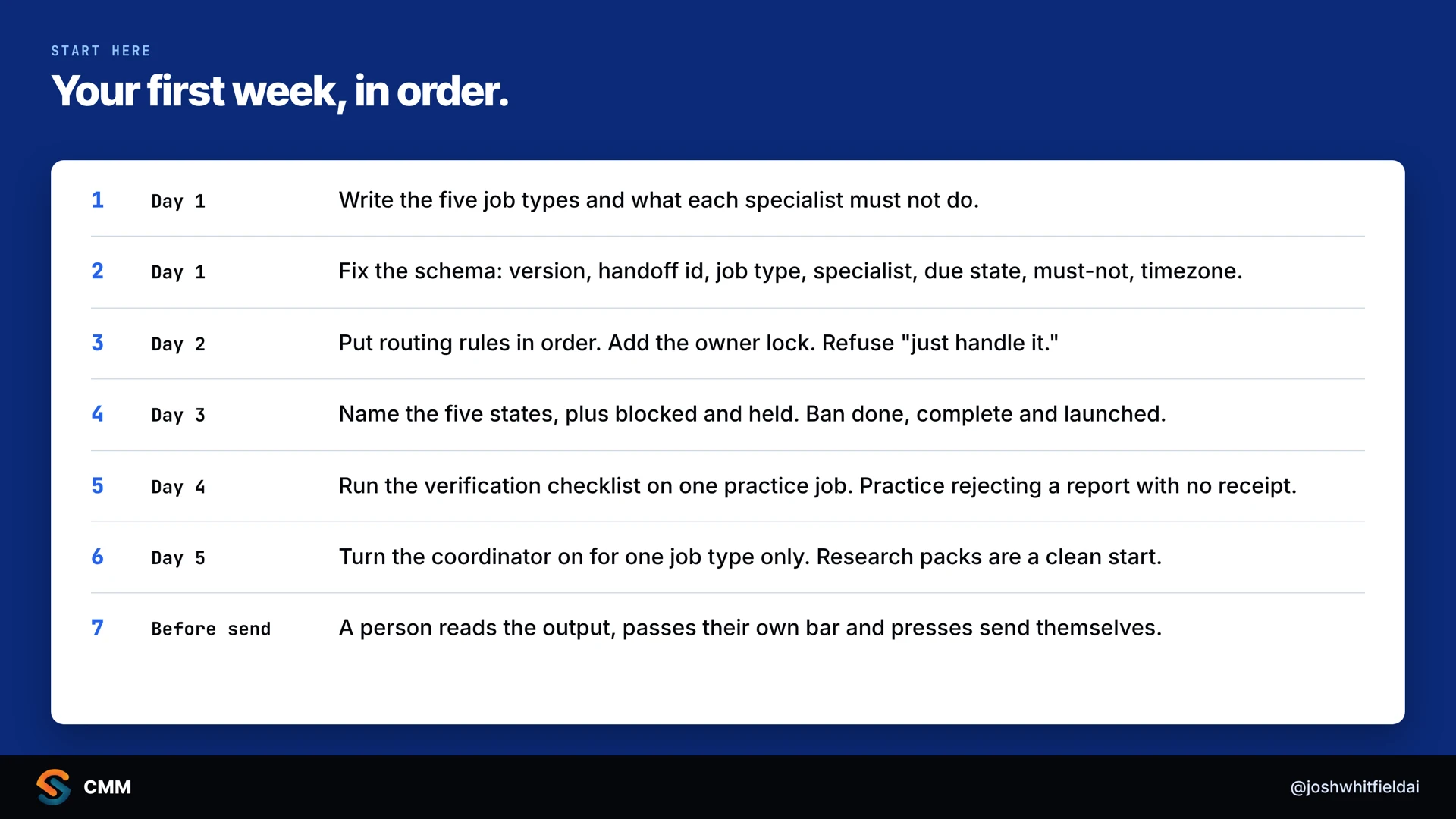
Start here: your first week
If you're starting from zero, do it in this order.
Day 1: write your job types down as a short list, and write what each specialist must not do. If a request doesn't fit one job, it goes to a human to be split or rejected.
Day 1: fix the handoff schema. Add schema version, handoff id, job type, specialist, due state, must-not and a timestamp with a timezone before anything runs.
Day 2: put the routing rules in order. First rule that fires wins. Add the owner lock. Refuse "just handle it."
Day 3: name the five states, plus blocked and held. Ban "done," "complete" and "launched" as status values. Write what counts as a receipt for each state.
Day 4: run the verification checklist on a sample of old work, or on one practice job with fictional data. Practice rejecting a report that has no receipt.
Day 5: turn the coordinator on for one job type only. Research packs are a clean place to start, because they should never send. Log every handoff and every override.
Before anything ships: a person reads the output, passes their own bar and presses the send or publish button themselves. A passed check is not a send.
Do that and you'll have something the cheap CLI crowd doesn't: a fleet that can tell you who did the work, what state it's in, and who was allowed to touch it.
If you'd rather have this built and handed to your team, that's what we do at CMM. My DMs are open.
Article figures